Why Small Businesses Wait Too Long to Adopt a CRM

Most small businesses adopt a CRM way later than they should — and it costs them. Not upfront, but quietly: missed leads, founder bottlenecks, and revenue leaking through untracked follow-ups.
The right time to get one is earlier than you think. It's when customer information starts living in too many places and follow-up depends on memory more than process.
If that's already happening to you, this article shows why it matters now, what to look for, and how to start simple so adoption doesn't become another headache.
Why small businesses stay in manual mode
At first, manual customer management feels fine. There are only so many leads. Everyone sort of knows what's happening. A quote request can still be found by searching email. A callback can be remembered because the volume is low enough. Nothing seems broken enough to justify a new system.
The leak pattern
But contact chaos starts earlier than most teams expect. It doesn't arrive as one dramatic failure. It shows up as small leaks: a prospect who never gets a promised follow-up, two people replying to the same lead, an old quote no one revisits, a customer who has to explain their history again.
Those moments are easy to dismiss one by one. Together, they start limiting growth.
A real cost you can measure
A service business with three sales people receives a lead form submission at 2:00 PM. No one's sitting at the desk. By 3:30 PM, when someone finally checks email, the prospect has already contacted a competitor. Research shows the odds of making successful contact with a lead are 100 times greater when attempted in the first 5 minutes versus 30 minutes after submission. One lost lead might seem small, but over 30% of leads are never contacted at all, wasting the marketing effort that brought them in.
That is the real business question: when does manual customer management start becoming a constraint rather than a cheap workaround?
Usually, it happens well before the company sees itself as needing formal systems.

What a CRM actually is for a small business
A CRM (customer relationship management system) is a shared system for storing customer data, tracking sales activity, recording communication history, and managing service interactions in one place. For a small business, that matters less as a technology category and more as an operating system for customer relationships.
CRM vs. Spreadsheets and contact lists
A contact list is not the same as a CRM. A contact list stores names, phone numbers, and maybe some notes. A CRM connects the customer record, the deal record, the communication record, and the activity record so the whole team can see the full context in one place.
If someone asks, "what is CRM for small business?" the simplest answer is this: it's where your team can see who a customer is, what's happened so far, what needs to happen next, and who's responsible for that next step. Everyone works from the same source of truth instead of rebuilding context from scattered emails or their own memory.
Start small
A small business CRM doesn't need to be broad or complex on day one. In many cases, the first value comes from one thing: turning scattered relationship data into a shared, usable record.
Why CRM matters earlier than most founders expect
Lost revenue from slow follow-up
Teams that respond within one minute see up to 391% higher conversions compared to those with slower processes. Without a system, response times slip. Some inquiries get immediate attention. Others disappear into inboxes or get pushed behind urgent work.
Example-in-action: A plumbing contractor gets three service inquiries in one morning. One caller gets transferred to the owner immediately—he answers in 2 minutes. The other two fill out the contact form and wait. By evening, the owner hasn't checked email. By next morning, two of those prospects have already hired someone else. That's two jobs lost to speed alone, not because the contractor's prices or service quality were worse.
The visibility problem
Without a CRM, leaders don't really know what's in progress. They know what they personally remember, what they can pull from an email thread, or what someone tells them in a meeting. That's not operational visibility. It makes forecasting weaker and staffing decisions less grounded.
If a manager wants to know, "How many deals are in the proposal stage?" the answer becomes a meeting, an email, or a manual spreadsheet pull instead of opening one system. That delay costs both time and accuracy.
Founder dependence
In many young companies, the founder becomes the unofficial customer database. They know which leads are warm, which accounts are sensitive, which proposals are still open, and who needs a check-in. That works until the business gets busier. Once volume rises, the founder becomes a bottleneck instead of a force multiplier.
The small business CRM advantage
Early CRM adoption is not about adding software for its own sake. It's about protecting revenue, coordinating the team, and making follow-up more reliable before bad habits harden.
Done well, it supports responsible growth and creates enough structure to keep customer relationships from becoming messy as the business gets busier.
How CRM works in day-to-day business operations
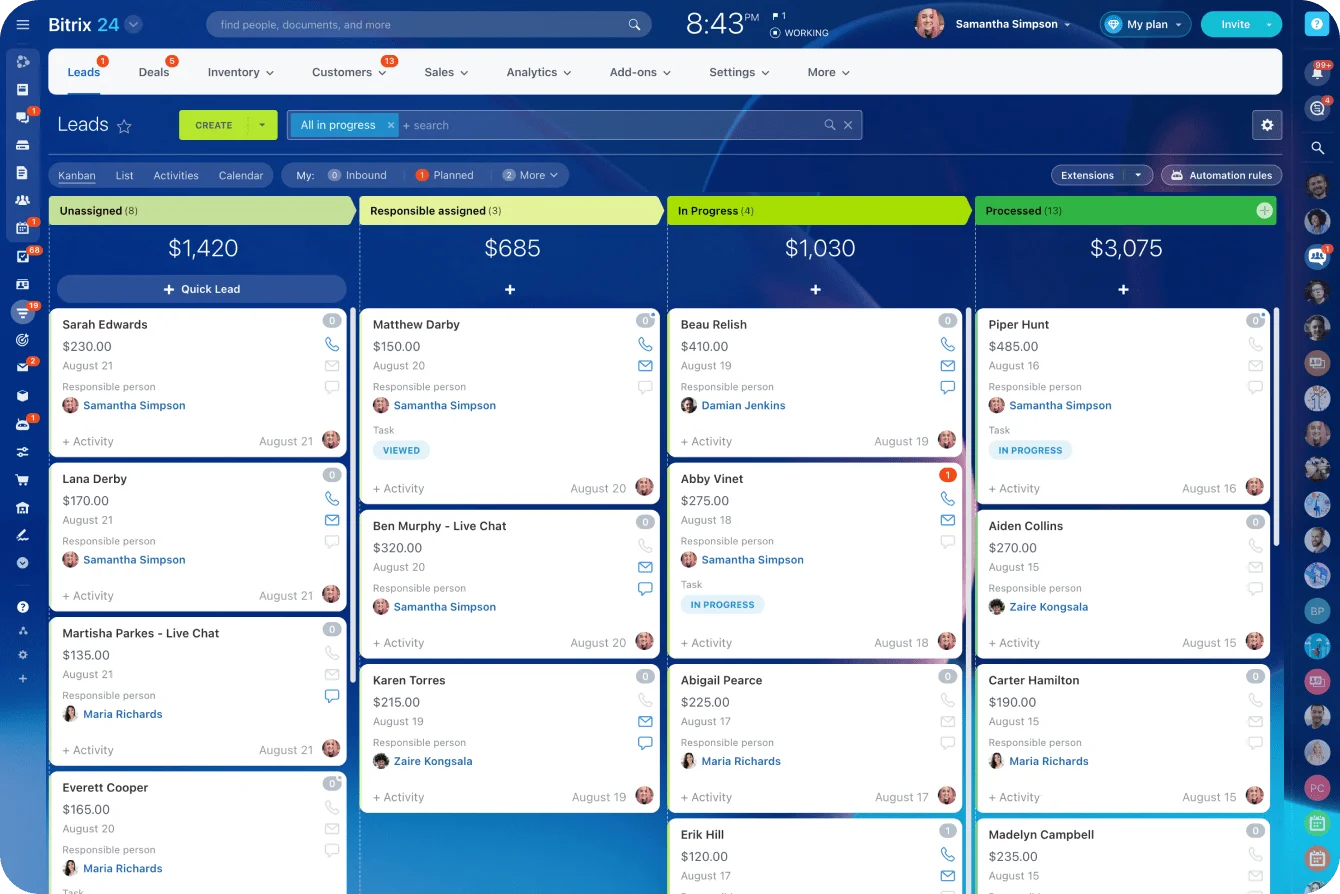
In daily use, a CRM works as a flow system. Leads enter the system from forms, referrals, calls, ads, or manual outreach. Each lead gets a record. As conversations happen, emails, calls, meetings, notes, and tasks are attached to that record. If the lead becomes an opportunity, it moves through defined pipeline stages. If action is needed later, reminders keep the next step from being forgotten.
That operating logic sounds simple because it is simple. The value comes from consistency. Instead of each employee using their own method, the business has one place to track what happened and what should happen next.
It also reduces handoff friction. Marketing can see which campaigns generated leads. Sales can see where those leads stand. Customer service can see what was promised before the deal closed. Everyone works from the same customer record instead of rebuilding context from separate tools or trying to find old email threads.
That shared record matters even in a very small company. A customer doesn't care whether poor handoff happened because the team has three people or three hundred. They only experience the inconsistency.
CRM vs. spreadsheets and email
|
Tool |
Visibility |
Speed |
Accountability |
Scalability |
|---|---|---|---|---|
|
Spreadsheet |
Basic list of contacts or deals |
Manual updates slow things down |
Weak ownership and follow-up control |
Breaks as volume and team size grow |
|
Inbox |
Conversation-level visibility only |
Fast for one person, poor for shared work |
Tasks depend on memory and flags |
Hard to standardize across a team |
|
CRM |
Shared view of customer, deal, and activity |
Faster access to context and next actions |
Clear ownership, tasks, and status tracking |
Supports higher volume and more handoffs |
Put simply, a CRM is not just a database. It's a way to make customer work visible, trackable, and transferable.

The core CRM functions small businesses benefit from first
Small businesses usually see the earliest return from a narrow set of CRM functions, not from the long feature lists vendors promote. A useful way to think about early CRM value is: organize, follow up, measure, retain.
Organize: Contact management
The CRM keeps customer names, companies, emails, phone numbers, notes, and interaction history in one place. That sounds basic, but it removes a lot of waste. Teams stop searching through inboxes, old files, and multiple spreadsheets to reconstruct who someone is and what they've said. A new team member can onboard in hours instead of weeks because all context is recorded and available.
Follow Up: Task and pipeline discipline
Task reminders, pipeline stages, and activity logging create discipline around next steps. A quote can have a due date. A lead can sit in "contacted" until a response comes back. A customer check-in can be scheduled instead of left to memory. This is where many small teams get immediate payoff — they stop dropping follow-ups because the system reminds them, not because they remembered.
Measure: Basic reporting
Not enterprise analytics. Just enough to answer useful questions: How many leads came in? How many moved to proposal? Which deals are stalled? Which rep or channel is producing results? These reports help owners move from guesswork to pattern recognition. When the data's easy to get at, deals move faster.
Retain: Account context and continuity
A small business doesn't need a huge support platform to benefit from this. It just needs the ability to see what the customer bought, what was discussed, what issue came up before, and when someone last followed up. That improves continuity and reduces the need for customers to repeat themselves.
The essentials that matter first
The earliest return usually comes from these foundational mechanisms:
- Centralized contact records
- Task and reminder management
- Simple sales pipeline visibility
- Email logging or tracking
- Shared notes and activity history
- Basic reporting on deals and follow-up
Many advanced features can wait. Complex automation, custom objects, multi-touch attribution, and deep territory management are often unnecessary at the start.
For a small team choosing a first CRM, the best product is usually the one that makes core relationship management easier to maintain every day. Plenty of small teams skip CRM altogether — put off by cost, the setup learning curve, or the fact that a spreadsheet still sort of works. When they do adopt one, choosing a CRM built for small teams rather than enterprise is often what decides whether it sticks or gets abandoned.
Common CRM misconceptions and early-stage mistakes
Misconceptions
"We're too small for CRM"
Usually what that really means is, "our current volume still feels manageable." But manageability is not the same as reliability. A process can feel manageable while still leaking leads, causing delays, and depending too heavily on one person.
"CRM is only for sales"
In practice, customer relationships don't divide neatly by department. Marketing generates interest, sales converts it, and service protects the account afterward. Even in a small company, those functions overlap. A CRM helps preserve continuity across them. A customer issue that customer service resolves should inform how sales approaches renewals. A complaint should be visible to the person who sold the contract.
"A spreadsheet is basically the same"
A spreadsheet can store data, but it's weak at capturing ongoing activity, assigning next steps, showing communication history, and supporting shared accountability. It can act as a list. It doesn't reliably function as a living record of the relationship. The moment someone needs to update a deal status while another person is searching for a customer's phone number, spreadsheets break down.
Mistakes
Overbuying
Some teams choose a system built for much larger organizations and end up buried in fields, workflows, and setup work they don't need. That usually leads to weak adoption, because the software feels heavier than the business itself.
Treating data entry as optional
If the team treats the CRM as optional, records go stale quickly. Then trust drops, people stop checking it, and the business slides back into private notes and inbox memory. The CRM becomes a task instead of a tool.
Vague pipeline stages
If "qualified," "proposal sent," or "active" mean different things to different people, the system produces confusing reports and inconsistent follow-up. A CRM only works well when it becomes the system of record for customer relationships, not just another place to put partial information.
Real-world small business use cases for CRM
Different small businesses use CRM in different ways, but they benefit from the same core advantage: central visibility into customer activity and ownership.
A service business might use CRM to capture inbound inquiries, assign consultations, track quote status, and schedule follow-up after jobs are completed. That helps reduce response lag and makes sure estimate requests don't disappear during busy weeks. A plumber or contractor can assign work to field staff, track whether a quote was sent, and flag when to follow up if the prospect hasn't responded in two weeks.
An agency often uses CRM to manage new business conversations, proposal timing, and client renewal discussions. If one account lead leaves or gets overloaded, another team member can step in without starting from zero. That continuity matters because agency relationships depend heavily on context and trust. A client might mention a budget concern to one person and expect the next person to remember it.
A B2B startup may use CRM to track outbound prospecting, demo scheduling, deal stages, and post-sale account ownership. The startup benefit isn't just lead organization. It's making sales progress visible enough that the company can learn what's actually converting. A founder can see whether demos scheduled on Mondays convert better than Fridays, or whether a certain message in the outreach performs better.
A local business can use CRM for referral tracking, appointment follow-up, and customer reactivation. For example, a home services company can record who referred a new customer, whether an estimate was sent, and when to follow up after the seasonal service window opens again. A salon might track which clients haven't visited in six months and run a reactivation campaign.
Small sales teams use CRM to avoid account confusion. Instead of asking, "who last spoke to this prospect?" they can see the answer immediately. That improves both conversion rate and professionalism because customers get faster, more coherent communication.
Common use cases include:
- Lead capture from web forms and calls
- Quote and proposal follow-up
- Renewal and contract reminder management
- Referral source tracking
- Customer service continuity across team members
These aren't edge cases, they're ordinary operating needs. CRM helps small businesses handle them with less guesswork and fewer dropped balls.

What happens as the business scales: Operational impact and limits
How CRM reduces bottlenecks
As volume increases, CRM starts doing more than keeping contacts organized. It reduces bottlenecks that otherwise form around founders and early employees. New hires can see account history. Managers can inspect pipeline health without chasing updates. Follow-up standards can be applied more evenly across the team.
This matters because growth changes the nature of work. In the earliest stage, people rely on direct conversation and memory. Later, that breaks down. More leads, more customers, and more employees create more handoffs. A CRM helps standardize those handoffs so growth doesn't automatically create confusion.
Better forecasting
It also improves forecasting. Not perfect forecasting, but much better than intuition alone. When deals are assigned stages and activities are logged consistently, leaders can see where pipeline is building, where it's stalling, and what capacity the team may need next. Instead of "I think we're on track," a manager can say, "We have $250K in proposals with a 65% close rate. If that closes, we need another person next quarter."
What a CRM won't fix
Still, CRM has limits. It won't fix weak sales strategy, poor messaging, confused pricing, or low-quality lead generation. It won't make an undifferentiated offer suddenly convert. What it does is make the real operating picture more visible and more manageable.
The cost tradeoff: Visible vs. hidden
There's also a cost tradeoff. Early CRM adoption carries software cost, setup time, and some process discipline. But scaling on disconnected tools has its own cost — and that cost is often less visible until it becomes painful. It shows up as missed renewals, duplicate outreach, slow onboarding, inconsistent customer service, and tribal knowledge trapped in a few people's heads.
For small businesses using a CRM, 83% saw a positive return on investment (ROI), while only about a quarter of all small businesses have actually adopted one. That gap is telling: the ones who use CRM benefit; the ones waiting for a "perfect time" miss out.
Choosing and integrating a first CRM
When evaluating a first CRM, look for three things: ease of use, a clear path for your workflow, and the ability to add features without starting over.
A system like Bitrix24 combines contact management, sales pipeline tracking, task management, and communication tools in one system, so small teams can start with contact tracking and pipeline visibility, then add task automation or calendar scheduling as they grow, without switching platforms.
The key to adoption is keeping the setup simple at first. Don't try to capture every possible field. Start with the data you actually use daily: contact name, company, last activity, next action, and deal value. Add complexity later when you know what you need.
The bottom line
The right time to get a CRM is before customer information fragments and follow-up turns unreliable, not after. Small businesses rarely regret having clear customer visibility a little early. They regret the opposite: waiting until growth has already buried the leads, hardened the bad habits, and turned the founder into a bottleneck nobody can route around.
That's the asymmetry. Starting early costs you some setup time and a monthly fee you can see on an invoice. Waiting costs you renewals you never knew lapsed, leads that went cold in an inbox, and knowledge locked in one person's head — none of which shows up as a line item until it's expensive.
The cost of waiting is higher than the cost of starting. It's just harder to see until it's too late.
Stop Losing Leads to Manual Follow-Up
Bitrix24 unites CRM, tasks, pipelines, and communication so small teams capture leads faster and keep every next step visible.
Get Started NowFAQ and bottom line
Does a solo founder need CRM?
Often, yes. Especially if that founder is handling multiple leads, repeat follow-up, or longer sales cycles. The CRM doesn't replace discipline; it supports it when everything depends on one person. A founder who has 10 leads in various stages benefits from seeing them all in one place instead of across email folders.
When do spreadsheets stop being enough?
Usually when they stop reflecting the full reality of customer activity. If deals require repeated follow-up, multiple touchpoints, or coordination across people, a spreadsheet becomes too static. The moment two people are updating the same spreadsheet and creating version conflicts, it's time to move.
Is CRM worth it for low-volume sales?
It can be, particularly when each deal is valuable. A low-volume business with high-ticket sales often benefits more from reliable tracking than a high-volume business with transactional sales. One lost deal worth $50K hurts more than missing 10 $100 transactions.
When is the best time to migrate?
Before customer information is badly fragmented. Migration gets harder once years of inconsistent records pile up across inboxes, files, and disconnected tools.
What if the team won't use it?
That's usually a system design issue, not just a people issue. First CRMs work best when the setup is simple, the fields are relevant, and the tool clearly supports daily work instead of adding admin for its own sake. If people have to do extra work to use the CRM, they won't. If it saves them work, they will.
Can CRM help with customer service, not just sales?
Yes. Even a basic CRM can preserve account context, previous issues, promised actions, and ownership. That improves continuity and reduces the need for customers to repeat themselves. A service rep who can see the customer's full history—not just the current issue—provides better support and closes faster.
How should a small business choose a first CRM without overcommitting?
Start with core needs: contact records, pipeline tracking, reminders, notes, and basic reporting. If the software handles those cleanly and gets used consistently, it's doing its job. You can layer on AI scoring, integrations, or automation later. If budget is the worry, this is also where Bitrix24 is worth a look: its free plan covers the core (contact records, pipeline, tasks, chat) for unlimited users, with no per-seat fee, so a small team can start without a purchasing decision at all and upgrade only when storage or advanced automation actually becomes the constraint. Start simple, scale as you learn.