Cross-Functional Collaboration: Unlock Success in Project Management

Most cross-functional projects don’t fail because one team stops working. They fail when a scope change, approval, or customer promise reaches the next team too late.
A reliable collaboration system makes those handoffs visible. It gives each decision an owner, each dependency a deadline, and each team a clear point of entry.
This article explains how to build that system from intake to delivery, including the workflows, roles, escalation rules, and automation that keep shared projects moving.
What cross-functional collaboration means in a project management system
Cross-functional collaboration in project management is a structured operating model for planning, executing, and governing shared work across departments. It defines who is involved, what decisions must be made, when each team enters the workflow, and how work moves forward when tradeoffs appear.
It’s more than status-sharing
A status update tells other teams what happened. A collaboration system controls what happens next.
It manages:
- Dependencies
- Handoffs
- Approvals
- Escalation paths
- Feedback loops
- Decision records
- Readiness checks
That structure keeps the project moving even when teams have different timelines, incentives, and constraints.
Collaboration is not the meeting. It’s the mechanism behind the meeting. That mechanism includes explicit goals, named owners, due dates, entry and exit criteria, and decision rules for when teams disagree.
Where this matters most
Cross-functional collaboration is most useful when multiple teams share delivery responsibility.
That includes:
- Product launches
- Client implementations
- Internal transformation programs
- Campaign rollouts
- Process changes
- System migrations
- Training and documentation projects
- Customer readiness programs
In these cases, the project manager or program lead is not just tracking tasks. They’re running a system that connects departmental work into one deliverable outcome.
For example, a product launch doesn’t fail only because a feature ships late. It often fails because sales enablement wasn’t ready, customer support didn’t receive updated scripts, marketing built assets from outdated positioning, or operations didn’t know what support volume to expect.
Each team may have done its own work well. The system failed between them.

Why cross-functional collaboration usually breaks in real projects
It usually breaks long before launch. The failure starts upstream, when teams enter shared work with different assumptions about priority, timing, and ownership.
The cost of those coordination failures adds up quickly.
PMI’s 2013 communications research found that US$75 million of the US$135 million at risk for every US$1 billion spent on projects was tied to ineffective communications.
In practice, that loss begins with ordinary problems: an approval with no owner, two teams building overlapping deliverables, or a downstream function discovering a change after its work is already complete.
Competing incentives create silent conflict
Engineering may optimize for stability, marketing for launch timing, sales for customer commitments, and operations for support readiness. None of those goals are wrong. The problem is the absence of a mechanism for deciding which tradeoff wins when they conflict.
A sales team tracking customer commitments manually will often push for a launch date based on a promised deal. Product may still be refining scope. Support may not have documentation. Without a shared decision rule, each team acts from its own version of urgency.
Ownership is often visible, but authority isn’t
Undefined ownership is another frequent issue. Teams may know who is doing the work, but not who owns the decision.
That creates delays at scope approval, timeline changes, dependency acceptance, and launch readiness. When nobody has formal authority, the project waits for consensus that never fully arrives.
A useful rule: every cross-functional decision needs one named approver. Other stakeholders can advise, challenge, or provide input, but the final call can’t belong to a group chat.
Planning rhythms don’t match
Planning horizons also clash. One team plans quarterly, another sprint by sprint, another by campaign calendar, and another around month-end operations.
If the project doesn’t translate work into a shared rhythm, dependencies look aligned on paper but fail in execution.
For example:
- Marketing may think “launch next month” means assets are due in three weeks.
- Engineering may think it means code freeze in four weeks.
- Customer success may need enablement two weeks before both.
- Operations may need support procedures approved before customer communications go out.
The plan only works when those rhythms are visible in one schedule.
Requests enter the workflow too casually
Many organizations let cross-team work begin without clear request criteria. A team asks for support in chat or during a meeting, and the request becomes “real” without scope, due date, business impact, or a resource check.
That creates hidden work and priority disputes later.
Pro tip: Treat every cross-functional request like a small intake ticket, even if the request starts in chat. The intake doesn’t need to be heavy. It should capture the business goal, owner, due date, affected teams, and what happens if the work doesn’t get done.
Tool fragmentation hides the truth
Tool fragmentation makes this worse. Plans live in a project tool, approvals in email, issue tracking in another system, and dependency status in spreadsheets or chat threads.
Teams work from partial context. Project leads spend their time reconciling versions instead of managing flow.
This is where a connected workspace matters. In Bitrix24, teams can connect project plans in task management, discussions in communication tools, and reusable guidance in a knowledge base.
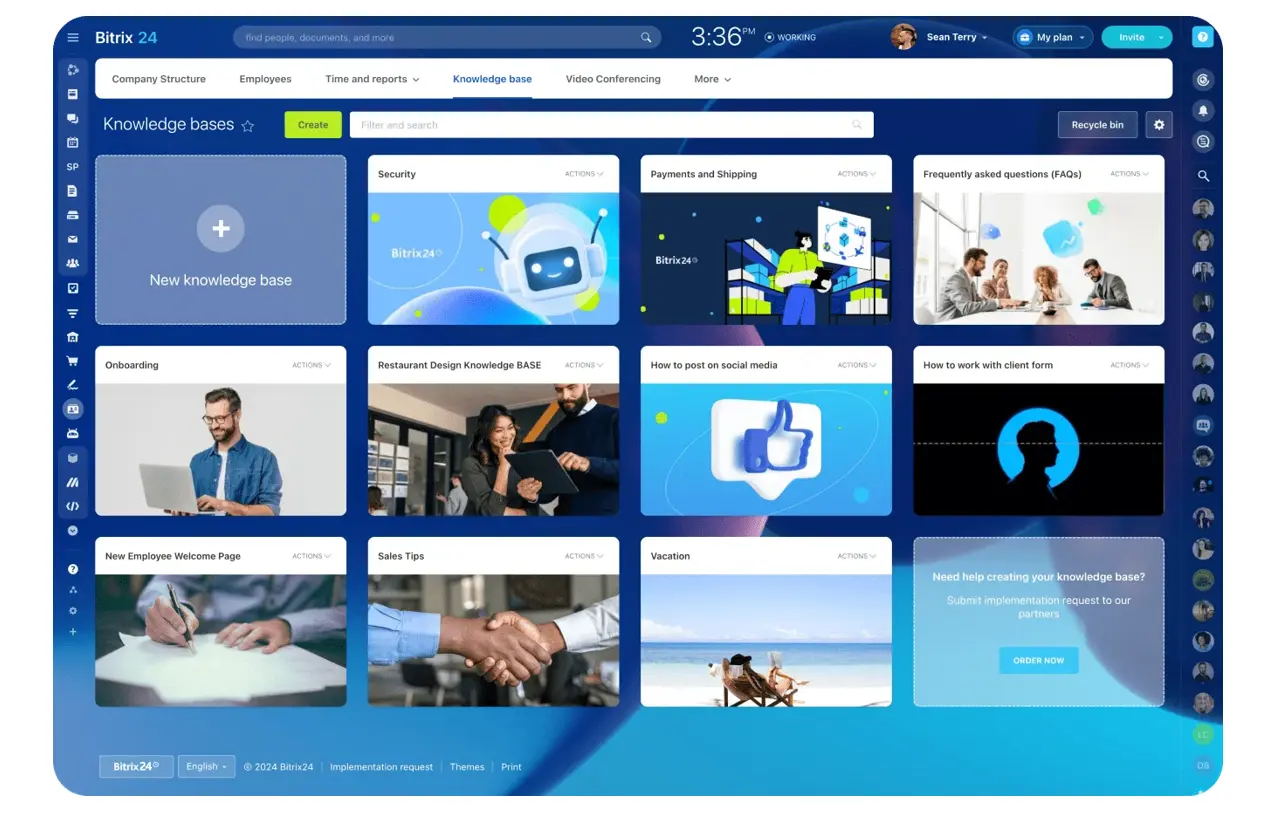
The practical value is a shared source of operational context: teams can see what was decided, what must happen next, and which document or requirement governs the handoff.
Timing failures are the final trigger
A downstream team gets involved after customer promises have already been made. Handoffs happen because a date arrived, not because readiness was confirmed.
The failure often looks harmless at first. Engineering marks a release complete on Friday. On Monday morning, support discovers that the troubleshooting guide still describes the old workflow, while sales has already started contacting customers. The project moved forward administratively, but the receiving teams were never ready to use what they received.
That’s why handoffs need acceptance criteria and readiness checks. A completed task shouldn’t automatically move the whole project forward.
The Cross-Functional Collaboration Workflow: From Intake to Delivery and Feedback
A workable system needs an end-to-end flow every team understands. The point is not to force every project into the same details. It’s to standardize how requests enter, how decisions are made, how dependencies are managed, and how work exits one stage before entering the next.
|
Stage |
Trigger |
Required Inputs |
Entry / Exit Logic |
Output to Next Stage |
|---|---|---|---|---|
|
Request intake |
New initiative or cross-team request |
Business objective, sponsor, target date, affected teams, risk level |
Enter through standard intake; exit when accepted, rejected, or returned for clarification |
Validated request with initial owner |
|
Scope alignment |
Accepted intake |
Goals, constraints, assumptions, success criteria, exclusions |
Enter when core teams are identified; exit when scope and decision owner are documented |
Approved scope brief |
|
Planning |
Approved scope |
Milestones, dependencies, capacity assumptions, approvals |
Enter when owners provide inputs; exit when timeline, owners, and handoff dates are baselined |
Integrated delivery plan |
|
Execution and dependency tracking |
Baselined plan |
Assigned work, due dates, issue log, dependency owners, acceptance criteria |
Enter when work starts; exit when deliverables are complete and dependencies are resolved or escalated |
Completed functional outputs |
|
Decision review |
Scope, timeline, risk, or priority change |
Issue summary, options, impact analysis, recommendation |
Enter when decision threshold is met; exit when approver records decision and plans are updated |
Logged decision and revised plan |
|
Launch and feedback |
Readiness criteria met |
Signoffs, training, support plan, communications, performance data |
Enter when go-live checklist is complete; exit when ownership transfers and improvements are assigned |
Delivered outcome and updated standards |
Intake should reject vague requests
A request like “Can marketing help with this launch?” is not enough.
The team needs to know:
- What is launching
- Who owns the business outcome
- When the work is needed
- Which teams are affected
- What assets or deliverables are required
- Whether the date is fixed or preferred
- What happens if the work is delayed
In a real workflow, intake is usually completed by the requesting owner, reviewed by the workflow owner, and clarified with affected teams before planning starts.
For small projects, this can take 10 minutes. For higher-risk work, it may need a short review meeting.
Scope alignment should lock what’s included and excluded
Scope should define the work, but it should also define the boundaries.
For example:
- Included: launch email, sales one-pager, support FAQ, product update page
- Excluded: paid campaign, webinar, customer migration plan
- Decision owner: product lead
- Final approver: business sponsor
- Change threshold: any new deliverable that affects the launch date or team capacity
This prevents scope from expanding quietly during execution.
Planning should force dependencies into the schedule
Dependencies should not sit in a notes field. They need owners, due dates, acceptance criteria, and escalation rules.
A dependency such as “sales needs positioning” should become:
- Owner: product marketing
- Receiver: sales enablement
- Due date: 10 business days before launch
- Acceptance criteria: talk track, objection handling, competitive notes, approved claims
- Escalation trigger: two business days overdue or launch risk created
That level of detail is what makes a handoff manageable.

Execution should separate tasks from decisions
Tasks track work. Decision logs track why the work changed.
If scope changes during execution, the workflow should reopen planning for impacted teams. If a dependency misses its service-level target, the issue should move from team-level follow-up to escalation with a named arbitrator.
If two functions disagree on priority, the system should route the issue to the decision owner with impact data.
Pro tip: Keep a decision log separate from the task list. A task list tells people what to do next. A decision log protects the project from repeated debates, lost context, and “I thought we agreed…” confusion three weeks later.
The goal is closed-loop delivery: visible triggers, usable outputs, and explicit consequences when a stage is incomplete.
Roles, ownership, and handoffs across teams
Cross-functional work gets messy when participation is mistaken for accountability.
The cleanest model is usually simple:
- One workflow owner
- One decision approver at each major gate
- Functional owners for team-specific deliverables
- Contributors who provide input without owning the outcome
- An executive escalator for conflicts that exceed project-level authority
Core roles to define
A practical structure looks like this:
- Workflow owner: Runs the process, tracks dependencies, manages stage movement, and raises exceptions
- Functional owner: Owns delivery inside a department such as engineering, marketing, operations, or customer success
- Approver: Makes or confirms key decisions on scope, priority, budget, or launch readiness
- Executive escalator: Resolves conflicts that exceed project-level authority
- Contributors: Provide inputs, reviews, and execution support
You can formalize this with RACI or DACI, but the requirement is operational clarity. Everyone should know who decides, who executes, who must be consulted before a handoff, and who breaks deadlocks.
Where handoffs usually fail
The highest-risk handoffs are predictable.
Strategy-to-execution fails when goals are clear but constraints are not.
Product-to-go-to-market fails when features are “ready” without positioning, enablement, or support impact defined.
Engineering-to-operations fails when deployment is complete but monitoring, support procedures, and rollback ownership are not.
Each handoff needs a transfer package:
- Confirmed scope
- Acceptance criteria
- Dependency signoff
- Required documentation
- Approval timestamp
- Readiness checklist
- Known risks
- Fallback plan
Work should not be considered transferred until the receiving team confirms it is operationally usable. “Sent” is not the same as “accepted.”
In Bitrix24, teams can assign functional owners through project management, add acceptance criteria directly to tasks, and attach the documents, checklists, and approvals required by the receiving team. That keeps the transfer package connected to the work item (rather than buried in separate files or message threads).

Automation, visibility, and control points that keep collaboration on track
Once the workflow exists, technology should reduce coordination friction, not create another layer of manual administration.
Automation is most useful where requests, decisions, and exceptions follow repeatable patterns.
Automate intake and routing first
Start with intake routing. A standard request form can classify the project by type, risk, required functions, and target timeline, then route it to the right owner.
Approval workflows can assign scope review based on budget threshold or department impact. Change notifications can alert affected teams when milestone dates or scope assumptions move.
This is especially useful when the same types of projects repeat, such as product launches, client onboarding, internal requests, system updates, or campaign rollouts.
Track dependency risk before it becomes a launch problem
Dependency management is another strong automation point.
If one team’s deliverable date slips beyond an agreed threshold, the system should:
- Flag the dependency as at risk
- Notify the owner
- Alert the workflow owner
- Start an escalation timer
- Show the downstream impact on the project plan
AI can summarize updates, surface delivery risks, and detect aging blockers, but human confirmation should remain the source of record for decisions.
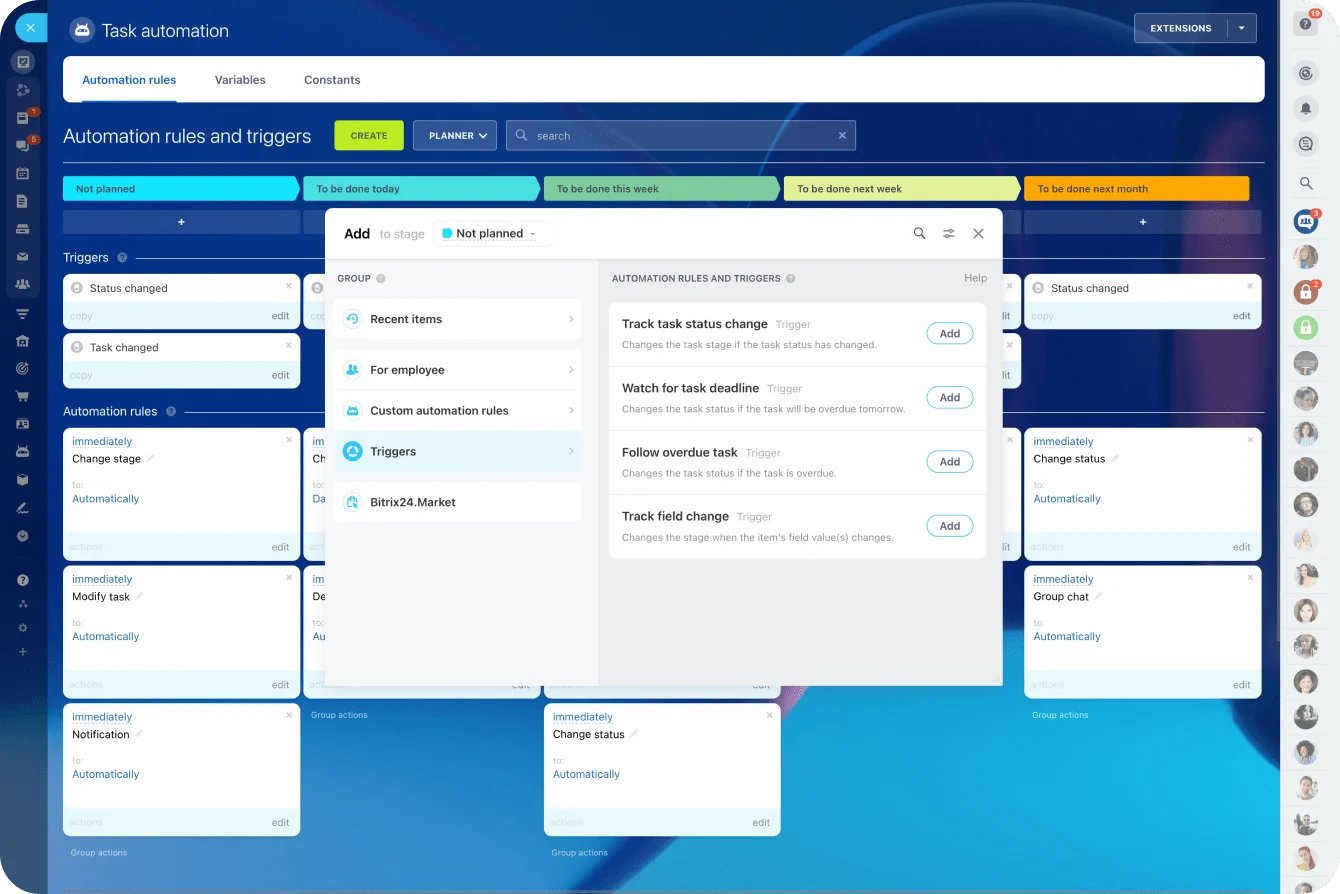
Bitrix24’s task automation can enforce repeatable parts of the workflow through reminders, status changes, approval routing, and notifications when tasks move between stages. That’s useful when each launch, client onboarding process, internal project, or operational change must follow the same minimum controls.
Build dashboards for flow, not vanity reporting
Good dashboards typically show:
- Milestone health by project and function
- Blocked dependencies by age and owner
- Decision backlog and approval latency
- Tasks or deliverables with owner aging
- Cross-functional SLA adherence for handoffs and reviews
Leadership doesn’t need every task. It needs a clean view of where the system is stalling, which teams are overloaded, and which projects are approaching risk thresholds.
Bitrix24’s analytics and reporting tools can support this by giving teams a shared view of status, delays, and workload patterns. The point is to expose the bottleneck early enough to act, not to create a report after the deadline slips.
Use control points to protect delivery
Control points keep the workflow honest.
Stage-gate reviews verify readiness before work moves forward. Exception thresholds define when a delay becomes material. Escalation triggers specify when unresolved issues must move beyond the working team. Audit trails preserve who approved what, when changes occurred, and whether downstream owners were updated.
Teams should have autonomy in day-to-day execution, but not in whether they bypass the controls that protect shared delivery.
Pro tip: Don’t automate a broken process. First, map the actual workflow people use today, including side chats and manual approvals. Then automate the repeatable parts. Otherwise, automation just moves confusion faster.
Common cross-functional collaboration mistakes that derail project delivery
Some collaboration problems aren’t communication issues; they’re actually design flaws in how the project is governed.
1. Too many people are allowed to decide
One of the biggest mistakes is assigning too many decision makers. When five stakeholders must all agree, the project slows to the pace of the least available person.
A better model is one decision owner with named consultees. The consultees can challenge assumptions, but they don’t all hold veto power.
2. Meetings become the workflow
Recurring meetings are another common trap. Meetings can support the workflow, but they should not replace it.
If the project only advances when everyone joins a call, decisions wait, follow-up gets lost, and accountability becomes fuzzy between sessions.
The work should move in the system of record. Meetings should resolve exceptions, review risks, and make decisions that are then logged.
3. Scope changes happen informally
Execution mistakes are just as costly. Teams start work before downstream groups are ready to receive it. Decision logs stay informal. Scope changes are allowed in practice but not reflected in owners, timelines, or dependencies.
That creates invisible rework and weakens delivery confidence.
A common pattern: a senior stakeholder asks for “one small change” late in the project. The change affects documentation, training, customer messaging, support scripts, and release timing. If the change is not logged and re-planned, every downstream team absorbs the impact separately.
4. Metrics reward siloed behavior
There is also a cultural-operational mismatch. Leadership tells teams to collaborate, but teams are measured on siloed throughput, local response times, or departmental utilization.
The system says “work together,” while the metrics reward “protect your lane.”
When projects repeatedly derail, check whether the collaboration model itself is pushing teams toward the wrong behavior.

How to scale cross-functional collaboration without adding more process drag
As project volume grows, the answer is not more custom coordination, it’s more standardization in the parts of the workflow that repeat.
Standardize the repeatable parts
Reusable templates are the first lever.
Standard intake forms reduce ambiguity. Role-based approval paths prevent every project from inventing its own routing logic. Common dependency categories make patterns easier to track. Shared service-level expectations create consistency around review times, handoff acceptance, and escalation windows.
That doesn’t mean every project needs the same process. It means every project should have the same minimum operating rules.
Useful templates include:
- Cross-functional intake form
- Scope brief
- Launch readiness checklist
- Handoff checklist
- Decision log
- Risk register
- Post-project review template
Add portfolio-level capacity planning
Mature organizations build on this with portfolio-level capacity planning. Instead of reviewing projects one by one, they look across the pipeline to see where shared resources are overcommitted, which functions are becoming systemic bottlenecks, and where launch calendars are colliding.
Review bottlenecks as process data
Recurring bottleneck reviews turn project pain into process improvement.
If approval latency keeps delaying launches, review approval paths. If one team causes repeated rework at handoff, inspect transfer criteria. If dependencies often fail near the same milestone, the issue may be planning sequence rather than individual performance.
The most useful scaling metrics are operational:
- Handoff cycle time
- Approval turnaround
- Dependency breach rate
- Rework rate
- Gap between planned and actual readiness dates
- Number of decisions reopened after approval
- Aging of blocked work by owner or function
Use risk tiers instead of one heavy process
More governance is not always better.
High-impact, customer-visible, or regulated projects need tighter controls and stronger auditability. Lower-risk work can use lighter coordination rules, fewer approvers, and shorter checklists.
Risk tiering applies control where failure is expensive and keeps routine work moving.
For example:
- Tier 1: Customer-visible launch, regulatory impact, major revenue risk, executive sponsor required
- Tier 2: Internal process change, moderate customer impact, cross-team dependencies
- Tier 3: Low-risk internal improvement, limited dependencies, lightweight approval
This keeps the system practical. Teams are more likely to follow the process when the process matches the risk.
FAQs
Who should own cross-functional collaboration when no PMO exists?
Assign a workflow owner at the project or program level, such as a project manager, operations lead, product operations manager, or senior functional lead with authority to manage handoffs, track decisions, and escalate conflicts.
What tool stack is sufficient for small teams?
Use one project management platform, one shared documentation space, and one communication channel tied back to the system of record. Intake, owners, dependencies, and decisions should be visible in one primary workflow.
When should a blocked dependency be escalated?
Escalate when it misses its SLA, threatens a committed milestone, or cannot be resolved by the directly involved owners within the agreed window.
How often should handoff SLAs be reviewed?
Review them quarterly in stable environments and more often during rapid growth, major organizational changes, or repeated delivery misses.
How do you handle collaboration across time zones?
Use structured intake, decision logs, explicit due dates, and written acceptance criteria. Avoid dependency chains that require same-day live coordination unless the work justifies overlap hours.
What changes when external agencies or vendors are involved?
Put them into the same workflow with named owners, deliverable criteria, review timelines, and escalation paths. If they affect delivery, they need the same visibility as internal teams.
How do you manage shared resources across multiple projects?
Review capacity at the portfolio level. Shared specialists, approvers, and operational teams need visible demand queues, prioritization rules, and explicit tradeoff decisions.
What if one function consistently becomes the bottleneck?
Treat it as a system issue first. Check intake quality, approval load, staffing, sequencing, and acceptance criteria before assuming individual underperformance.
How do you introduce this process without overwhelming teams?
Start with standard intake, named owners, dependency tracking, decision logging, and a few stage gates. Apply it first to high-impact projects, then refine it based on actual failure points.
What early metrics show the model is working?
Look for shorter approval times, fewer missed handoffs, lower rework, earlier risk identification, and more predictable milestone performance.
How can AI help without replacing accountability?
AI can summarize updates, flag delivery risk, route requests, and detect stalled approvals or aging blockers. Decisions still need named human owners and approvers.
Keep cross-team projects moving
Bitrix24 connects tasks, approvals, docs, and automation so every handoff has an owner, deadline, and visible status.
Get Started NowBuild the handoff before adding another meeting
When a cross-functional project breaks, the post-mortem usually blames communication. That diagnosis is convenient, sure. But often wrong.
The real failure happened earlier: a request entered without enough detail, a decision had five owners, a dependency lived in someone’s notes, or work was handed over before the next team could actually use it.
Another meeting may expose the damage. It won’t repair the system that caused it.
Start with one recent delay. Trace the project back to the first broken handoff, then rebuild that point with a named owner, clear acceptance criteria, a deadline, and an escalation rule.
Bitrix24 gives you one place to connect the tasks, decisions, documents, approvals, and automation behind that flow.
Sign up for Bitrix24 for free and fix the handoff most likely to derail your next project.