Google Workspace Is Not a Work Management System: What to Add Around It

TL;DR (Quick Summary)
Google Workspace is excellent at communication and content and was never built to hold the state of work: who owns a task, which stage a deal sits in, whether an approval actually happened. The fix is a small system of record beside it, matched to whatever object your team keeps losing, with Workspace kept as the front door.
- Workspace is built for communication and content → it moves messages, files, and meetings but holds no owner, status, or history for the work itself.
- What cracks first under cross-team work? → ownership goes implied, client context scatters, pipelines drift, and approvals lose their trail.
- Where should the missing state live? → in a system of record, one durable home for whichever object keeps vanishing.
- Which system for which gap? → work management for tasks, a CRM for client history, a workflow tool for repeat approvals.
- How do you add it without a mutiny? → keep creating in Gmail, Docs, and Calendar, and record the official state where it's owned.
- What keeps the integrations from fighting? → one owner per record, linked files over duplicates, one-way sync by default, and a named human watching the connectors.
- What do you get back? → accountability you can see, reviews without the status round-robin, handovers that survive someone leaving.
- Where does it net out? → find the one object that keeps slipping and wire its home into the tools people already open.
Takeaway: Workspace for talking and making things; a system of record for anything that has an owner, a status, or a history.
Ask a manager who owns a given piece of work, what stage it's in, and what changed last week, and in a Workspace-only shop the answer is usually a short silence followed by "let me check." The tools carried the work. They just never kept score.
The cost is measurable. McKinsey's 2012 study of interaction workers found they spend nearly 20% of the workweek looking for internal information or tracking down colleagues, close to a full day a week spent hunting for answers that should have been written down somewhere findable. The figure dates from 2012, but anyone who's sat through a Monday status meeting knows the pattern hasn't moved. Certainly not for the better, anyway…
Get the structure right and that silence disappears: you open one record and see the owner, the status, and the history, instead of opening six inboxes.
This article shows you how to find the record your Workspace setup is missing, which kind of tool should hold it, and how to wire it in without pulling anyone out of Gmail, Docs, or Calendar.
Google Workspace is a collaboration layer
Most of the visible work happens in Workspace. Messages land in Gmail, drafts live in Docs, files sit in Drive, meetings go on Calendar, teams talk in Chat and Spaces.
It handles light task work too. You can create and assign tasks inside Google Chat Spaces, with owners and due dates, so basic coordination doesn't need a second platform.
Where the gap starts to appear
The gap shows up the moment someone has to see across the work: several teams at once, a quarter of customers, a portfolio of projects.
Collaboration tools help people talk, edit together, share files, book time, and comment on each other's drafts. Operational systems answer a different set of questions:
- Who is accountable for this item?
- What stage is it currently in?
- What has to happen before it can move forward?
- Which customer, project, or request does it belong to?
- What changed since last week?
- Where can a manager review all similar work at once?
One campaign runs fine on a shared Drive folder, a planning Doc, a Space, and a few Calendar deadlines. Add legal review, product dependencies, regional versions, exec sign-off, and a coordinated launch date, and someone needs a real execution record.
Structured task management holds the assignees, deadlines, status, and dependencies while the campaign's files stay in Google Drive.
Where Workspace breaks down under cross-team work
The breakdown starts quietly.
A decision gets made in email. The latest thinking sits in a doc. A follow-up gets mentioned in a meeting. A deadline lands on a calendar. Every piece exists; the state of the work has to be reassembled by hand.
That reassembly is a tax. A 2022 Harvard Business Review study of 137 workers across three large companies found they switched between apps and websites roughly 1,200 times a day and lost close to four hours a week reorienting after each jump. The more places the truth lives, the bigger that bill.
For a small, local task, that's fine. Once several people depend on each other, it isn't.
Ownership becomes implied
Email is a terrible place to assign ownership.
A message to six people generates six opinions and zero owners. "Can you take a look?" isn't a commitment anyone tracks. A meeting ends with clear verbal next steps that never become a single visible task.
The cross-team launch is the classic case. Marketing thinks ops owns the final check. Ops assumes product is making the change. Product thinks marketing is waiting on approval.
Everyone's read the thread. Nobody owns the next move. The thread proves the topic came up; it doesn't prove anyone agreed to act, and reply-all consensus is the flimsiest accountability there is.
Customer context becomes fragmented
Client information ends up everywhere: Gmail threads, calendar invites, Docs, Sheets, attachments, someone's private notes.
That holds up as long as one account manager carries it all in their head. It falls apart the week they're on vacation, the month they resign, the day customer success inherits the account, or the moment a manager wants a read on the relationship without booking time with the owner.
A CRM gives that activity a durable record. Contacts, deals, notes, conversations, next steps, and commercial status live around the account instead of around one inbox.
The trigger isn't headcount. A solo rep with ten accounts and a tidy inbox is fine for now. Continuity risk is what forces the move: the handover where the only copy of "where we are" walked out with one person.
Pipeline management turns into status chasing
A spreadsheet tracks deal stages for a surprisingly long time.
Then maintenance kills it. Someone has to update the sheet every time reality moves in Gmail or on a call.
On Monday the pipeline says "Proposal sent." Friday's email already recorded procurement rejecting the terms. Nobody updated the sheet, so the official view is three days behind the truth.
So the pipeline meeting becomes a lap of "where are we with this one?" rather than a review of anything trustworthy.

Approvals leave weak audit trails
Approvals run on email and doc comments until the day someone needs the receipt.
Take a routine discount sign-off. Sales emails a manager, finance raises a question, the rep sends revised numbers, and eventually someone replies "approved."
A month later, good luck establishing:
- which amount was approved;
- which version was final;
- whether another approver was required;
- how long the request sat waiting;
- who made the final decision.
Once that approval repeats, it needs a real request: fixed fields, named approvers, a status, and a decision that stays put.
Pro tip: For any recurring process, ask two questions: "Who owns the next action?" and "Where can I see its current state without asking anyone?" If either answer is unclear, the process needs a stronger record.
The missing layer is a system of record for work, relationships, and decisions
You rarely need to replace Workspace. Gmail, Drive, Docs, Calendar, and Chat already earn their keep, and dragging people off tools they know creates its own drag.
The missing piece is a system of record: one durable, structured home for whichever business object matters.
Name the missing object and the buying decision gets easy.
Work vanishing in handoffs points to a work record. Customer history vanishing between people points to a CRM. Approvals that require email archaeology point to a workflow tool.
The trap is buying the tool with the most noise around the problem instead of the one built to hold the record. A busy inbox doesn't turn Gmail into a CRM. A fat Drive folder doesn't give you a portfolio view. A spreadsheet full of requests isn't an approval process.
Pro tip: Before buying anything, write down the five fields managers keep asking people to fill in by hand. "Owner," "status," "due date," "customer," and "next action" show up on most lists. Those fields are what your missing system has to hold.

Match each gap to the tool that solves it
Three gaps account for most of the pain in Workspace-only teams, and each needs a different record:
|
Operational gap |
Best-fit tool category |
What it should hold |
|---|---|---|
|
Cross-team tasks and dependencies |
Work management platform |
Assignee, due date, status, dependency, project or portfolio |
|
Client history and pipeline |
CRM |
Accounts, contacts, communications, opportunities, notes |
|
Repeatable requests and approvals |
Workflow or approval tool |
Requester, required fields, approver, target time, decision trail |
Cross-team execution needs a work record
Cross-functional work needs explicit ownership. A work management tool shows, at a glance:
- what's open;
- who owns it;
- when it's due;
- what's blocking it;
- what comes next.
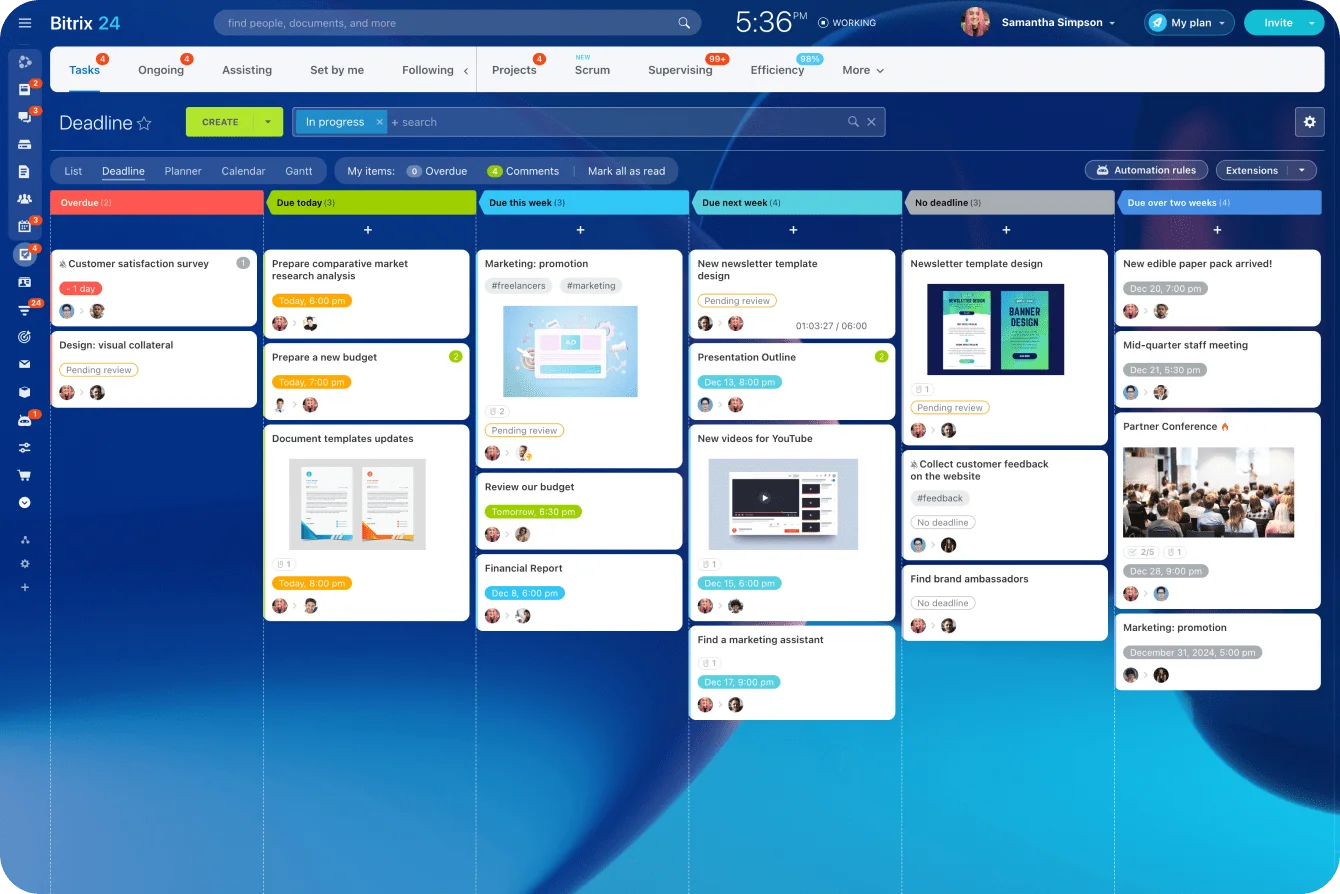
Managers need a level above the task, too. You can't see which projects are late or which team is the bottleneck by rereading email.
In Bitrix24, teams run project management at that execution layer while the working documents stay in Workspace. Paid plans are priced per organization, not per seat, so adding the whole cross-functional group to a board doesn't raise the bill person by person, and the people who drop handoffs are exactly the ones a per-seat budget tends to leave off.
Customer activity needs an account record
Sales and service teams need continuity across people and time.
A new rep opens the account and sees recent conversations, live opportunities, planned follow-ups, and notes, without digging through a predecessor's mailbox.
Same when sales hands off to onboarding or customer success: the context travels with the account.
Repeatable decisions need workflow
A one-off approval stays lightweight. A repeated one earns structure. The usual suspects:
- contract reviews;
- purchase requests;
- pricing exceptions;
- creative approvals;
- access requests;
- hiring approvals;
- expense exceptions.
The test is frequency times consequence. Regular request, plus a missed step that costs money, legal exposure, a customer, or an outage? Build the workflow.
Below that bar, a Google Form feeding a Sheet does the job: structured fields, a timestamp, done. A dedicated workflow tool earns its cost when volume climbs, when you're measuring time-to-decision against a target, or when someone will later have to prove who approved what and when.
The Sheet stores data. It won't enforce the steps, route the request, or hold an audit trail together.
From there, task automation strips out the repetitive handoffs, like kicking off the next task the moment a stage closes.
Design the stack so Workspace stays the front door
A working setup keeps the Workspace tools people know in front of them and parks the structured records next door.
The rep still writes email in Gmail. The project lead still drafts in Docs. Meetings still go on Google Calendar. What changes is where the important state lands: in the system that owns it.
Keep creation close to the user
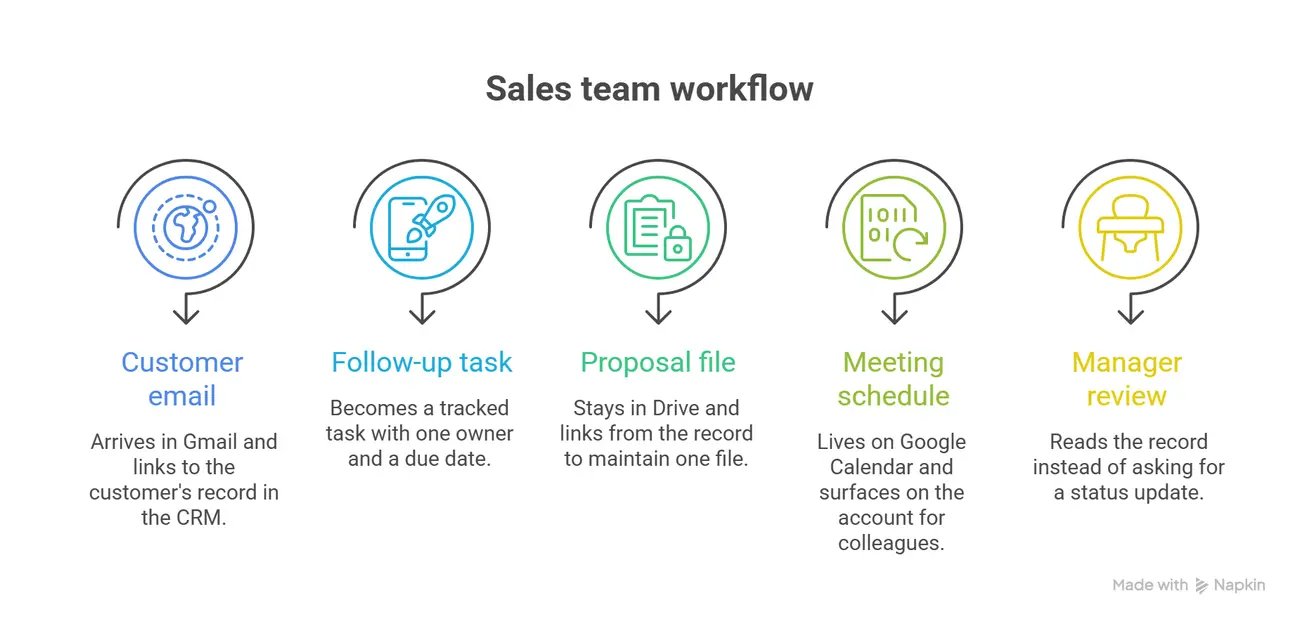
Never make people type the same thing into three places. Here's one illustrative flow for a sales team:
- A customer email arrives in Gmail.
- It gets linked to the customer's record in the CRM, so the thread sits against the account, not in one inbox.
- The follow-up becomes a tracked task with one owner and a due date.
- The proposal stays in Drive and links from the record, so there's one file rather than a copy per system.
- The meeting lives on Google Calendar and, when colleagues need it, surfaces on the account.
- The manager reads the record instead of asking for a status update.
Bitrix24 integrations sit on that boundary when Workspace stays part of the daily toolset; the Google connectors listed include Gmail, Google Calendar, and Google Drive.
The rule is simple: make creation easy, and make the official state of important work explicit.
Don't make the structured system optional
One failure shows up again and again. A team rolls out a CRM or a project tool, then lets status keep living wherever it always did.
Some people update it. Some keep a private spreadsheet. One team runs everything out of email. Within a month managers stop trusting the official record, because they know the real answer might be somewhere else.
This is what sinks most rollouts, and it has nothing to do with features. The tool works fine. Discipline is what cracks: the first time a manager takes a verbal update in a meeting instead of pointing at the record, everyone learns the record is optional, and the second copy of the truth is born. Picking the tool is the easy part. The hard part is refusing to let status live in two places.
Set a clear rule for each record type:
- Drive owns working files.
- CRM owns customer and deal state.
- Work management owns task status.
- Calendar owns meeting schedules.
- The workflow system owns approval state.
Now everyone has the same answer to "where does this go?"
Integration hygiene keeps records from fragmenting
Wire systems together and you inherit a new job: stopping them from disagreeing with each other. The best integration policy is short and explicit.
Give each record one canonical owner
One authoritative status per task. One pipeline stage per deal. One live version per document. Otherwise two apps both look right while telling you different things.
Be careful with two-way synchronization. It sounds safer than one-way and isn't. The moment both systems write the same field, you're inviting duplicates and silent overwrites: edit a contact in Gmail and in the CRM in the same hour and you get two records, or one quietly overwrites the other. Default to one-way, flowing out from whichever system owns the record. Keep two-way for the places where both sides genuinely create data, like calendar events and email threads, and even there, decide in advance which side wins a conflict.
Link files instead of multiplying them
Copies are the other reliable way to lose the thread. Someone downloads a proposal from Drive, uploads it into another tool, edits it there, and now the team has Proposal_FINAL and Proposal_FINAL_v2_USE_THIS, and nobody's sure which one the client saw.
Keep the working file where it belongs in Drive and link to it from the task, project, or customer record.
External sharing gets its own rule. Link a Drive file into a CRM record a client can see, and the file's own sharing settings still control access; the record and the file don't police each other. Choose on purpose between "restricted" (named people only) and "anyone with the link," and keep anything commercially sensitive to named access. A link the client can't open costs a round-trip; an "anyone with the link" file on a widely shared record leaks more than you meant. Share the link either way. Hand over a downloaded copy and you're back to duplicate finals sitting in a client's inbox.
Google Shared Drives keep files with the team instead of with a person. Files stay put when someone leaves, which is what makes them right for team-owned content. Rule of thumb: client and project files go in Shared Drives, operational records stay out of anyone's personal My Drive, so offboarding a rep means transferring one account, not spelunking through a departed employee's private folders for the current contract.
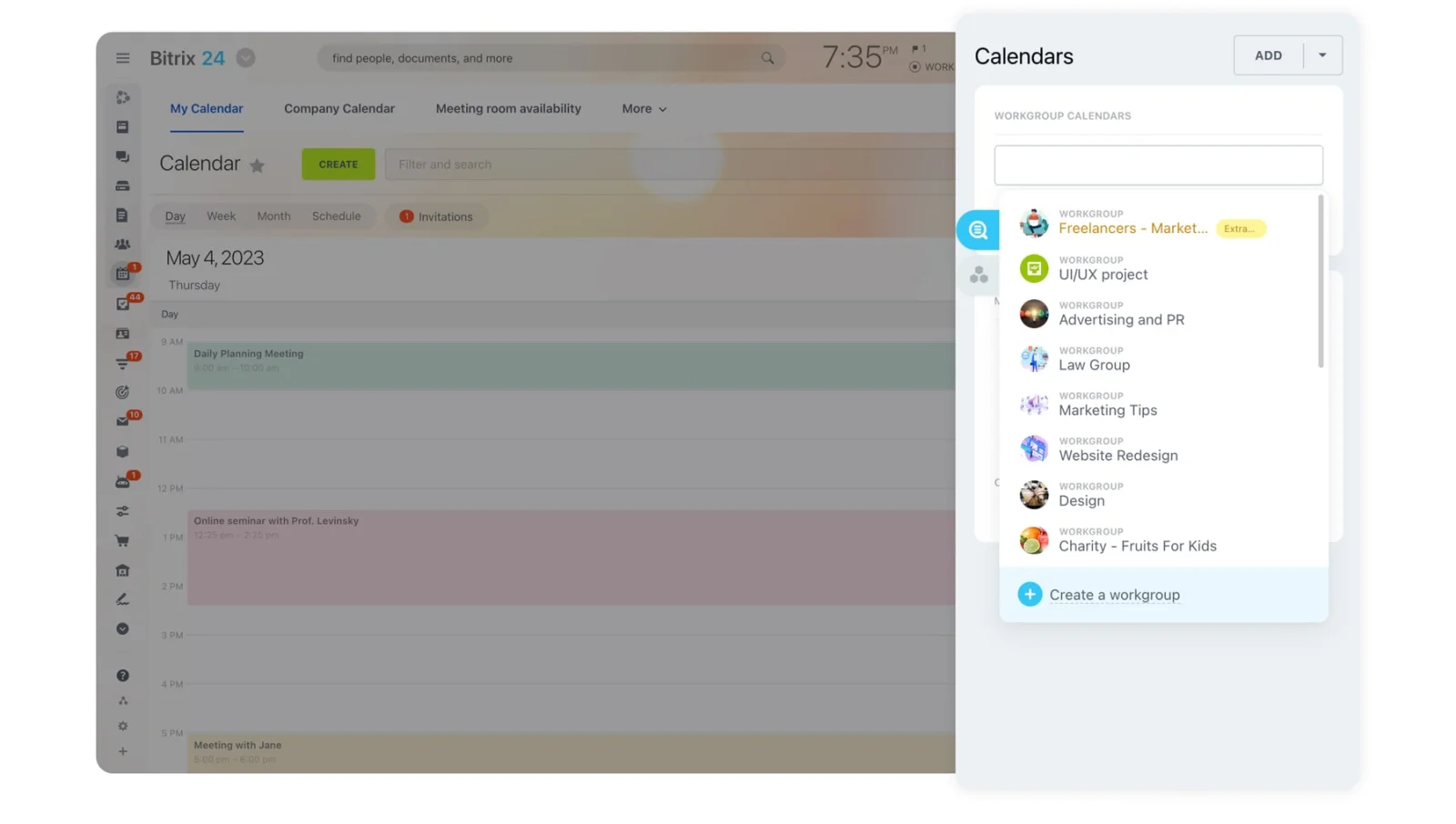
Decide how calendars should behave
Meetings belong in the operational record too. A big customer meeting that lives only on one person's calendar takes its context with them the day someone else has to cover.
When a meeting matters beyond the people in the room, decide which events surface in the adjacent system. Bitrix24's calendar tools handle that when teams want scheduling sitting next to the rest of the work record.
Give somebody ownership of integration health
Automations fail. Permissions change. Accounts get disconnected. Fields get renamed. And you find out the Monday after a long weekend, when a sync that ran clean for two years has quietly stopped writing records and the one person who understood it left months ago. A connector that worked last quarter isn't guaranteed to work today.
Public Health England found this out in October 2020. Its interim chief executive, Michael Brodie, traced 15,841 missing positive cases to a fault in "the data load process that transfers COVID-19 positive lab results into reporting dashboards." Press reports put it down to an Excel file that had hit its maximum size, so new results simply stopped being added. For about a week, the official numbers looked lower than they were, and nothing flagged it.
Give someone in ops or IT the job of checking, on a schedule:
- failed automations;
- disconnected accounts;
- duplicate records;
- field mapping errors;
- permission problems;
- records that have stopped updating.
A small team checks monthly. A high-volume process checks weekly.
Pro tip: Put the integration audit on the ops calendar as a recurring event. Run one real record end to end instead of trusting the connector's status light. Green doesn't prove the right fields, files, and events are landing in the right place.
What changes once the layer is in place
Accountability sharpens first. Commitments that used to hide in messages and meeting notes turn into assigned records, and anyone can see who owns the next step and when it's due.
Managers spend less time collecting status
A weekly review gets easier when one screen shows:
- active items;
- overdue work;
- blockers;
- ownership;
- upcoming deadlines.
The meeting spends its time on exceptions and decisions instead of gathering facts that were already written down.
Customer work runs the same way. With a real account history, a sales manager reviews pipeline off the records instead of stitching together a spreadsheet and a round of verbal updates. Analytics and reporting tools start earning their keep once the records underneath them stay current.
Handoffs carry more context
Records make handoffs stop depending on one person's memory. An account changes hands and the new owner reads the history. A task moves from product to marketing and the next team sees its status and its files. Someone goes on leave and nobody rebuilds their commitments from an inbox.
Reporting starts with better inputs
Reporting quality depends on record quality. No dashboard rescues missing owners, stale deal stages, freehand status labels, or approvals that happened off-system.
The real test is whether, for any live piece of work, you can name the owner, see the current status, open the latest file, reconstruct the decision, and hand the whole thing to someone else without a debrief. Where that holds, Workspace and the system beside it are each doing their job.
Give every task one reliable home
Bitrix24 connects tasks, CRM, approvals, and Google Workspace, so teams see ownership, status, files, and history in one place.
Get Started NowGive the work one dependable home
Teams that can't name the owner and status of their live work are rarely failing everywhere. One specific object keeps slipping through the cracks: a task, an account, a deal, a request, an approval, a decision. Find that object before you shop for anything. Run your own stack past five questions:
- Where do tasks die, agreed in a thread or a meeting and then tracked nowhere?
- Where does client context vanish when someone's out or gone?
- Where do approvals leave no trail you could reconstruct a month later?
- Where do files get copied instead of linked, so "final" exists in three places?
- Which syncs and automations have nobody watching them?
Most teams don't need a new tool for all five. They need one dependable home for the thing that keeps slipping, wired to the Workspace apps people already open every morning.
Leave it scattered and you keep paying the same bill: the status meeting that's really a fact-finding meeting, the handover that loses half its context, the "final" file that isn't.
Bitrix24 is one way to keep that home in a single place: tasks, CRM, and approval workflows together, connected to Gmail, Google Drive, and Google Calendar, so the record you make canonical doesn't turn into the sixth disconnected silo.
You'll know it's working when you ask a manager who owns a piece of work, what stage it's in, and what changed last week, and get a link back instead of "let me check."
Takeaway: Leave communication and content in Workspace, and give every task, account, and approval one home that outlives whoever created it.