Delegating to a Virtual Assistant: Access, Handoffs, and Quality Control

TL;DR (Quick Summary)
A first VA setup breaks down when the work is vague, the access is too broad, or review starts only after mistakes spread. Treat delegation as a controlled workflow instead: scoped tasks, least-privilege access, visible handoffs, and early quality checks.
- Which work do you hand off first? → Recurring tasks with outputs you check in minutes, where a mistake stays visible.
- How do you brief it? → Write the task down to ten fields; the decision rules and the missing-information rule are what stop stalls and guesses.
- How much access? → The VA's own identity and least-privilege permissions, never the founder login.
- How does work move back and forth? → One visible queue with a Definition of Ready and Done, so nothing stalls between people.
- How do you hold quality? → Check the actual output rather than a "done" status; review closely at first, then drop to spot checks.
- Who decides what? → Sort calls into do-alone, pre-approve, and never; name a backup approver before you need one.
- How does it stick? → Fix the defects execution turns up, and expand only once rework stays low.
Takeaway: A VA pays off once the system around them lets routine work finish without the founder translating, approving, or repairing every step.
Most first VA hires disappoint for a reason that has nothing to do with the assistant. The work was never defined, the access was never scoped, the approvals were never named, so every task routes back to the founder anyway. Delegation becomes a second management job, and the hours it was meant to save disappear into clarifying, approving, and cleaning up.
The fix is a small operating system around the role: repeatable work, written instructions, permissions matched to the job, and close review for the first few cycles. Get those right and routine work leaves your desk for good instead of boomeranging back to it.
Start with low-risk, repeatable work that exposes your operating gaps
Point your first delegation wave at routine work that frees your time and shows you where the process is fuzzy. Pick tasks that recur, follow recognizable rules, eat real hours, and produce an output you check fast.
Look for clear triggers and visible outputs
The best early tasks start from a visible trigger, run on known inputs, and end with a clear result.
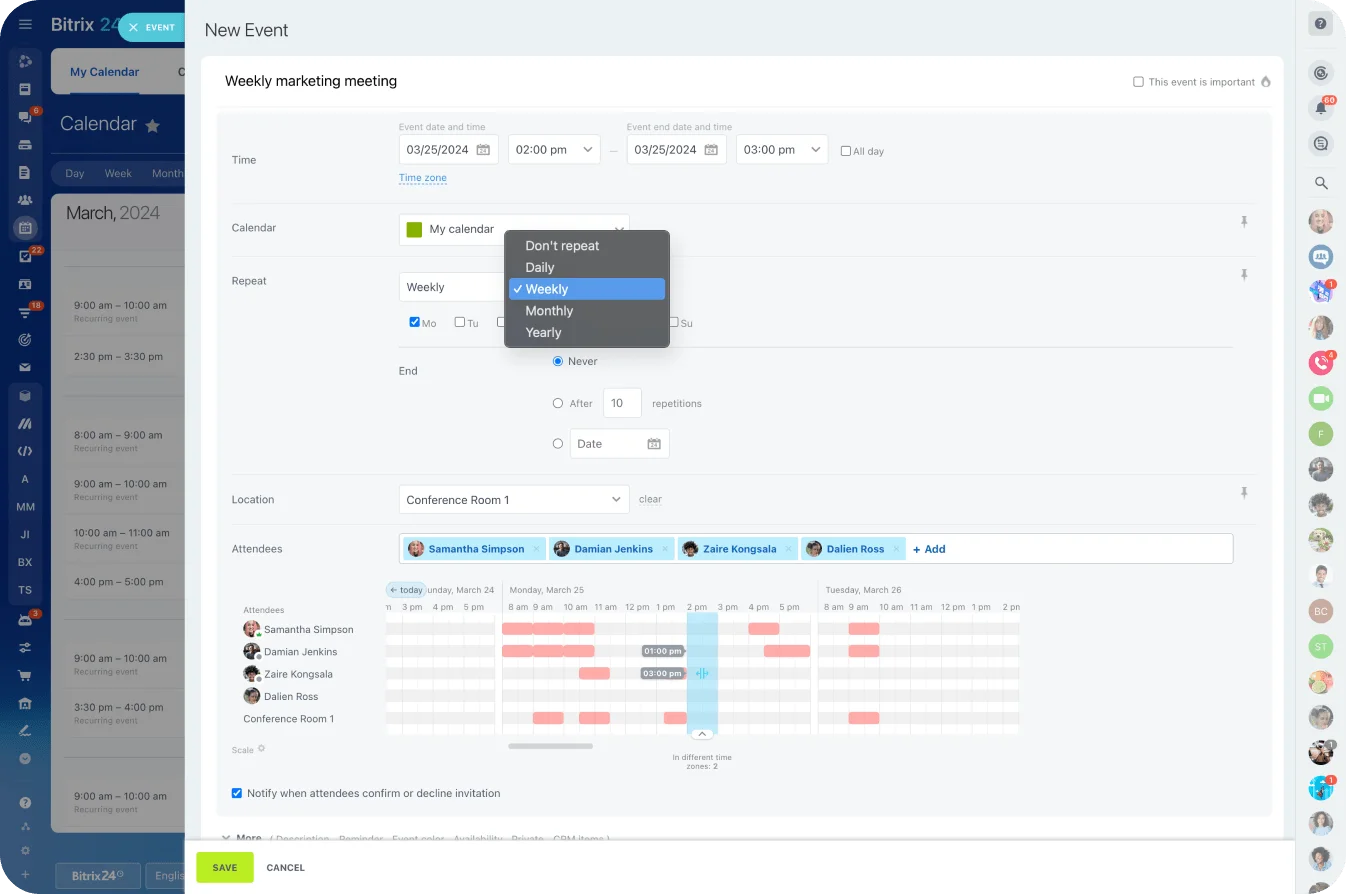
Calendar coordination fits. A scheduling request lands, availability rules get checked, attendees get confirmed, and the task ends with a booked meeting or a clear reply. Bitrix24 Calendars handles this kind of shared scheduling when more than one person needs visibility.
Other useful first-wave tasks include:
- Inbox triage and routine response drafting
- CRM record updates
- Travel research within stated budget and timing limits
- Basic prospect or vendor research
- Follow-up scheduling
- File organization and recurring administrative checks
These tasks matter, and mistakes stay visible and correctable. That makes them a safer training ground than work with irreversible decisions.
Keep high-consequence work with the owner
Pricing exceptions, sensitive financial calls, strategy, people management, confidential HR, legal commitments, payments: this work needs stronger controls. Don't force a new VA to interpret rules you haven't defined yet.
One test settles most cases before you delegate: can you state the trigger, the expected output, and the standard for "done" in plain language?
"Manage my inbox" fails that test. A workable version reads:
- Label inbound messages by type
- Archive newsletters
- Flag client issues
- Draft routine replies
- Escalate refunds, legal threats, or contract changes
A founder who can't define "done" has found an operating gap. Close it before piling on more delegated work. When a first delegation flops, the instinct is to blame the hire. The real culprit is a task nobody could run cleanly because "done" was never set, and the VA does the only two things left to them: stall or guess. And unfortunately for them, both read as poor performance.
Pro tip: For the first two weeks, favor tasks you review in under five minutes. Fast cycles expose weak instructions early without turning oversight into its own workload.
Turn founder habits into instructions a VA can execute without chasing context
Convert your habits into instructions the VA acts on without asking you to rebuild the process each time.
Build a minimum task spec
A good task spec has ten fields. Paste this skeleton into a task or knowledge-base entry and fill it in per process:
Task name:
Purpose:
Trigger (what starts it):
Inputs required:
Steps (in order):
Decision rules (VA can decide alone):
Good-output example (link or attach):
Deadline / SLA:
If information is missing:
Escalate to / how:
Filled in for inbox triage (illustrative, adjust to your setup):
Task name: Daily inbox triage
Purpose: Keep the founder's inbox to decisions only
Trigger: Twice daily, 9:00 and 15:00
Inputs required: Access to shared inbox, label set, reply templates
Steps:
1. Label each new message by type (client, vendor, admin, newsletter)
2. Archive newsletters and promotions
3. Draft replies to routine messages using templates
4. Flag client issues for founder review
Decision rules: Send routine template replies without approval;
never send anything involving money, contracts, or complaints
Good-output example: [link to a sample triaged thread]
Deadline / SLA: Inbox cleared within 1 hour of each triage window
If information is missing: Leave the message unlabeled and note it in the task
Escalate to: Founder via task comment; anything legal or a refund goes to direct message
Two fields carry the weight. Decision rules tell the VA what they own outright. The missing-information rule tells them what to do when something's absent, which is the line between a sensible pause and an invented answer.
The same spec covers travel booking. It triggers on a confirmed trip. Inputs are destination, dates, budget, loyalty accounts, seat preferences, and meeting times. Steps run research, shortlist, approval, booking, confirmation. Decision rules cap layovers and hotel spend and require refundability, and the VA escalates before exceeding budget or booking anything non-refundable.
That last rule closes the most expensive gap in delegated travel. Leave "refundable only" in your head instead of the spec, and you'll pay for the day the VA books the cheapest fare and it turns out you can't cancel it.
Document a live task, not an imaginary perfect process
Don't build a giant SOP library before you delegate. Capture instructions from real work. Documentation pays off on recurring tasks, so a genuine one-off isn't worth a spec. Don't let the urge to write everything down become its own delay.
For each recurring process, save:
- A short screen recording
- The checklist you actually follow
- Message or email templates
- One or two completed examples
- Common exceptions
- The escalation rule
Park that material in a shared Bitrix24 Knowledge Base or next to the task itself, where it won't vanish into old chat threads.
Separate rules from judgment
Some things the VA follows without asking:
- Calendar buffers
- Required CRM fields
- Travel budget limits
- Standard response templates
- File naming conventions
- Approved vendors
Judgment calls get a separate approval rule: moving an important client meeting, answering an unhappy customer, changing a commercial commitment, making an exception for a lead.
Blur that line and the VA compensates one of two ways. They escalate almost everything, or they act past their authority. Both trace back to instructions that never drew the line.
Grant access by role, not by trust: set up a secure external-contractor environment
Access follows the work. Sharing your own login is quick, and it wrecks both control and traceability. Credentials are still the attacker's favorite tool: in Verizon's 2026 Data Breach Investigations Report, credential abuse shows up somewhere in 39% of breaches, more than any other vector it tracks, even though exploited software flaws have now overtaken it as the first step in.
A shared founder login is exactly the credential that gets reused, pasted into a chat thread, and left impossible to attribute after the fact. Lock things down too hard, though, and you manufacture constant dependency on yourself.
Give the VA their own identity
Use dedicated accounts wherever the tool allows. Give the VA their own seat, a company email where it fits, and role-based permissions instead of your login.
The reason founders share a login anyway is cost: another seat is another monthly charge. That excuse doesn't always hold. Bitrix24's Free plan covers one to two users, which is exactly a founder and a first VA, so the VA gets their own login from day one at no cost. Past that, Bitrix24 prices per organization rather than per seat (Basic includes five users), and even a per-seat charge elsewhere is cheaper than an untraceable shared account.
Store passwords in a manager vault rather than firing credentials through chat or email. Where a service offers delegated access, use it. Google Workspace and Microsoft 365 both support delegation natively, so a VA acts on your calendar or inbox without ever holding your password. Slack doesn't, so give the VA their own seat or guest account there.
Scope permissions task by task. Scheduling needs the calendars required for booking, not private notes or unrelated events. CRM maintenance needs the right to update records, not bulk export or admin rights. File management needs the relevant folders, not the whole drive. Project coordination needs to update assigned tasks, not change workspace-wide settings.
Bitrix24 sets access controls across tasks, projects, workgroups, calendars, and CRM, so permissions match what an external contractor actually does.
Keep high-risk systems restricted
Some systems stay closed until there's a concrete reason to open them:
- Banking and payment systems
- Payroll
- Legal records
- Bulk customer-data exports
- Billing controls
- Administrator settings
- Sensitive employee files
If the VA genuinely needs access later, widen it deliberately instead of handing over everything at onboarding. Watch the temporary shortcut. Access shared "just for now" during a busy week is the access still shared a year later, and it's what turns offboarding into a scramble.
Build basic security controls around the role
Bitrix24 security covers two-step authentication and other account protections, but your own access rules still decide the outcome. MFA is the highest-return control you have: Microsoft's research puts it at blocking more than 99.2% of account-compromise attacks.
At minimum:
- Turn on MFA, and prefer an authenticator app over SMS codes, which are easier to intercept
- Never let anyone share a one-time 2FA code, including with you
- Keep work and personal accounts separate
- Don't share founder credentials
- Set approved-device requirements where needed
- Keep login and activity history where your tools offer it (in Bitrix24, login history comes with the Enterprise plan)
- Review permissions when responsibilities change
Set expectations on the contractor's side too. A short NDA and a plain note on how company data gets handled, where files live, what can't leave, and what happens to access at the end, cost little and kill ambiguity later.
Write the offboarding checklist before you need it. In 2018, three months after his consulting firm fired him, an IT contractor who'd worked on a Carlsbad, California company's Microsoft 365 migration got into its server from India and deleted more than 1,200 of its 1,500 user accounts, shutting the business down for two days. Your VA is not that contractor. The checklist exists so that nobody who has left still has a way back in, whatever their mood:
- Suspend the account and revoke delegated access
- Remove them from the password vault and rotate any shared secrets
- Reassign licenses or seats
- Reassign ownership of recurring tasks
- Transfer or archive shared files
- Collect or wipe any company material stored locally
Pro tip: Keep an access register with four columns: system, permission level, reason for access, and who's responsible for removing it. Review it whenever the VA's scope changes, not only when they leave.

Design clean handoffs so work does not stall between owner, VA, and other tools
Good instructions and scoped access still won't save a broken handoff. Work stalls because the request arrives in chat, the source files live somewhere else, approvals happen over email, and finished work has no agreed home.
Create one visible work queue
One task management system shows, at a minimum:
- Task owner
- Status
- Due date
- Required inputs
- Current blocker
- Approval status
The VA has better things to do than piece today's priorities together from three message threads.
This matters more the moment several people touch one workflow. The founder creates the task, the VA does the administrative work, another team member approves the output. Every handoff stays visible.
Define the handoff contract
Every recurring workflow answers five questions: how work is assigned (through the task queue, not a verbal ask), where source materials live (a named folder, record, or document), what "ready to start" means (inputs and instructions present), where finished work goes back (into the same workflow), and how approval gets requested (a defined status, field, or action).
Two short checklists keep both ends honest.
Definition of Ready, before the VA starts:
- Trigger has actually fired
- All required inputs are attached or linked
- Decision rules and the escalation path are stated
- Deadline is set
Definition of Done, before it's marked complete:
- Output meets the stated quality criteria
- Result is filed in the agreed place
- Any required approval is recorded
- Open questions are noted, not left implied
Take follow-up scheduling after a sales call. A ready task card looks like this (illustrative):
- Task: Book follow-up with Acme after discovery call
- Owner: VA
- Status: Ready → In progress → Awaiting approval → Done
- Inputs: call owner, attendee names, meeting objective, approved scheduling range, message template, customer-specific notes
- Blocker: (empty)
- Approval: required before sending to client
Miss the approved date range and the VA is stuck hunting through chat, email, and the CRM to infer it. By the Definition of Ready, the task isn't ready, and the right move is to flag the gap, not guess at it.
Match communication channels to the problem
Match the channel to the message. Routine progress lives in the task system. Normal clarifications go in task comments. A same-day blocker warrants a direct message. An urgent security or customer issue takes the defined escalation route.
For Bitrix24 teams, workgroups and collaboration tools keep tasks, files, discussions, calendars, and project context in one place.
When every assignment opens with "Can you handle this?" and three unrelated links, the system still runs on the VA rebuilding the process by hand.
Use a review loop that tightens quality without pulling the work back onto the owner
Quality control fails at two extremes. The founder reviews every detail forever, or oversight evaporates before the process is stable. There's a quieter version of the first: reviewing the wrong signal. A task marked "done" tells you nothing. The actual output is the only thing that catches a misread rule before it repeats.
Stage the review instead.
Review closely first, then reduce the frequency
For the first few cycles of a recurring task, read the actual output, not the status.
Look for:
- Hidden assumptions
- Missing information
- Incorrect interpretation of rules
- Repeated formatting problems
- Unclear approval points
- Steps the VA has to rediscover each time
Once output holds steady, drop to spot checks, then to exception reporting or a few performance indicators. A workable starting cadence, not a fixed standard: review every task for the first several cycles, spot-check roughly one in five once it's consistent, then move to exception-only oversight after a clean run. Tighten or loosen based on what the errors tell you.
Define quality by task
"Do a better job next time" gives the VA nothing to work with. Score against criteria that fit the task: accuracy, completeness, timeliness, tone, formatting, adherence to the decision rules.
A single-task checklist makes "good" concrete. For a CRM update, the reviewer (or the VA, self-checking) confirms:
- Required fields complete and correctly formatted
- Deal or lead stage matches the latest interaction
- Notes capture what was agreed and the next step
- Entered the same day as the interaction
- No duplicate record created for an existing contact
- Follow-up task or reminder set where the process calls for it
Inbox triage runs on its own set: right category, right escalation, a usable draft, priority messages surfaced fast. Travel booking on another: budget rules held, itinerary complete, preferences met, approval obtained.
Feed corrections back into the process
Every recurring correction changes something in the system.
Forget an attachment twice? Add an attachment check to the template. Draft lands in the wrong tone? Save a corrected example. Take an action that needed approval? Tighten the decision rule or pull the access.
Keep that feedback with the reusable instructions and document management instead of trapped in one-off conversations.
Pro tip: For the first month, tag each correction as an instruction problem, a missing input, an execution error, or an approval delay. If one category keeps showing up, fix the workflow before you treat it as a performance issue.
Set ownership boundaries, escalation rules, and exceptions before they create risk
Delegation gets hard at the edges. A calendar conflict. An odd customer request. A CRM record that looks duplicated. An email that smells like phishing. The VA needs a rule for those before they happen, not after.
Use three levels of authority
Sort recurring decisions into three buckets:
- Complete independently
- Requires pre-approval
- Never delegated
That gives the VA a framework when something falls outside the standard instructions.
|
Situation |
VA action |
Escalation rule |
|---|---|---|
|
Missing information on a routine task |
Check standard sources and note the gap |
Escalate if the required input is still missing |
|
Conflicting calendar requests |
Apply documented priority rules |
Ask for approval if a key meeting would be affected |
|
Unusual customer request |
Collect details without making commitments |
Escalate before agreeing to anything outside policy |
|
Duplicate CRM record |
Flag the record and pause the merge |
Escalate if identity or ownership is unclear |
|
Unclear priority between tasks |
Use due dates and stated queue order |
Escalate if business impact appears materially different |
|
Suspected phishing or security issue |
Don't click, download, or reply |
Escalate immediately through the security contact path |
Take the duplicate-CRM case. Two people work the same lead, a second record appears, and a sloppy merge overwrites the newer notes. Pausing the merge and escalating when ownership is unclear costs a message; the silent overwrite costs the context of a whole deal.
Remove gray areas around sensitive decisions
Some actions always route to approval:
- Payments
- Legal commitments
- Hiring decisions
- Public statements
- Contract changes
- Refunds outside policy
- Sensitive employee matters
Spell out the escalation route itself. The VA needs to know:
- Who to contact first
- Which channel to use
- What counts as urgent
- How long to wait for a response
- Who becomes the backup approver
Put response times in writing so "urgent" stops being a matter of interpretation. An example set to adapt: urgent security or customer issues get a target of about an hour through a direct channel; routine approvals, one business day through the task queue.
Whatever numbers you pick, the part founders skip most is the last one. With no named backup approver, a clean workflow still dies the moment the main decision-maker boards a plane, and the VA is left choosing between guessing and doing nothing.
Stabilize the arrangement over the first 30 days and know when to expand the scope
The first month makes the workflow dependable. It doesn't hand over as much work as possible.
Start with short operational check-ins
Early on, near-daily check-ins fit active workflows. Keep them tight:
- What's blocked?
- What requires approval?
- What caused repeated confusion?
- What instruction needs updating?
- Is access missing or unnecessarily broad?
Then a weekly review covers backlog, quality problems, recurring blockers, and process changes.
A rough first-month cadence, to shape rather than follow exactly:
- Week 1: one or two tasks, every output reviewed, daily check-in, instructions fixed as gaps appear
- Week 2: same tasks, tighten the specs that caused questions, start spot-checking the steadiest one
- Week 3: add one adjacent task if the first ones run clean, move stable work to spot checks
- Week 4: weekly review of the indicators below, decide what to expand
Track workflow defects as they appear
Keep a running list of what execution turns up.
Tasks arriving without attachments? Fix the intake template. Deadlines unclear? Make the due date mandatory. Same approval stuck every week? Change the approval step. Same question every few days? Put the answer in the instructions.
These fixes cut future coordination work far better than dumping five more tasks on top of unstable ones.
Watch a small set of practical indicators
You don't need a dashboard. You need to know whether recurring work needs less of you each week, because if it doesn't, you've hired a very well-organized way to keep doing it yourself:
- Turnaround time
- Rework rate
- Missed handoffs
- Clarification frequency
- Tasks completed without intervention
- Repeated exception types
Bitrix24 task statuses, comments, due dates, and task automation (Professional plan and up) support this once the process is stable. Automation works on a predictable process. Run it on a shaky one and you automate the mess.
Automate intake, recurring task creation, status reminders, or overdue alerts after you've pinned down exactly how the work moves.
Set the bar for adding scope
Expand on a readiness bar, not a calendar date. A reasonable one: rework has dropped and stayed low for two straight weeks, handoffs aren't getting missed, and the same clarifications have stopped recurring. Pick thresholds you read off your own indicators.
What expanding looks like:
- One adjacent recurring task
- Access to one more system
- Fewer manual reviews
- Automation on a stable step
- A wider range of routine exceptions the VA handles alone
Hold off while the system still runs on founder rescue. Rewriting instructions in chat, manually recovering dropped tasks, approving routine actions that already deserve a rule: those are the tells that the process needs repair, not more scope.
Takeaway: The only work truly ready to delegate is the work you've already defined, scoped, and made checkable. Everything else stays a founder job until you do.
FAQs
What should I delegate to a virtual assistant first?
Recurring work with a clear trigger and an output you can check in a few minutes: calendar coordination, inbox triage, CRM updates, follow-up scheduling. Mistakes on those tasks stay visible and cheap to fix, which makes them the right place to find out where your instructions are fuzzy. Keep pricing exceptions, payments, legal commitments and anything involving HR with the owner until the basics run clean.
Is it safe to share my login with a VA?
No. A shared founder login can't be traced, can't be limited, and tends to end up pasted somewhere it shouldn't be. Give the VA their own account with permissions scoped to the job, and use delegated access where a tool offers it (Google Workspace and Microsoft 365 both do). Bitrix24's Free plan covers one to two users, which is enough for a founder and a first VA to each have their own login.
How much should I review a VA's work?
Read every output for the first several cycles of a task, not just the "done" status. Once the work holds steady, drop to spot checks, then to exceptions only. If the same correction keeps coming up, fix the instruction or the template before you treat it as a performance problem.
How long does it take for a VA arrangement to work smoothly?
Plan on about a month to make the workflow dependable. Week one is one or two tasks with every output reviewed, and by week four you're deciding what to expand. The signal to add scope is low rework for a couple of straight weeks, handoffs that no longer get missed, and clarifying questions that have stopped repeating.
What should happen when a VA leaves?
Run a checklist written in advance:
- suspend the account and revoke delegated access
- remove them from the password vault and rotate shared secrets
- reassign their recurring tasks
- transfer or archive their files
An access register that lists each system, its permission level, and who removes it turns offboarding into a quick routine instead of a hunt.
Delegate VA Work Without Losing Control
Bitrix24 centralizes tasks, approvals, calendars, and role-based access so a VA can work securely with fewer handoffs and less rework.
Get Started NowYour process is the bottleneck
Hire a VA into an undefined process and you've hired yourself a second inbox. The tasks come back for clarification, the approvals stack up on your desk, and the hours you meant to reclaim go to supervising instead of doing.
These failures share a root. Work that only made sense in your head. Access nobody could trace. Approval lines that held only while you were in the room to enforce them.
What keeps a founder stuck in every task is the undefined process itself.
Bitrix24 covers the two structural pieces the system depends on: one visible task queue where every handoff and approval stays legible, and role-based access scoped to the job instead of your login (the Free plan covers one to two users, enough for a founder and a first VA).
Fix the root, and the hire that felt like a second inbox starts emptying your first one. The playbook above gets you there in 30 days.