From Timer to Invoice: Making Billable Hours Survive the Trip

TL;DR (Quick Summary)
Billable hours leak between the timer and the invoice when the record turns incomplete, miscoded, unapproved, or priced under the wrong rule. Treat each hour as a record with a clean handoff at every stage and more of the time you earned reaches the bill.
- Where does a billable hour actually get lost? → At the handoffs nobody owns.
- When should time get recorded? → Close to the work, or you're rebuilding it from memory.
- What makes an entry survive review? → Consistent coding and a description the next person can read.
- What settles the billing decisions? → Approval, before accounting builds the invoice, not after.
- How do you build a defensible invoice line? → Consolidate for readability, keep the thread back to the source entry.
- What do you do with late time and disputes? → Rebuild from evidence, mark it an exception, feed the cause back.
- How do you know it's working? → A handful of reliability metrics, checked weekly.
Takeaway: The invoice only holds up if every stage from timer to bill preserves the same source record.
Work can be completed correctly and still never turn into revenue. Hours disappear when they're logged late, coded to the wrong client, left waiting for approval, priced under a stale rate, or edited on the draft invoice until nobody can trace the charge back to the work.
Treat each billable hour as a record moving through a defined workflow, and the leaks become visible.
This article gives you the controls that keep an hour intact at each handoff, from the moment it's logged to the day the client pays.
Map the full lifecycle of a billable hour and define where it can be lost
A billable hour begins the moment someone does chargeable work. From there it moves through a predictable chain:
- Work performed
- Time captured
- Client and matter or project coded
- Entry reviewed
- Rate applied
- Invoice line created
- Invoice delivered
- Query or dispute resolved, if necessary
Small firms spread those steps across calendars, email, project tools, spreadsheets, and accounting software. The breaks happen at the handoffs between them.
You rarely catch the loss as it happens. You catch it at month-end, when the write-down report lands and nobody can say why a chunk of hours on a live matter never reached a bill. The person who did the work is deep in three other clients by then and can't rebuild the afternoon.
The chain breaks in five places: capture, coding, approval, pricing, and the invoice edit that quietly rewrites what the timesheet said.
Draw the process on one page and put a name beside every handoff. If nobody owns the move from time entered to time approved, that gap is already costing you.
For firms already coordinating client work in Bitrix24, our task and project management tools keep work, ownership, deadlines, and recorded effort in one place. On the Professional plan, task tracking adds time tracking alongside checklists, subtasks, reports, and other project controls.
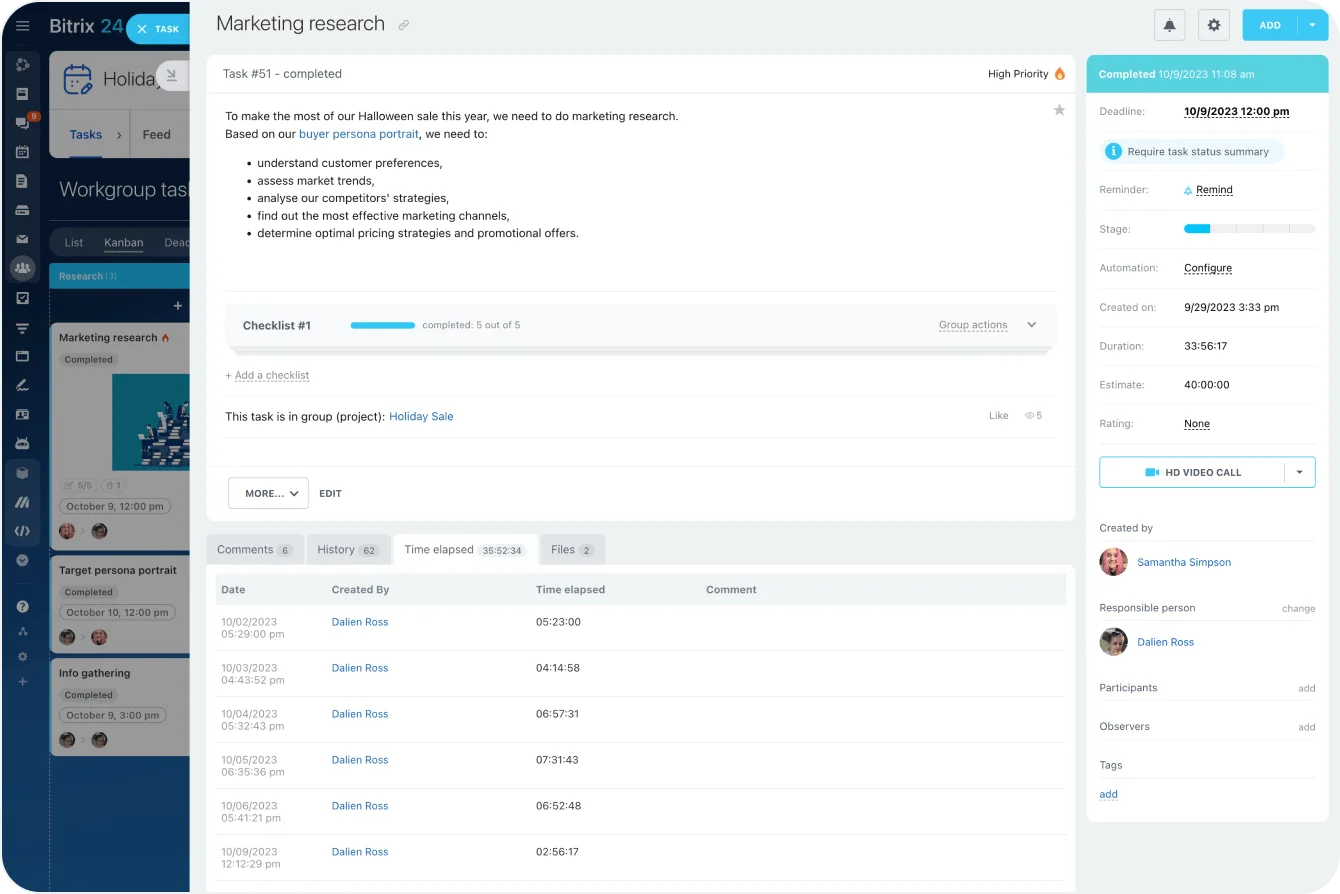
Capture time close to the work so reconstruction becomes the exception, not the system
Enter time long after the work and you're already in recovery mode. Make the default recording time close to task completion, not the Friday scramble or the night before invoices go out.
How long the trip takes is measurable. Clio's 2025 benchmark data puts the median law firm's realization lockup at 43 days: six weeks of revenue tied up in work that's done but not yet billed. Every one of those days gives an entry more time to go stale.
Set a minimum capture standard
Everyone needs to know when time is due and what a usable entry contains. At a minimum:
- Date
- Time spent
- Client
- Matter or project
- Task or activity type
- Billable status
- Raw description of the work
The routine stays simple: Discrete work gets logged as soon as the task ends. Someone bouncing between short activities does a daily closeout. Calendars, task histories, and email jog recall; mobile capture matters for anyone regularly away from a desk.
Example-in-action: Take a consultant who reviews a client model in the morning, takes a 30-minute call after lunch, then revises the recommendations. Logging each activity as it ends costs almost nothing. Rebuilding the same sequence on Friday means opening calendars, searching email, checking files, and guessing where one task ended and the next began.
Separate raw capture from invoice wording
Raw capture stays quick and factual:
Reviewed client markup on MSA; procurement call; revised indemnity clause.
The client-facing version gets cleaned up later:
Reviewed proposed MSA changes and revised indemnity provisions following procurement discussion.
The polished narrative comes from the source record, rather than replacing it.
This heads off a familiar trap: people put off entering time because they think every line has to read like it's ready for the client. So they forget details, merge unrelated work, or fall back on vague descriptions.
Pro tip: Run a five-minute end-of-day check instead of leaning on a weekly reminder. You want to catch gaps while the day's work is still easy to reconstruct.
Standardize categorization and narrative detail so entries survive review and client scrutiny
Captured time still needs structure. Without consistent coding, reviewers and billing staff read each entry and guess.
Standardize the fields first
Core categorization should cover:
- Client
- Matter or project
- Task or activity type
- Billable status
- Phase or workstream
- Any client-specific billing code
Every field earns its keep downstream. Client and project codes route the time. Activity codes feed reporting. Billable status decides whether the entry moves toward pricing. Phase tells a reviewer where the work sits in the engagement.
When Bitrix24 is part of the setup, its CRM and task records keep client context and delivery work in front of the people reviewing what happened. That doesn't replace billing or accounting controls. It cuts the context a reviewer has to dig out of separate systems.
Write descriptions for the next person in the chain
A reliable standard: action, subject, purpose or outcome.
Weak: Contract review.
Stronger: Reviewed supplier contract markup and revised payment terms for the negotiation response.
The second tells a reviewer what happened without making them open another record.
Repeat phrases like "attention to matter" or "work on project" do the opposite. They log that time passed without saying what got done.
Don't confuse detail with disclosure
Sensitive matters don't need privileged reasoning, confidential strategy, or internal back-and-forth spelled out just to make a description longer.
Explain the work well enough to justify the charge. Keep the sensitive reasoning out of client-facing text.
Know when to split an entry
A single block works when one person spends a continuous stretch on one coherent activity: drafting a motion, building a financial model.
Split when the entry lumps together materially different work:
- Client call
- Document review
- Internal meeting
- Research
- Revisions
Take an entry reading "4.2 hours, review/calls/revisions." A reviewer now has to work out whether all of it is billable, whether some activities need different treatment, and whether the client's billing rules even allow them. Structure it at capture and that investigation disappears.

Make approval and rate decisions explicit before hours reach draft invoices
Unapproved time is pending inventory. Approval settles the billing decisions before accounting starts building the invoice.
Give reviewers a fixed checklist
Check every entry for:
- Correct billable status
- Correct client and project coding
- Adequate description
- Compliance with client billing rules
- Budget or scope issues
- Appropriate rate
- Any required write-up or write-down
If a client won't pay for internal training, administrative follow-up, or duplicated attendance, the reviewer makes that call here. Wait until the draft invoice is circulating and you're making the same call fast, with worse information.
Put deadlines around review
Open-ended approval queues slip. A small team reviews time weekly; a firm with heavier billing volume needs daily checks as period-end approaches.
Set a pre-bill freeze date. Once it passes, late additions and changes go through an exception process instead of quietly rewriting the data accounting is already using.
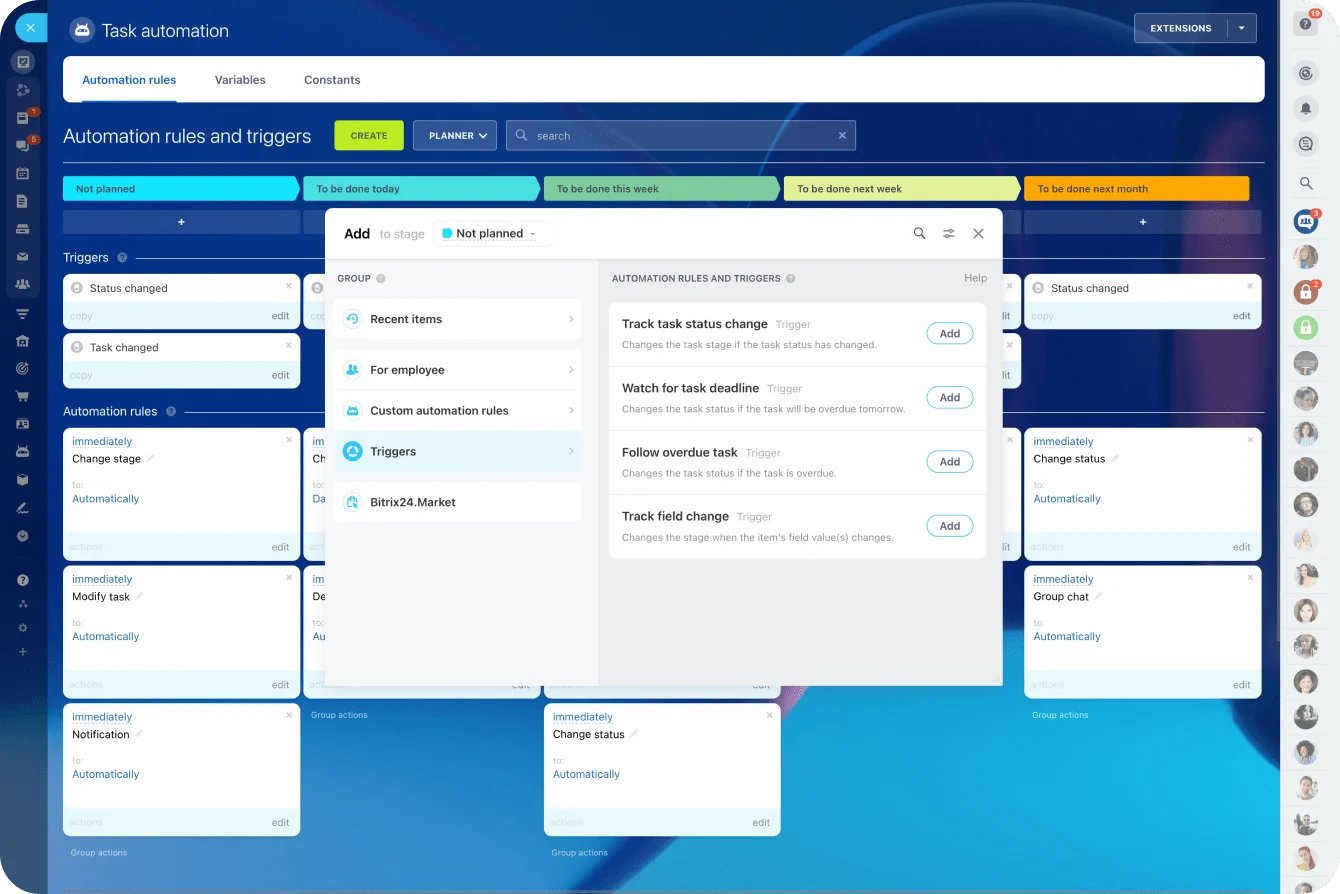
An approval queue can also run through Bitrix24 task automation. Rules and triggers create tasks, reassign work, move stages, and fire notifications when an entry hits a defined point, which routes a questionable entry back to the responsible manager without anyone chasing it by email.
Pro tip: Give every rejected or returned entry a reason code: missing detail, wrong matter, rate check, scope question. After a few billing cycles, the codes show you which part of the process is bleeding.
Control rate overrides
Pricing rules need to separate:
- Standard rates
- Client-specific negotiated rates
- Staff-level rates
- Matter-specific exceptions
- Fixed-fee or capped work
- Discounts
Limit overrides to defined roles, and record who changed the charge and why. A negotiated rate gets agreed over email, the billing system never catches up, and every invoice since goes out at the old number until the client's procurement team is the one who flags it.
A single small discount looks harmless. Repeat it without explanation and nobody can tell a deliberate commercial decision from a billing error.
Build invoice lines that clients can read quickly and accounting can defend later
By the time approved time reaches invoicing, the work is turning source entries into a bill the client understands without cutting the thread back to the underlying work.
A predictable share of worked value never makes it that far. It gets written down, buried in a description a reviewer couldn't defend, or dropped because the coding routed it to the wrong matter. The point of this stage is keeping everything that survived attached to the work that produced it.
Consolidate carefully
Some consolidation helps readability. Too much makes the bill impossible to explain later. Combine entries when they cover closely related work and the client's billing rules allow it. Don't combine when doing so buries different:
- Dates
- Timekeepers
- Work types
- Rates
- Matter phases
- Billing treatments
Accounting has to be able to answer one question at any time: which source entries make up this invoice line?
Keep the client-facing format consistent
Group related work by phase, workstream, or date sequence. Use plain language, not internal shorthand, and keep expenses separate from labor. Consistency also makes an odd charge easy to spot on the final review.
Validate administrative requirements before sending
Client disputes aren't always about the amount charged. A bill gets bounced because a required reference is missing.
On the client's side, that bounce is routine. Ardent Partners' 2025 benchmarks put the average accounts-payable team's invoice exception rate at 18.4% (or, as the report's author, Andrew Bartolini calls them, "the bane of AP's existence"). Your invoice is competing to be one of the ones that doesn't get flagged.
Check for:
- Purchase order numbers
- Matter references
- Billing codes
- Named contacts
- Submission formats
- Required descriptions or categories
Then run the final controls before it goes:
- Reconcile billed hours to approved hours.
- Confirm rates and discounts.
- Check client references and submission fields.
- Confirm invoice edits haven't broken the link to original time entries.
If wording needs changing, change it through a controlled process and keep the original description. Otherwise, the client sees one version and the internal record shows another.
Create a reconstruction protocol for late entries and a response path for invoice disputes
Late time happens. The mistake is handling every case off the cuff. A repeatable process recovers supportable hours without letting late entry become the way everyone works.
Reconstruct from evidence, not memory alone
Useful evidence:
- Calendar events
- Emails
- Call histories
- Meeting notes
- Task activity
- Documents
- Version histories
- File timestamps
Someone who realizes on Monday that Friday afternoon is missing shouldn't log "3 hours, client work" and move on. They check the client meeting on the calendar, the document revisions that followed, and the task activity tied to the work.
Bitrix24's task records help here, since time and task history stay attached to the assignment. Our calendar tools give another reference point for pinning down when a meeting or scheduled activity happened.
Treat reconstructed time as an exception
Reconstructed entries need to be identifiable as reconstructed.
Set rules for:
- How old an entry can be before extra review is required
- What evidence is acceptable
- When manager or partner approval is needed
- Whether unusually large backfilled entries need additional scrutiny
- How repeat late entries are reported
Pro tip: Track repeat exceptions by person and matter. Several reconstruction requests from the same workflow point to a capture problem you can fix upstream.
Route invoice disputes by cause
Start by naming the issue:
- Unclear description
- Rate challenge
- Possible duplicate
- Budget or scope overrun
- Non-billable objection
- Administrative mismatch
Then pull the supporting records and decide whether the answer is clarification, adjustment, or credit. Accounting may catch the query, but the responsible manager or partner usually has to validate the work and sign off on any financial change.
Feed the cause back into the workflow
Once it's resolved, use it to fix the process. Repeated questions about descriptions mean the narrative standard needs work. Rate disputes point at pricing controls. Administrative rejections mean the pre-send checklist is missing a field. That turns disputes into operational feedback instead of a string of one-off billing fires.
Track a small set of reliability metrics that show whether hours are making it through intact
You don't need a reporting stack to find billing leakage. A handful of operational measures show where the process slows down or loses value.
Track the metrics that point to a cause
- Time-entry lag (days between work performed and time recorded)
- Late or reconstructed time (share of entries created after the normal cutoff)
- Approval backlog (entries waiting for review)
- Write-down rate (value removed before invoicing)
- Invoice query rate (bills that draw client questions or disputes)
- Billing cycle time (days from period close to invoice sent)
Each one points somewhere. Entry lag flags weak capture habits. Approval backlog points to review capacity or unclear ownership. Write-downs can trace to poor scoping, weak descriptions, pricing problems, or all three at once.
Review weekly, diagnose monthly
A weekly manager or partner check catches missing time, pending approvals, and looming billing deadlines while they're still fixable.
The monthly review looks for repeat causes, not individual slips:
- Who consistently logs time late?
- Which matters generate the most write-downs?
- Where do approvals spend the longest time waiting?
- Which clients repeatedly question descriptions?
- Which billing requirements cause rejected invoices?
If late entries cluster around people working off-site, fix mobile or task-based capture. If one reviewer keeps holding the queue, change the route. If the same client keeps questioning descriptions, adjust the billing standard for that account.
Bitrix24's analytics and reporting tools support this kind of monitoring, where operational data already lives in the CRM or connected workflows.
Give every recurring problem an owner
The metric fixes nothing on its own. If time-entry lag rises, change the capture routine. If approval backlog grows, change reviewer capacity or routing. If invoice queries climb, inspect descriptions, pricing rules, and required client fields before the next cycle runs.
A metric nobody owns is just a more precise way of watching the money leave…
Keep every billable hour on track
Bitrix24 connects tasks, time tracking, CRM, approvals, and reports so teams reduce leakage and invoice with clearer records.
Get Started NowThe bottom line
Every stage between the timer and the invoice is a handoff, and every handoff is a place the record can lose its link to the work.
Firms don't lose billable time in one dramatic gap. They lose it in small, repeatable ones: the entry logged from memory, the code that routed time to the wrong matter, the discount nobody explained, the description rewritten until it no longer matches the source.
Left alone, those leaks are the difference between the work you did and the revenue you keep.
Takeaway: Give every handoff an owner and a deadline, and most leaks close before anyone has to reconstruct anything.