Customize Less, Document More: A Calmer Way to Configure Work Tools

More customization often starts with a reasonable request.
Sales wants one more CRM field. HR needs a different approval path. A project team asks for its own statuses, dashboard, and automation rules. Each change solves an immediate problem, so approving it feels like progress.
The cost appears later. Reports stop matching. Two teams use different names for the same stage. An automation breaks after someone removes a field they didn’t know it depended on. The administrator who built the workflow leaves, and nobody is willing to touch it.
That accumulated complexity is a form of operational debt. McKinsey estimates that technical debt can equal 20% to 40% of the value of an organization’s technology estate. Business platforms create a similar burden when temporary preferences become permanent system logic.
This article gives you a practical way to control that drag. You’ll learn how to separate useful configuration from costly customization, decide which requests deserve approval, document the exceptions you keep, and prevent today’s quick fix from becoming next year’s cleanup project.
What “Customize Less, Document More” actually means in business software environments
In practical terms, this approach means favoring standard product behavior and light configuration over deep custom changes, while documenting every meaningful exception.
The aim is practical: a system that other people can understand, support, and change safely.
Configuration vs. customization
|
Approach |
What it does |
Typical examples |
|---|---|---|
|
Standardization |
Reduces unnecessary variation |
Shared objects, common stages, standard roles, agreed process definitions |
|
Configuration |
Adapts the product within supported boundaries |
Fields, forms, permissions, views, templates, approval routes, basic automations |
|
Customization |
Introduces deeper or bespoke variation |
Scripts, custom objects, complex logic, bespoke integrations, heavily altered processes |
|
Documentation |
Makes necessary variation understandable |
Business purpose, owner, dependencies, reporting use, change history, review date |
“Customize less, document more” doesn’t mean refusing to adapt tools to real business needs. It means being selective.
If a change creates minor convenience but adds long-term support work, it probably isn’t worth it. If it supports compliance, a core operating model, or a genuine commercial requirement, it may justify the cost.
Future admins, users, and leaders still need to understand why it exists.
A practical example
A sales team tracking deals manually will often ask for extra pipeline fields because reps want more context. That may be valid.
But if every field becomes mandatory, reps start rushing entries, managers distrust the data, and reporting gets worse instead of better. The issue wasn’t the field. It was adding it without defining its purpose, owner, or reporting use.
The better question isn’t, “Can the platform do this?” It’s, “Should this become a permanent part of how our business system works?”
Pro tip: Before approving a new field, ask one practical question: “Who will make a decision from this data?” If the answer is unclear, the field is probably clutter.
Why this approach matters: Lower operational risk, faster onboarding, and more resilient systems
Software that stays closer to its default design is usually easier to live with. Support teams can troubleshoot faster because they’re working with known product patterns. Vendor updates are less disruptive because the environment has fewer custom dependencies.
Reporting is also more reliable because the underlying structures are more consistent.
It reduces everyday support friction
When a tool behaves in expected ways, less time is spent deciphering exceptions.
Teams don’t need to reverse-engineer why two departments use slightly different statuses for the same process. They don’t need to guess why a hidden field controls an automation nobody remembers building.
That matters in ordinary workflows:
- A sales operations manager updating pipeline stages
- An HR admin changing an approval path
- A finance lead checking why an expense report is missing data
- A project manager trying to compare workload across teams
The less mystery inside the system, the faster those people can do their jobs.
It protects the business from memory risk
Documentation turns tacit knowledge into organizational knowledge. Instead of a system living inside the head of one admin, consultant, or long-tenured manager, the logic becomes visible. That matters during onboarding, audits, internal transfers, system migrations, and plain old vacations.
This is where many teams feel the pain. A process works fine until the person who built it leaves. Then a simple change becomes risky because nobody knows what the original logic was supposed to do!
Example-in-action:
One operations team discovered this after its CRM administrator left. A lead-routing rule had been quietly excluding several postcode ranges for months, but nobody knew why. Sales assumed the missing leads were a marketing problem. Marketing blamed poor territory coverage. The rule was finally found when a new admin rebuilt the workflow and noticed that an old regional exception was still active.
The mistake wasn’t simply that someone had added a custom rule. It was that the rule had no visible owner, documented purpose, or review date. Once the original administrator left, the business lost the context needed to question it.

It lowers the true cost of ownership
Lower complexity usually means lower total cost of ownership, rather than simply fewer developer hours.
It also means:
- Fewer training costs
- Fewer accidental errors
- Fewer delays during change projects
- Fewer broken reports
- Fewer surprises during upgrades or integrations
Stripe’s Developer Coefficient research found that developers spent an average of 13.5 hours per week addressing technical debt and another 3.8 hours fixing bad code. Although the research focused on software development, the same cost pattern appears in business systems: every undocumented exception creates future work that someone must investigate, repair, or explain.
Resilience is the real payoff. A resilient software environment can absorb growth, staff turnover, process changes, and new business requirements without becoming brittle.
How the model works: Balancing configuration flexibility against documentation discipline
A useful way to run this model is to treat system design as a sequence of escalating choices.
Start with the default product behavior. Move to light configuration when there is a clear business reason. Use deep customization only when the value is material and difficult to achieve another way.
Start with the default
Defaults are fast, tested, and easier to maintain. They also help teams stay closer to the product’s intended structure.
That doesn’t mean defaults are always right. It means they should be the starting point, rather than the fallback after every department has requested its own version.
Move to light configuration when needed
Light configuration gives teams room to adapt without creating a completely separate operating model.
Common examples include:
- Adding a field with a clear reporting purpose
- Creating a role-based view
- Adjusting a form for a team’s workflow
- Setting up a basic approval route
- Creating a reusable task template
These changes are usually manageable when they’re documented and reviewed.
Raise the bar for deep customization
Deep customization can solve specific needs, but it brings cost, dependency, and long-term maintenance commitments.
It should be reserved for cases where the value is material and difficult to achieve another way. When the same outcome can be reached through standard settings, templates, or light automation, that is usually the safer path.
Match every change with documentation
Every layer of variation should have matching documentation. If a workflow changes, the documentation should explain:
- The business purpose
- The rule it supports
- The owner
- Any affected reports
- Any affected integrations
- The change history
- The review date
Otherwise, the system becomes readable only to insiders.
A simple configuration decision framework
|
Approach |
Typical examples |
Speed to deploy |
Cost |
Risk |
Maintainability |
|---|---|---|---|---|---|
|
Standard setup |
Default objects, workflows, roles, and vendor-recommended process design |
High |
Low |
Low |
High |
|
Light configuration |
Custom fields, views, approval settings, templates, and basic automations |
Medium to high |
Moderate |
Manageable if documented |
Good |
|
Deep customization |
Custom objects, scripts, bespoke integrations, and complex branching logic |
Low to medium |
High |
Higher dependency and upgrade risk |
Variable, and often weak without strong controls |
Deep customization has a place. It needs a higher bar, clearer ownership, and better documentation.
In Bitrix24 CRM, this might mean using the standard pipeline structure where it fits, then adding only the custom fields or automation rules that support a real sales process. If the team needs task management handoffs after a deal closes, connecting the CRM to a simple, documented task workflow may be safer than building a workaround outside the system.
Pro tip: Keep a short “configuration register” for every important tool. For each change, record the requester, business reason, owner, affected reports, and review date. It can live in a spreadsheet or knowledge base. The format matters less than whether people actually use it.
Core mechanisms behind sustainable configuration: Standards, governance, and visible system knowledge
Sustainable environments rely on a few quiet controls that stop casual changes from becoming permanent system debt without slowing every decision down.
Use consistent naming conventions
Naming conventions are one of the simplest controls.
When fields, workflows, groups, and reports follow a consistent structure, admins can understand the system faster. They’re also less likely to create near-duplicates that confuse users.
For example, a team may use:
- Lead Source - Original
- Lead Source - Latest
- Deal Owner - Region
- Approval - Finance - Vendor
- Approval - HR - Leave
That kind of structure isn’t glamorous, but it prevents confusion later.
Create approved configuration patterns
If every team designs forms, automations, and approval logic from scratch, the platform slowly fragments. With a few accepted ways to solve common problems, variation stays controlled.
That makes support easier and reporting cleaner.
Useful patterns might include:
- One standard way to request a new field
- One standard template for approval workflows
- One standard naming format for automations
- One standard owner field for reports
- One standard review cycle for critical processes
Use lightweight change review
Change review doesn’t need a heavy committee. Often, it’s enough to have a short checkpoint that asks:
- What business problem does this change solve?
- Does an existing pattern already handle it?
- Who owns it after launch?
- What else could it affect?
- How will users know the change exists?
- When should the change be reviewed again?
These questions stop casual customization from becoming permanent system debt.
Map ownership clearly
Every significant workflow, object, automation, or report should have a clear business owner and an administrative owner.
The business owner decides whether the process still makes sense. The admin owner understands how it works inside the system.
Without both, no one knows who can approve changes, retire old logic, or fix a broken dependency.
The problem often surfaces during an apparently routine request. A sales manager asks for an obsolete field to be removed, but the admin discovers that it feeds a regional dashboard and triggers an onboarding task after a deal closes. The person who built the automation left eight months ago. What looked like a five-minute cleanup becomes a week of messages, test records, and nervous approvals.
Document business logic, not just screenshots
Documentation is most valuable when it captures business logic, rather than merely recording screen layouts.
A screenshot shows where a field sits. It doesn’t explain:
- Why the field exists
- Who relies on it
- What report consumes it
- What automation uses it
- What would break if it disappeared
That deeper context is what makes a system usable over time.
Bitrix24 teams can use a shared knowledge base to document process rules, field definitions, approval paths, and ownership notes. That keeps system knowledge close to the work instead of burying it in chat threads or individual notebooks.
Visible system knowledge means giving teams one accessible place to find current rules, definitions, dependencies, and ownership without detective work.
Pro tip: Add “last reviewed” dates to process documentation. A perfect setup from two years ago may no longer match the business.
A few clear rules upstream can prevent years of reactive cleanup later.

Common misconceptions: When teams confuse flexibility with maturity
A lot of customization problems start with reasonable assumptions. The trouble is that those assumptions age badly.
“If the platform allows it, we should use it”
A common mistake is assuming that because a platform allows a change, the change is wise.
Modern business software is deliberately flexible. Vendors expose options because customers have different needs. Product capability, however, isn’t the same as good operating design.
A tool may allow ten pipeline variations. That doesn’t mean your business should create ten.
“We’ll document it later”
Another weak assumption is that documentation can wait until the system is “finished.”
Systems are rarely finished. They keep evolving. Undocumented customization doesn’t sit still as a harmless gap. It compounds risk every time a process changes, a person leaves, or a new integration gets added.
The best time to document a change is while the reason is still fresh.
“Our process is too unique to standardize”
Teams also tend to overrate how unique their process really is.
Local habits, departmental preferences, and historical quirks often get treated as essential business requirements. Companies then redesign tools around inherited behavior without asking whether the workflow itself should become simpler or more standard.
A regional sales team may genuinely need a different compliance step. It may not need a separate pipeline simply because it uses different internal language.
“Heavy customization means we’re advanced”
Some organizations see heavy customization as evidence of sophistication. A highly tailored platform can feel advanced.
In many cases, it indicates weak process discipline, loose governance, and too little willingness to adopt proven patterns.
Martin Fowler explains technical debt in terms of the extra effort required to make future changes: “The extra effort that it takes to add new features is the interest paid on the debt.”
In business software, that interest often appears as extra admin work, confusing reports, and slow change requests.
Flexibility is useful. Maturity is knowing when not to use it.
Real-world business use cases: Where limiting customization creates better outcomes
This approach works best in systems that many teams depend on. The more widely a tool is shared, the more damaging uncontrolled variation becomes.
CRM: Keep the core pipeline shared
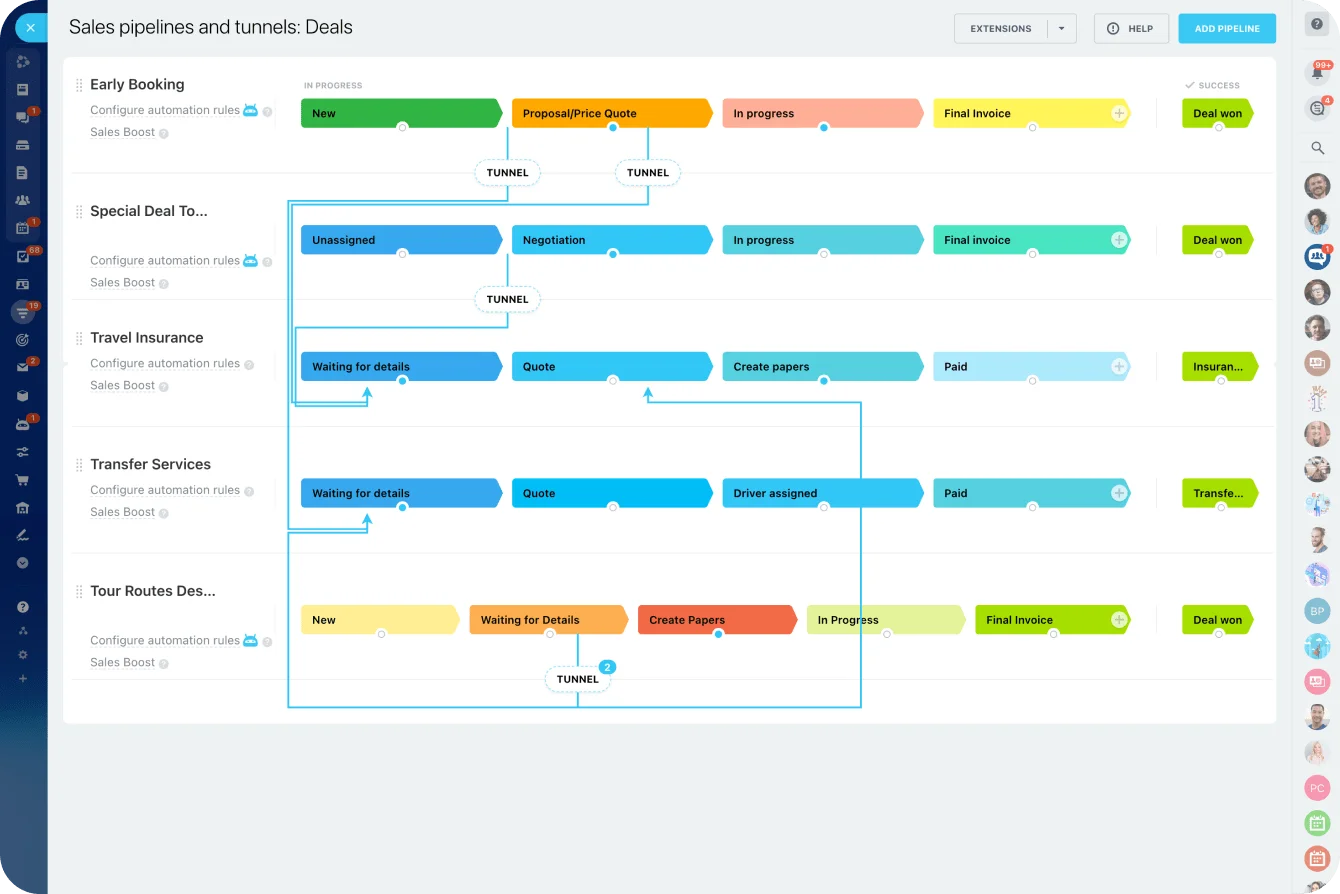
Sales teams often want unique pipeline stages, probability logic, lead-routing rules, and activity tracking by region, product, or manager preference. Some variation is legitimate. When every team gets a custom structure, however, forecasting becomes messy and handoffs break down.
Example-in-action:
At one company, regional sales teams had customized their pipelines so heavily that “closed won” meant something different in each office. One team used it when the contract was signed. Another used it when payment arrived. A third used it when implementation began.
The forecast looked precise, but finance, delivery, and leadership were all reading different versions of the truth. Deals appeared in revenue reports before payment was due, implementation teams received some handoffs late, and managers spent forecast meetings arguing about definitions instead of discussing the pipeline.
Companies usually do better by standardizing the core pipeline and documenting approved exceptions rather than embedding every local preference into the system.
In Bitrix24, that can mean keeping a shared sales pipeline management model, then documenting where regions or product lines are allowed to differ.
HR: Standardize policy before customizing forms
In HR platforms, pressure for bespoke forms and role-specific workflows can grow quickly.
One business unit wants a special onboarding path. Another wants custom leave logic. Another wants department-specific approval chains.
A documented standard process usually reduces that sprawl. The software stays easier to maintain, and policy interpretation becomes more consistent.
Finance: Document rules before building exceptions
Finance tools show a similar pattern.
Expense approvals, vendor onboarding, purchase requests, and entity-level controls often drift into fragmented setups when every stakeholder gets a custom path.
Clear documentation of policy rules can remove the perceived need for many system-level exceptions.
IT service: Keep request paths understandable
IT service environments are another strong fit.
Teams frequently build separate ticket categories, custom forms, and unique routing logic for every service group. Each addition may solve a legitimate request, but the service portal gradually becomes harder for employees to understand and for administrators to maintain.
Example-in-action:
One IT team eventually found that employees had stopped using the service portal altogether. Years of new categories, mandatory fields, and overlapping request forms had made it easier to message whichever technician happened to be online.
The reporting dashboard still showed falling ticket volume, which management initially interpreted as improved service. In reality, requests had moved into private chats, where they couldn’t be prioritized, measured, or handed over when someone was absent.
Shared standards with clearly documented service differences tend to work better. Employees get a request path they can understand, while the IT team retains the information needed for routing, workload planning, and reporting.
Project management: Let teams adapt without fragmenting the system
A marketing team may want campaign tasks. An operations team may want recurring checklists. A customer success team may want implementation milestones.
Those differences are valid, but the core structure should still be readable across teams. Bitrix24 project management tools can support shared task templates, ownership, deadlines, and status tracking without forcing every team to invent a separate operating model.
Scaling implications and limitations: Where this philosophy helps most, and where it has limits
As companies scale, every undocumented exception gets more expensive.
Support teams have more users to assist. Reporting requirements become broader. Integrations multiply. Compliance expectations rise. What was once a harmless workaround for a 20-person team can become a serious operational obstacle at 500 people.
Where the model helps most
This philosophy works especially well in shared operational systems, including:
- CRM
- HRIS
- ERP modules
- Service platforms
- Procurement tools
- Collaboration environments
- Project management systems
These systems benefit from clarity because many teams depend on the same data structures and process definitions.
The approach is especially valuable in multi-entity and fast-growing businesses. During acquisitions, office launches, or system handoffs, a heavily personalized setup is difficult to replicate or merge. Documented standards give teams a common operating baseline and make transitions easier to control.
Why connected tools need extra discipline
The model also matters when tools are connected.
A small CRM change can affect dashboards, marketing lists, customer service workflows, billing handoffs, or management reports. Documented ownership and change review become more important once teams connect systems through integrations.
A field that looks harmless inside one tool may be a required value in another. When nobody documents that dependency, the breakage may show up weeks later in a report, automation, or customer handoff.
Where customization still makes sense
The model has limits. Some areas genuinely justify heavier customization.
A company may need bespoke logic to:
- Meet regulatory requirements
- Support a complex product-configuration model
- Protect a workflow tied to commercial value
- Handle entity-specific controls
- Manage industry-specific approval rules
In those cases, standardization for its own sake would be the wrong choice.
The better principle is simple: differentiate where it matters and standardize where it doesn’t. When customization supports something strategically important or legally necessary, it may be worth the burden. That burden should still be acknowledged and managed.
Documentation keeps those exceptions from becoming blind spots. It distinguishes intentional strategic choices from accumulated drift, a distinction that becomes more valuable as the organization grows.
FAQs
When is customization worth it?
Customization is usually worth it when it supports a materially important requirement that can’t realistically be handled through standard product behavior.
Good examples include specific compliance rules, unique revenue operations, complex approval logic, or a workflow tied closely to how the company creates commercial value.
What if a legacy system is already deeply customized?
The immediate goal is usually visibility before simplification.
Teams need to map what exists, what is still used, what is duplicated, and what has no clear owner.
Every custom element doesn’t need to be removed, but every critical one should become understandable.
How much documentation is enough?
There should be enough for a competent new admin or cross-functional stakeholder to understand the business purpose, owner, dependencies, and likely impact of a change without relying on verbal history.
If the system still requires folklore to operate, the documentation isn’t enough.
What if teams resist standardization?
Resistance often comes from fear of losing local efficiency or control.
The practical response is to separate genuine business requirements from preferences, then show where simpler shared systems reduce delays, support work, and reporting confusion.
A good starting point is to standardize the core process while allowing documented exceptions at the edges.
How does this apply in mergers or acquisitions?
Standardization becomes especially valuable because combined organizations need common process language.
Even when systems can’t be unified immediately, documented definitions and ownership make integration planning far less chaotic.
What about regulated industries or highly technical departments?
They may need more customization than average, but that increases the need for disciplined documentation.
Specialized environments need clarity because the cost of misunderstanding is higher.
What if the vendor product is the real limitation?
That happens. Sometimes a platform forces awkward design choices.
Even then, documenting the constraint, workaround, and affected processes helps teams make cleaner decisions later, whether they reconfigure, integrate, or replace the tool.
Control customization without slowing teams
Bitrix24 unites CRM, tasks, automation, and knowledge bases so teams can adapt workflows while keeping ownership and logic visible.
Get Started NowMake the next change earn its place
The real cost of customization rarely appears when the change is approved. It appears months later, when a report stops matching, an automation fails, or a new administrator can’t work out why a field exists.
That doesn’t make customization a mistake. It means every exception needs to justify the maintenance, training, and dependency it creates.
The more people and systems that rely on it, the clearer its purpose and ownership need to be.
Bitrix24 brings CRM, tasks, automation, project management, and shared documentation into one workspace, making it easier to keep those dependencies visible as the business changes.
Sign up for Bitrix24 for free and build the flexibility your teams need without leaving the logic behind.