Bitrix24: The Key to Unlocking Greater Productivity for Small Teams

On Monday, a client change lands in chat. By Wednesday, delivery is still working from the old brief, sales assumes it was handled, and the founder discovers the mistake on the next client call.
This is how small-team productivity usually breaks down: not through a lack of effort, but through work being split across messages, project boards, calendars, files, and customer records.
Asana’s 2023 Anatomy of Work Global Index found that workers used an average of 10 apps per day and spent 62% of their time on repetitive, routine tasks. For a small team, that means more chasing, copying, checking, and rebuilding context instead of moving work forward.
Bitrix24 brings communication, tasks, CRM, calendars, files, and repeatable workflows into one shared space, helping teams reduce handoff gaps and see where work actually stands.
What Bitrix24 is: A centralized work hub for communication, projects, and process management
Bitrix24 is a business platform that combines internal messaging, project and task management, document sharing, calendars, CRM, and workflow automation.
It functions as a shared work hub rather than a single-purpose app. Teams can manage the discussion around a piece of work, the person responsible for it, the related customer information, and the next action in the same environment.
What this looks like in practice
Consider a service team handling a new client request.
The initial message can be connected to a task, assigned to an owner, given a deadline, and linked to the relevant customer record and files. The manager doesn’t have to reconstruct the history by checking chat, email, the CRM, and someone’s personal calendar.
The discussion, owner, supporting material, and next step remain connected.
Where Bitrix24 fits best
Bitrix24 is most useful when a team’s work crosses several areas:
- Internal communication.
- Project delivery.
- Customer management.
- Document handling.
- Scheduling.
- Recurring processes and approvals.
It may replace some tools, connect with others, or sit at the center of daily operations. The right setup depends on how often information needs to move between people, functions, and customer touchpoints.

Why Bitrix24 matters for small teams focused on output, speed, and accountability
Small teams operate with limited headcount, fluid roles, and fast decision cycles. That can make them responsive, but coordination failures become visible quickly.
The same person may be handling sales calls in the morning, client delivery in the afternoon, and invoicing before the end of the day. When work is split across several systems, people spend more time reconstructing its status.
A shared system of record gives the team one primary place to check current work, ownership, deadlines, and related information.
Without one, a routine question such as “Has the Acme proposal been updated?” can trigger three separate searches. Someone checks email, someone else searches chat, and a third person opens the shared drive. (And even after that, the team may still be unsure which version was approved!)
Clearer ownership
Bitrix24 can make responsibility more explicit. Tasks can be assigned, deadlines displayed, approvals tracked, and customer activity connected to internal execution.
Instead of relying on memory or repeated check-ins, the team can see:
- Who owns the task.
- When it is due.
- What stage it has reached.
- Which customer, file, or project it relates to.
- What needs to happen next.
That improves accountability without requiring a team lead to chase every update personally.
Faster decisions
Small-team work often depends on quick coordination across roles. Sales may need delivery input before making a promise. Marketing may need approval from the founder. Operations may be waiting for a client response.
When the supporting information sits in separate systems, each decision begins with a search for context. When the record, discussion, and next action stay connected, the team can make the decision from the work itself.
The productivity outcomes leaders care about are concrete:
- Better visibility into active work and bottlenecks.
- More reliable follow-through on customer and internal commitments.
- Less time spent chasing statuses and coordinating routine admin.
- Clearer accountability across a small, busy team.
Those gains come from making everyday coordination easier to see and harder to forget.
Pro Tip
Before adding a productivity platform, write down the five places where work currently gets lost.
Common examples include:
- After a sales call.
- After client approval.
- When someone is absent.
- After a support request.
- When a deadline changes.
Those are the workflows to fix first.
How Bitrix24 improves productivity across daily team operations
Bitrix24 connects conversations, tasks, files, schedules, and customer activity. This reduces the delay between someone mentioning an action and someone becoming responsible for completing it.
In a disconnected setup, a lead may arrive in the CRM, get discussed in chat, and then depend on someone manually creating a task and setting a reminder elsewhere. Every extra step creates another opportunity for the follow-up to disappear.
From discussion to action
A message can become a task. The resulting task can have an owner, a deadline, supporting files, and a link back to the original discussion.
A sales opportunity can also lead to an internal task, while automation rules can create notifications, tasks, documents, or other actions when work reaches a particular stage.
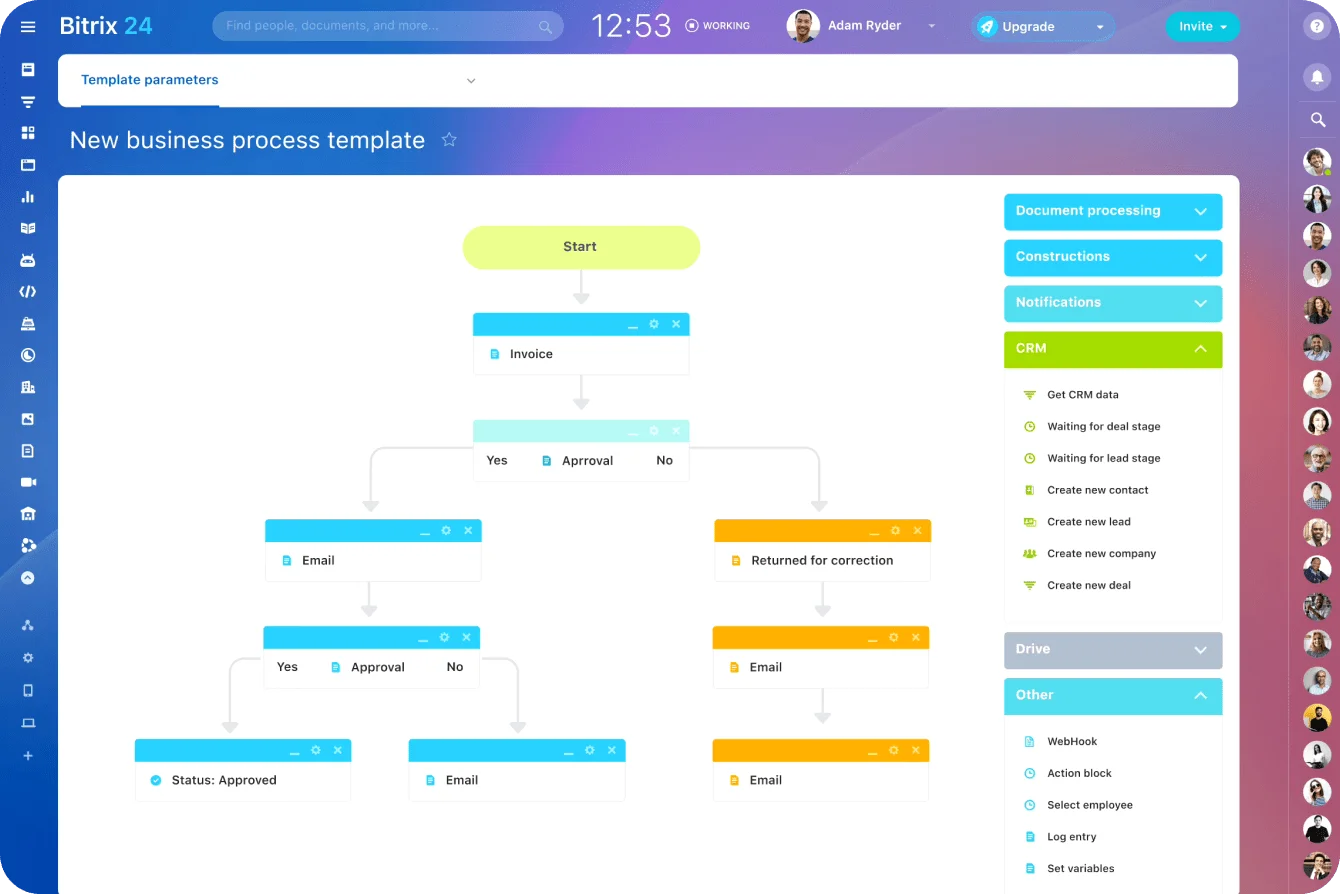
This is the practical difference between Bitrix24 and a disconnected collection of workplace tools. Separate tools require people to translate the work between systems. Connected workflows preserve the record, discussion, and next action in the same chain.
Fewer handoff errors
Handoff failures often follow a real conversation: a client call, a quick message, a team meeting, or a founder’s decision.
Everyone understands the decision in the moment. Then the call ends, the chat moves on, and nobody turns the decision into assigned work.
You usually discover the gap when someone asks, “Who was taking that?” and the room goes quiet. The account manager remembers discussing it, delivery remembers agreeing it was urgent, and the founder is sure someone wrote it down. Ten minutes later, people are searching the call notes, chat history, and their own notebooks for a decision everybody understood but nobody owned.
Keeping the task close to the original discussion reduces the chance that a detail will be reconstructed incorrectly several hours later.
Cleaner daily routines
A small business can use shared calendars for delivery dates, document management for proposals and current files, and task boards for daily execution.
The team doesn’t need to switch on every feature immediately. A useful first objective is much simpler: give everyone one reliable place to check before asking another person for an update.
Pro Tip
Start with one operating rule: if work needs follow-up, it must become a task.
Chat can remain the place for discussion. It shouldn’t become the final resting place for deadlines, client requests, approvals, or internal promises.
Core Bitrix24 features that drive collaboration and efficiency
Bitrix24’s value comes from how its features support different parts of the same workflow.
For a small team, the useful question is: what recurring team problem does each feature solve?
|
Feature |
Team problem it addresses |
Business impact |
Small teams that benefit most |
|---|---|---|---|
|
Chat, messaging, and video calls |
Scattered communication and slow issue resolution |
Faster coordination with less switching |
Hybrid, remote, founder-led, and client-service teams |
|
Tasks and project boards |
Unclear ownership and weak work tracking |
Better deadline control and accountability |
operations, and agency teams |
|
Shared calendars |
Missed deadlines and scheduling gaps |
Better visibility into timing and dependencies |
Cross-functional teams with frequent coordination |
|
Document collaboration |
Version confusion and file silos |
Less rework and easier access to current files |
Proposal-heavy, administrative, and operations teams |
|
CRM and workflow automation |
Missed follow-ups, recurring admin, and approval delays |
More reliable customer coordination and lower manual workload |
Sales, service, and process-heavy teams |
Communication tools
Team chat, messaging, and video calls improve communication speed. They are most useful when the answer also needs to connect to a task, customer record, meeting, or file.
The common mistake is treating messaging as the whole operating system. Chat is fast, but it is poor at long-term tracking.
A useful setup moves decisions out of the thread and into structured work.
Tasks, projects, and calendars
Task and project boards make ownership explicit, display status, and allow team leads to see whether work is moving without calling another status meeting.
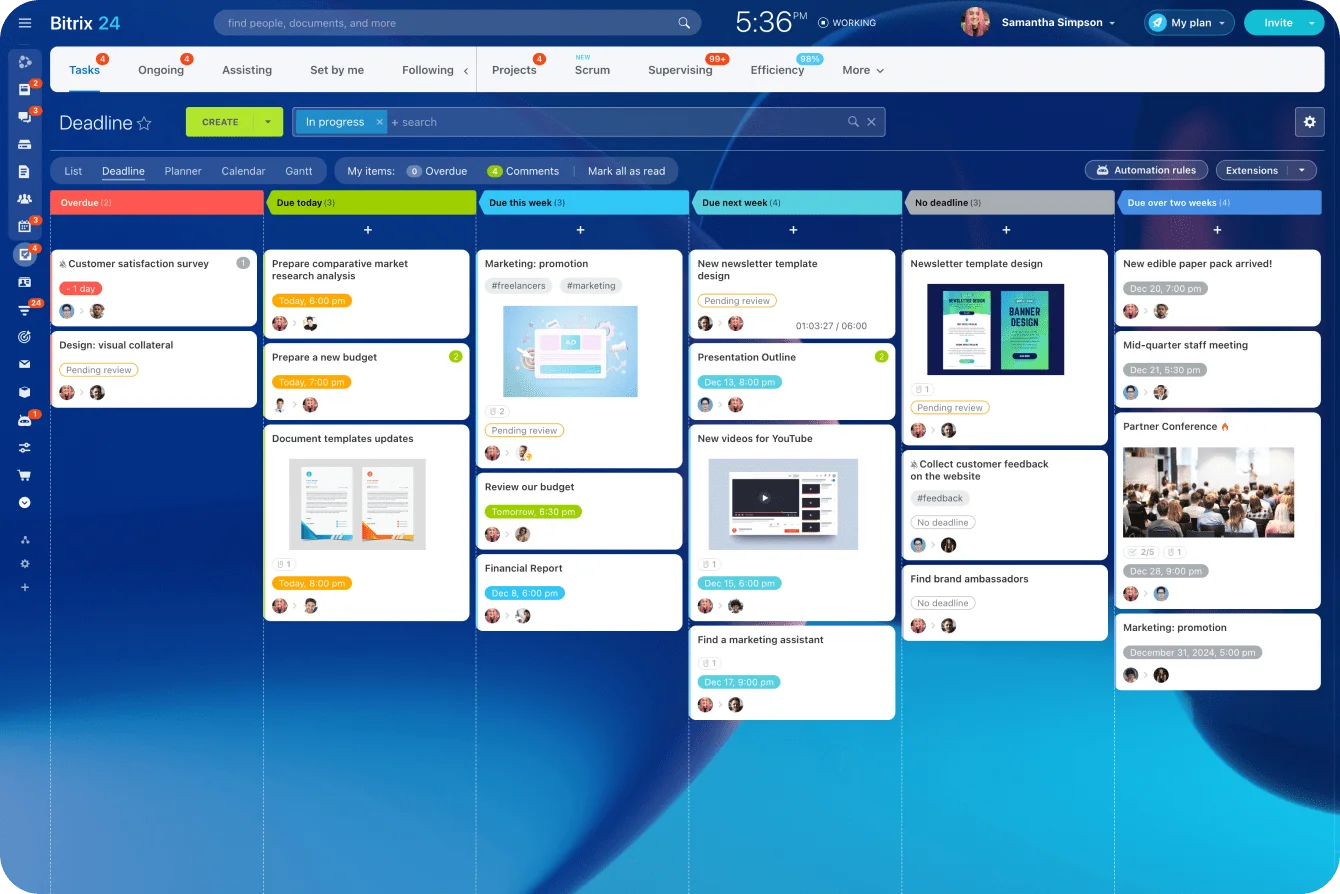
Calendars add timing and dependency visibility. A marketing team, for example, can coordinate copy deadlines, design review, approval meetings, launch dates, and follow-up work.
When that information is visible, meetings can focus on decisions and blockers rather than asking everyone to recite their task list.
Documents, CRM, and automation
Document collaboration reduces the time spent searching for the correct file or repairing work completed from an outdated version.
The CRM extends that visibility to customer interactions. Sales calls, contact history, follow-up activities, and internal delivery tasks can remain connected to the same customer relationship.
Workflow automation can then handle repeatable actions such as:
- Creating recurring tasks.
- Sending reminders.
- Routing approvals.
- Updating statuses.
- Assigning follow-up work.
- Notifying the right person when a process reaches a new stage.
For a small team, this is where routine admin can begin to fall meaningfully.
Pro Tip
Don’t automate a messy process on the first day.
Run it manually inside Bitrix24 for one or two cycles. Once the team agrees on owners, statuses, deadlines, and exceptions, automate the repeatable parts.
Common mistakes and misconceptions about using Bitrix24 for small-team productivity
One common misconception is that an all-in-one platform must be too complex for a small team. In practice, much of the complexity comes from the process being moved into it.
If ownership is unclear, naming is inconsistent, and handoffs happen differently each time, any platform will become difficult to use.
Bitrix24 can simplify coordination, but it won’t automatically repair a badly designed workflow. Teams that reproduce every existing habit without deciding what should be standardized often end up with cluttered boards, duplicate records, and weak adoption.
Mistake 1: Turning on too much too early
Small teams often overbuild the initial setup. They create too many task stages, custom fields, project spaces, and notifications before anyone has completed a full workflow.
A better first setup is usually smaller:
- One shared task structure for active work.
- One clear CRM flow for leads and customers.
- One file location for current documents.
- One rule for assigning owners and deadlines.
- One weekly review to clean up stalled work.
The aim is to make work easier to see, not harder to maintain.
Mistake 2: Letting notifications become noise
Because Bitrix24 connects several types of activity, teams can generate too many alerts, mentions, and reminders.
The first workaround is often surprisingly low-tech. Someone tells the team, “Tag me in chat if it’s genuinely urgent,” because they’ve stopped trusting the notification feed. Soon, approvals are being chased through private messages again, while the formal task still shows “waiting.” The platform remains full of activity, but the work that matters has moved back into side conversations.
The team should decide which events require immediate attention and which belong in a daily or weekly review.
Mistake 3: Creating tasks without ownership
Tasks lose value quickly when they have no clear assignee, outcome, or deadline.
A task called “Client stuff” tells the team almost nothing.
“Send revised proposal to Acme by Friday” defines the action, recipient, and timing. Add a responsible owner, and the rest of the team can immediately understand what should happen.
What Bitrix24 still needs from the team
Bitrix24 doesn’t replace management discipline. It can’t decide the team’s priorities, create accountability by itself, or determine which process should take precedence.
The team still has to decide:
- How work should be owned.
- What completion looks like.
- Which statuses matter.
- When records should be updated.
- Who is responsible for cleaning up stale work.
Bitrix24 becomes more useful once those decisions are explicit.

Real-world business use cases for Bitrix24 in small teams
Bitrix24 is most useful when responsibility moves between people, functions, or customer touchpoints. These transitions are where small teams often lose the context behind a task.
The following are typical operating failures rather than formal customer case studies.
Sales and client follow-up
A sales rep finishes a promising call and records a few notes in a document. They promise to send a revised proposal on Friday and put a reminder in their personal calendar.
On Thursday, the rep becomes unavailable. Nobody else can see the promise, the deadline, or the latest client requirements. The team discovers the missed follow-up when the prospect chases them on Monday.
With Bitrix24, the contact history, deal stage, call notes, follow-up task, deadline, and responsible person can remain together. The team lead can see what needs action without waiting for the original rep to return.
Marketing and campaign delivery
A four-person marketing team may handle strategy, copy, design, approvals, and scheduling across the same campaign.
The designer uploads “final-v3” to the shared drive. The founder approves a later change in chat, but the person scheduling the campaign uses “final-v2” because they never saw the message.
The mistake appears trivial until the wrong price, date, or offer reaches the audience.
Bitrix24 can keep the brief, files, deadlines, approvals, tasks, and campaign discussion connected. The main gain is fewer “Where is this?” and “Which version was approved?” interruptions.
Operations and recurring workflows
Recurring operational work often depends on one person remembering the process.
For example, a monthly supplier approval may require updated figures from finance, sign-off from the founder, and a final confirmation to the supplier. If the operations manager is absent, nobody is certain which step has been completed.
A shared workflow can define the sequence, owner, deadline, and required approval. Recurring tasks and automation can then recreate the process without someone rebuilding it from memory each month.
New client onboarding
Client onboarding exposes weak cross-functional handoffs quickly.
Sales closes the deal and sends a celebratory message. Delivery receives the client’s name but not the final scope. Finance has the price but not the billing date. The account manager assumes somebody else has scheduled the kickoff call.
The client experiences the result as hesitation and repetition. They are asked for information they have already provided, or they wait while the team reconstructs what was agreed.
In Bitrix24, the customer record, final scope, internal tasks, files, billing information, and kickoff schedule can remain connected.
For founders and team leads, the practical gains include:
- Fewer check-in meetings held solely to request updates.
- Faster handoffs between functions.
- Fewer missed deadlines.
- A clearer view of what the team is working on.
Scaling with Bitrix24: Operational impact, tradeoffs, and fit considerations
As a small team grows, informal processes become harder to sustain. Knowledge remains in people’s heads, handoffs become less reliable, and new hires struggle to understand how work moves.
Bitrix24 can help standardize recurring workflows and preserve the history behind tasks, customers, files, and decisions.
Repeatable processes become easier to maintain. Previous work is easier to reference. New employees can see how a task is handled instead of relying entirely on verbal explanations.
Microsoft’s 2023 Work Trend Index found that 64% of people struggled to find enough time and energy to do their jobs. Those workers were 3.5 times more likely to struggle with innovation and strategic thinking.
For a small team, that is the cost of coordination debt. Time spent finding information, chasing updates, and repairing handoffs comes directly from work that could move the business forward.
The tradeoffs
Centralization requires setup effort.
Someone has to decide:
- How projects should be named.
- Which workflows deserve automation.
- What customer and task data matters.
- How much structure the team will maintain.
- Which existing tools should remain.
A team that customizes everything before learning how people actually use the system can create another source of admin.
A better approach is to standardize the recurring work first, then add detail where a repeated problem justifies it.
Basic governance rules
Governance doesn’t need to mean heavy bureaucracy. Small teams still need basic operating rules:
- Where active work should live.
- How tasks are assigned.
- When CRM records are updated.
- Which notifications require attention.
- How completed work is closed.
- Who removes stale tasks and duplicate records.
Without those rules, the system slowly becomes less trustworthy. Once people stop trusting it, they return to personal notes and private messages.
Fit considerations
|
Bitrix24 may be a strong fit when… |
A lighter single-purpose stack may be enough when… |
|---|---|
|
Work spans sales, delivery, communication, and recurring internal processes |
The team only needs chat and basic task tracking |
|
Follow-through suffers because information is split across tools |
Processes are minimal and handoffs are rare |
|
Leadership needs better visibility without adding another manager |
The team is very small and coordination remains mostly verbal |
|
Recurring workflows and approvals create regular admin |
CRM and automation aren’t needed |
|
The business expects growth and needs repeatable operations |
Existing specialist tools are already connected and working well |
The fit question depends on the way work moves through the company.
When customer activity, internal delivery, communication, and recurring processes regularly intersect, Bitrix24 can remove several manual gaps. When the team’s needs remain narrow, a smaller toolset may be sufficient.
Bring small-team work into one clear hub
Bitrix24 connects chat, tasks, CRM, calendars, and files so teams reduce handoff gaps, track ownership, and move faster.
Get Started NowFrequently asked questions about Bitrix24 for small teams
Is Bitrix24 suitable for very small teams?
Yes, when even a small group is already experiencing coordination strain.
A three-person company handling sales, delivery, and administration may need more structure than a larger team completing one simple type of work. Workflow complexity matters as much as headcount.
Does it work for hybrid or remote teams?
Usually, yes. Teams that don’t share the same physical space benefit from keeping communication, task tracking, calendars, and files in one place.
The main requirement is consistency. Remote teams need shared habits around where work is assigned, where decisions are recorded, and how deadlines are tracked.
Is Bitrix24 only useful for sales teams because it includes a CRM?
No. Non-sales teams can use its project, communication, calendar, document, and workflow tools.
The CRM becomes particularly valuable when customer activity needs to connect with internal execution, such as onboarding, service delivery, account management, or support.
What about teams moving from spreadsheets and chat apps?
This is a common use case.
The biggest adjustment is moving from informal tracking to a shared system where ownership and status are explicit. That can initially feel more structured, but it reduces dependence on individual memory.
Spreadsheets can still support analysis and planning. They are less effective as a live operating system for tasks, customers, files, deadlines, and cross-functional handoffs.
How long does onboarding take?
It depends heavily on how clearly the team defines its core workflows.
A practical starting point is:
-
One CRM flow.
-
One shared task board.
-
One calendar rhythm.
-
One document structure.
Expand after the team uses those elements consistently.
Will feature overload become a problem?
It can if the team activates too much too early.
Use the parts tied directly to an active bottleneck. Ask which current workflow problem a feature will solve. When there is no clear answer, leave it switched off until the need appears.
How much process structure is needed to see value?
Some structure is necessary.
Teams need basic rules for task ownership, naming, deadlines, status updates, and information storage. The rules don’t need to be complicated. They need to be followed consistently enough for the system to remain trustworthy.
Fix the handoff that fails most often
Adding another app won’t repair a broken handoff.
Start with the moment where work most often disappears: after a sales call, after client approval, when a deadline changes, or when responsibility moves between teams.
Map the owner, the next action, the deadline, and the information they need. Then build that workflow in one shared system.
Sign up for Bitrix24 for free and fix one fragile handoff before it costs you another client, deadline, or working day.