The 25 Best Sales Enablement Apps
Sales enablement apps become worth evaluating when reps can’t find the latest content, new hires take too long to ramp, managers coach inconsistently, or leadership can’t see which activity helps deals move forward.
The right app fixes a defined operating problem, such as content governance, onboarding, coaching, buyer engagement, or workflow visibility.
The wrong one gives reps another platform to search, update, and eventually ignore.
Salesforce’s 2026 State of Sales report found that the average seller spends only 40% of their time selling. A useful enablement platform should give some of that time back, rather than add more searching, updating, and administration.
This guide compares 25 sales enablement apps, the operating problems they solve best, and the tradeoffs to consider before choosing one.
What to evaluate before switching sales enablement platforms
Before comparing vendors, inspect the process you’re trying to improve. Short, transactional deal cycles rarely need a heavy platform built around formal certification and approval workflows. Complex, multi-stakeholder sales motions usually need more than a lightweight content repository.
Teams also misdiagnose process problems as content problems. Reps may have plenty of assets but no clear way to find the right one, connect it to an active opportunity, or show managers where coaching is needed.
Start with the operating problem
Ask what is actually breaking:
- Are reps using outdated content?
- Are new hires slow because onboarding is informal?
- Are managers coaching inconsistently?
- Are buyer follow-ups scattered across email, documents, and CRM notes?
- Are leaders unable to connect enablement activity with pipeline movement?
- Are teams duplicating work across regions, product lines, or segments?
The answer changes the shortlist.
A content governance issue points toward Seismic, Highspot, Showpad, or Bigtincan. A readiness issue points toward Mindtickle, Allego, SalesHood, Brainshark, Seismic Learning, WorkRamp, or Second Nature. A buyer collaboration issue may point toward Dock, Trumpet, GetAccept, Paperflite, Mediafly, or Aligned.

Check integrations early
Most teams need CRM alignment, usually Salesforce or HubSpot, plus email, call recording, LMS, content storage, collaboration, or BI tools.
If integrations require heavy admin work to keep fields, permissions, content metadata, and reporting synchronized, total cost rises quickly. RevOps should be involved early, not after procurement has already picked a favorite demo.
In Bitrix24, enablement-related follow-up can sit closer to the customer record. A manager can create tasks related to clients directly from a CRM item, attach the required work to an active deal, and keep progress visible without asking reps to update several systems after every pipeline review.
Clarify ownership before rollout
Someone must govern taxonomy, archive outdated assets, maintain playbooks, define training paths, and monitor adoption. “Enablement owns it” is usually too vague.
A workable ownership model names who does each job:
- Marketing owns approved customer-facing content.
- Sales enablement owns playbooks, training paths, and coaching programs.
- RevOps owns CRM fields, reporting definitions, and workflow rules.
- Sales managers reinforce usage in one-to-ones, pipeline reviews, and onboarding check-ins.
Useful success metrics include:
- Rep adoption
- Onboarding completion
- Time-to-ramp
- Content usage in opportunities
- Coaching completion
- Connections between manager activity, productivity, and win-rate gains
Pro tip
Don’t migrate every old deck, script, PDF, and training recording into a new platform. Start with the assets used in active deals, onboarding, and the top three recurring objections. Archive the rest until someone can prove it still earns its place.
Judge pricing by total operating cost
Pricing should be judged by total operating cost, not base subscription cost. Lightweight knowledge tools may be inexpensive. Enterprise suites with analytics, buyer rooms, readiness, and governance can require services, admin capacity, and rollout investment.
Common operational problems with sales enablement tools as teams scale
Enablement rollouts often work at 20 people and degrade at 200. A manager can answer questions in Slack, marketing can point reps toward the latest deck, and someone usually remembers where the approved case study lives.
That informal system breaks once the company adds regions, product lines, partners, or compliance rules. Libraries fill with near-duplicates, local copies replace governed content, and coaching becomes detached from the deals it’s supposed to improve.
Content sprawl damages trust
Reps don’t need more content. They need the right content at the right moment.
When search results return five similar decks, three outdated battlecards, and a case study that no longer matches the current positioning, reps fall back on whatever they saved locally.
That creates a loop:
- The enablement platform becomes less trusted.
- Fewer reps use it during live selling.
- Usage data becomes less reliable.
- Marketing and enablement lose visibility into what helps deals.
- Leadership questions the value of the tool.
Controls such as localization, approvals, expiration dates, role-based access, and lifecycle ownership become necessary as teams grow.
Weak data quality leads to weak decisions
Some tools capture content activity without enough downstream performance context. Others capture buyer or coaching signals but require disciplined process design to make reporting reliable.
Leadership then risks making decisions about onboarding, messaging, and productivity from incomplete evidence.
For example, a content report may show that a competitor battlecard is heavily used. That doesn’t prove it helps deals move forward. It may mean reps are uncertain, the competitor appears often, or the sales process lacks better objection handling.
Category fit matters
Content-first platforms are strong at governance but may not make coaching measurable. Coaching-first platforms improve readiness but may not handle advanced content operations. Buyer engagement tools can improve deal collaboration, but they rarely replace formal onboarding or content lifecycle management.
Buying a strong product for the wrong bottleneck creates poor adoption.
Pro tip
Before buying, run a failed-search audit. Ask five reps to find the latest pricing deck, one objection-handling guide, one customer story, and one onboarding resource.
Watch what they do. The clicks, confusion, local files, and requests for help will tell you more than any vendor demo.
A practical framework for comparing sales enablement apps
Compare platforms across five operating areas. Most buying mistakes come from over-weighting one area and assuming the rest will work.
1. Content governance
Content governance includes taxonomy, approvals, version control, search, permissions, localization, and asset maintenance.
This matters most when marketing, product, legal, or regional teams influence what sales can say. It also matters in regulated industries where outdated claims, incorrect pricing, or old compliance language can create risk.
2. Seller workflow support
Seller workflow support measures whether reps can access recommendations, content, and guidance inside CRM, email, or meeting workflows without switching systems.
If reps must leave the opportunity record, open a separate platform, search manually, download an asset, and then return to CRM to log activity, adoption will suffer. The tool may technically work, but the workflow doesn’t.
Bitrix24 can help when teams want enablement work connected with deal execution. Reps can manage customer records in CRM, create related follow-up tasks, link calendar events to CRM records, and discuss work in shared tasks without repeatedly rebuilding the context.
3. Manager coaching
Manager coaching should be evaluated as an operating process, not a training library.
Some tools emphasize onboarding, assessment, practice, and certification. Others connect call review, peer learning, and field feedback.
A useful coaching workflow answers four questions:
- Who reviews performance?
- How often does coaching happen?
- Where is feedback stored?
- What follow-up action happens after feedback is given?
Salesforce’s 2026 report also found that 46% of Gen Z reps rarely get feedback on sales conversations and 47% don’t get enough roleplay before customer calls. That points to a practical gap: younger reps need practice, feedback, and reinforcement before live buyer conversations.
4. Buyer engagement tracking
Buyer engagement tracking matters most when prospect content consumption shapes follow-up and deal strategy.
In a multi-stakeholder deal, a proposal may be forwarded internally, a technical buyer may watch a demo, and a finance lead may only open the pricing page. Digital sales rooms and buyer engagement tools help reps see those signals and adjust follow-up.

5. Reporting depth
Reporting depth creates tradeoffs. Enterprise platforms can support richer analysis across content usage, rep behavior, and outcomes, but require cleaner administration.
Simpler tools may deliver faster time-to-value but hit limits when leadership wants standardized reporting across regions or roles.
The main tradeoffs are:
- Time-to-value versus configurability
- Usability versus control
- Consolidation versus best-of-breed performance
- Fast rollout versus long-term reporting discipline
Compare products by the execution problem you need to fix, not by demo breadth.
The main types of sales enablement apps and where they fit best
Sales enablement apps overlap, but most have a clear center of gravity.
Content-centric platforms
Content-centric platforms organize, govern, distribute, and track sales content.
They fit larger teams, product-heavy sales motions, regulated messaging, and organizations where marketing needs tighter control over what sellers use.
Coaching and readiness platforms
Coaching and readiness platforms support onboarding, practice, manager visibility, assessment, and skill development.
They’re useful when teams need to turn sales methodology, product knowledge, competitive positioning, and objection handling into repeatable behavior. They’re especially relevant when onboarding depends too heavily on shadowing calls or asking experienced reps for help.
Buyer engagement and sales room tools
Buyer engagement tools package content into buyer-facing experiences and track interaction.
They can help with proposal follow-up, mutual action plans, stakeholder education, and deal-room collaboration.
Gartner reported in 2026 that 67% of B2B buyers prefer a rep-free experience. That doesn’t mean reps are irrelevant, of course, but it does mean buyer-facing content has to carry more of the conversation when the seller isn’t in the room.
Knowledge and in-flow guidance tools
Knowledge and in-flow guidance tools help reps find answers and follow processes inside daily workflows.
They’re usually easier to roll out than full enablement suites, but they require discipline around verification, ownership, and the removal of outdated knowledge.
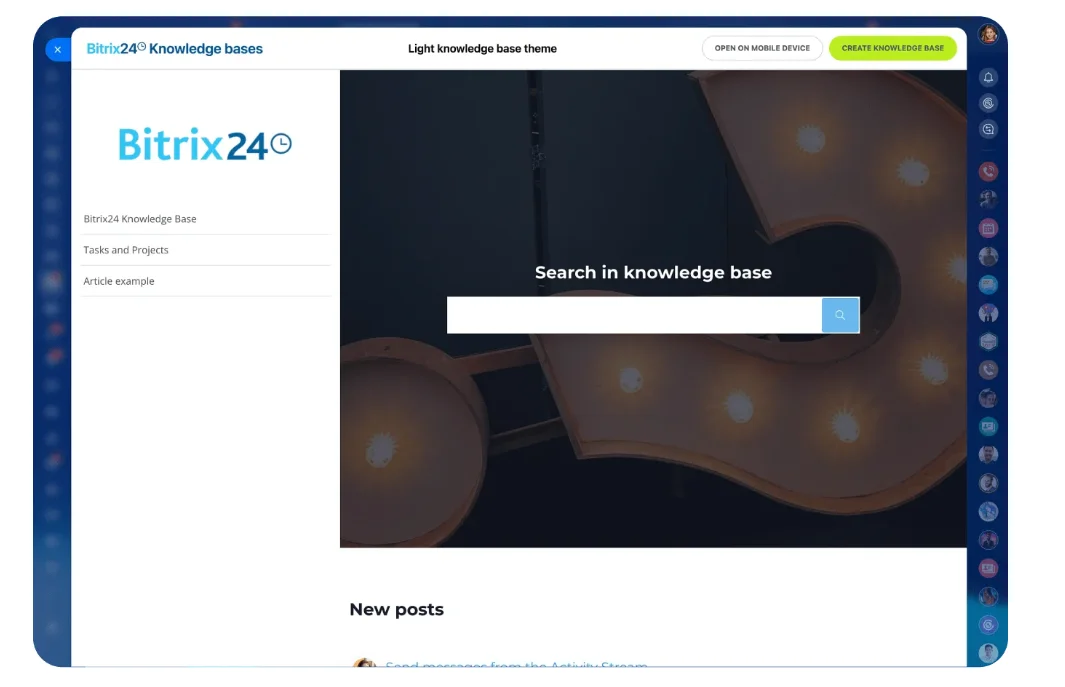
Bitrix24 Knowledge Bases can support this kind of internal enablement by storing instructions, training materials, playbooks, process notes, and FAQs in a structured internal resource.
Specialized enablement tools
Specialized enablement tools solve narrower problems such as demo automation, messaging governance, or interactive product education.
They can be useful when one workflow creates disproportionate friction, but they don’t replace a broad enablement system.
The categories aren’t interchangeable. A business governing thousands of assets across regions shouldn’t expect a coaching-first platform to solve that problem well. A team with weak onboarding shouldn’t buy a content platform and expect coaching discipline to appear automatically.
The 25 best sales enablement apps compared
|
Category |
Products |
Best fit |
Main limitation |
|---|---|---|---|
|
Enterprise content and suites |
Seismic, Highspot, Showpad, Bigtincan |
Governance, workflow standardization, analytics, global scale |
Higher admin and implementation effort |
|
Readiness and coaching |
Mindtickle, SalesHood, Allego, Seismic Learning, WorkRamp, Brainshark, Second Nature |
Onboarding, certification, practice, manager-led coaching |
May need other tools for advanced content operations |
|
Buyer engagement and sales rooms |
Mediafly, Paperflite, Dock, GetAccept, Trumpet, Aligned |
Content sharing, buyer collaboration, deal visibility |
Not full enablement backbones |
|
Knowledge and process guidance |
Guru, Spekit, Bloomfire, Trainual, Notion |
Fast access to answers, process documentation, lightweight rollout |
Limited sales-specific analytics and governance depth |
|
Specialized enablement |
Acrolinx, Walnut, Consensus |
Messaging governance, interactive demos, demo automation |
Narrower use case than broad suites |
Enterprise content and suite platforms
Seismic fits mid-market and enterprise teams needing large-scale content governance, CRM-connected workflows, and analytics. Its strength is control. Its caveat is implementation and administration complexity.
Highspot combines content management, seller guidance, training, and analytics with a strong rep experience. It suits growing and enterprise revenue organizations, but may be more platform than smaller teams need.
Showpad connects content delivery with learning and coaching. It fits product-rich, distributed, or field sales teams that want marketing-managed content and enablement-led training in one environment.
Bigtincan offers suite-level enablement across content, learning, and sales support. It fits organizations seeking consolidation, although experience and admin effort vary by deployment scope.
Mediafly is strong for buyer-facing presentations, interactive content, and engagement visibility in consultative sales motions. It may need supporting processes for coaching and readiness.
Readiness and coaching platforms
Mindtickle focuses on readiness, onboarding, assessments, coaching, and skill development. It is strongest when execution consistency and ramp performance matter more than asset governance.
SalesHood supports onboarding, manager-led learning, and playbook execution for SMB and mid-market teams. It is less suited to complex enterprise content operations.
Allego combines learning, coaching, mobile knowledge sharing, and peer collaboration. It fits distributed teams where manager feedback and field learning are central.
Seismic Learning (formerly Lessonly), WorkRamp, and Brainshark serve structured training, onboarding, certification, and readiness programs. They are strongest when learning discipline is the priority.
Second Nature uses AI role-play for sales practice and objection handling. It works best as part of a broader stack for teams that need scalable conversation practice.
Knowledge, buyer engagement, and specialized tools
Guru delivers verified knowledge inside daily workflows. It is strong for replacing scattered documents and chat-based tribal knowledge but does not replace a full enablement suite.
Spekit provides in-app guidance for CRM behavior, process consistency, and just-in-time learning. It is best when teams need workflow reinforcement without heavy change management.
Paperflite, Dock, GetAccept, Trumpet, and Aligned improve buyer-facing content delivery, digital sales rooms, mutual action plans, and buyer interaction visibility. They are useful for collaborative sales cycles but aren’t full coaching or governance systems.
Bloomfire, Trainual, and Notion help centralize knowledge and process documentation. They fit smaller or less mature teams but require manual structure and provide limited sales-specific analytics.
Acrolinx governs messaging consistency and brand compliance at enterprise scale. Walnut supports interactive product demos. Consensus automates demos and buyer education. Each solves a specialized enablement problem rather than the full operating model.
How sales enablement apps differ in workflow, automation, and daily use
The biggest daily-use difference is where the seller experiences the tool.
Strong workflow platforms surface content, plays, and guidance inside or near CRM, email, and meeting workflows. If reps must search in a separate system during live selling, adoption drops.
Workflow location matters
For a rep, enablement often means answering one practical question fast:
“What should I send, say, ask, or do next?”
If the tool answers that inside the deal workflow, it has a chance of becoming part of daily behavior. If it sits in a separate tab that reps visit only during onboarding, it becomes a library rather than a working system.
Automation varies by category
Some tools recommend follow-up content, create buyer-facing spaces, or prompt next steps by deal stage. Others guide internal behavior through in-app instructions or knowledge prompts.
Examples include:
- Spekit reinforcing workflow inside systems of record.
- Dock, Trumpet, and GetAccept shaping buyer-facing deal coordination.
- Bitrix24 using CRM automation rules and triggers to support follow-up tasks, deal movement, internal notifications, documents, approvals, and handoffs.
Coaching tools need cadence, not just content
Coaching workflows differ by operating model. Mindtickle, Allego, SalesHood, Brainshark, Seismic Learning, and Second Nature support learning, assessment, practice, peer sharing, and manager reinforcement in different ways.
A team with weak frontline coaching needs cadence support, not content access alone. That may mean:
- Weekly call reviews
- Monthly certification
- Objection-handling practice before a launch
- Deal-specific coaching after major stage losses
- Peer review sessions for new messaging
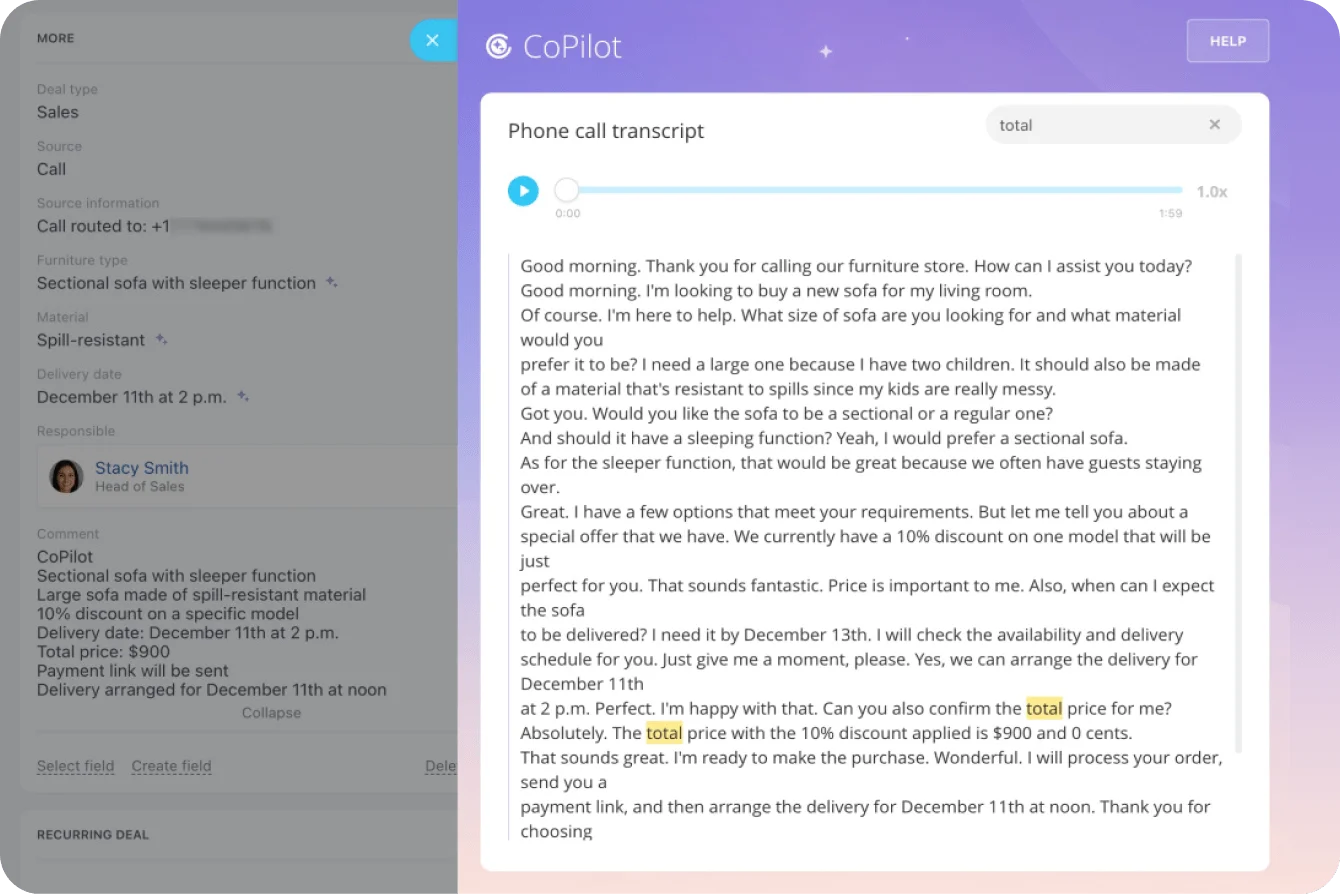
Bitrix24 can support the operational follow-through around coaching. Managers can create CRM-linked tasks and keep actions visible in shared task discussions. CoPilot in Tasks can draft task descriptions, generate checklists, and summarize comments, while CoPilot in CRM can transcribe calls, summarize conversations, and help complete CRM fields.
Analytics should be trusted by managers
Analytics depth is another dividing line. Some platforms connect content usage, buyer engagement, and opportunity outcomes. Others provide tactical reporting only.
The key question is whether business users can maintain and trust the data. If reps skip fields, managers coach outside the system, and content owners don’t tag assets properly, reporting becomes decorative.
Scenario recommendations include:
- Small teams prioritizing fast onboarding: Guru, Spekit, Trainual, or Notion.
- Growing teams standardizing coaching: SalesHood, Mindtickle, Allego, or Seismic Learning.
- Content-heavy mid-market or enterprise teams: Highspot, Seismic, Showpad, Mediafly, or Bigtincan.
- Teams prioritizing buyer collaboration: Dock, Trumpet, GetAccept, Paperflite, Mediafly, or Aligned.
- Enterprise teams seeking consolidation: Seismic, Highspot, Bigtincan, or Showpad.
Implementation, migration, and adoption considerations
Migration is less about moving files than redesigning operating structure.
Teams must clean up content, remove duplicates, define taxonomy, map metadata to roles and stages, set permissions, and decide which repositories will be retired.
Clean before you migrate
Projects slow when teams defer decisions about naming standards, ownership, approvals, and archive policies.
Without these rules, even a strong platform becomes another cluttered repository, especially across regions or business units. The problem follows the team into the new system.
A practical migration sequence looks like this:
- Identify the content used in current opportunities.
- Remove outdated, duplicate, or unsupported assets.
- Define naming rules and required metadata.
- Assign content owners.
- Set review and expiration dates.
- Connect assets to sales stages, personas, or use cases.
- Train managers before training reps.
Adoption risk is workflow risk
Reps abandon tools that add steps, require duplicate entry, or force separate searches during live selling.
Managers also need a clear role in coaching, onboarding, and reinforcement. Otherwise, the platform becomes an enablement-owned library rather than a field operating tool.
A common failure pattern is launching the tool with a training session and then expecting habits to change. Reps may attend, log in once, and return to old folders as soon as pipeline pressure takes over.
Roll out by workflow, not feature set
Smaller teams usually benefit from narrow rollout scope and quick wins tied to onboarding or frequently used content.
Large organizations often need phased deployment by region, role, or workflow, plus formal governance and change management.
Pro tip
Choose one workflow for the first rollout, such as new-rep onboarding, competitive deals, or proposal follow-up. Define what success looks like in that workflow before enabling extra modules.
Common mistakes when choosing a sales enablement App
The most common mistake is buying for headline features instead of the actual bottleneck.
Advanced analytics, AI recommendations, or suite breadth won’t fix poor findability, weak onboarding, or inconsistent coaching when those are the real problems.
Mistake 1: Buying the demo instead of the workflow
Vendor demos often show clean content libraries, perfect tagging, automated recommendations, and complete analytics.
Real teams usually have messy folders, inconsistent CRM usage, and uneven manager follow-through. A platform that looks impressive in a controlled demo may require more operating discipline than the team can realistically support.
Mistake 2: Assuming consolidation fixes execution
One platform can reduce tool sprawl, but only when it performs well in the workflows that matter most.
A broad suite that is weak in coaching may be worse than a focused coaching tool. A coaching tool that ignores content lifecycle management may frustrate marketing. A buyer room that doesn’t connect cleanly to CRM may create another reporting gap.
Mistake 3: Underestimating administration
Taxonomy, content hygiene, playbook maintenance, permissions, and reporting definitions determine whether reps trust the system and leaders trust the data.
If nobody owns maintenance, the tool gets worse every quarter. More content is added, old content stays live, and search quality declines.
Mistake 4: Overbuying or underbuying
Many teams overbuy for an imagined future state. Others underbuy for the current pain and then replace the platform a year later.
The better approach is to buy for the next stage of operational maturity. Choose a tool that solves the current bottleneck and can support the next level of process complexity without forcing a full rebuild.
Sales enablement apps FAQ
What is the difference between sales enablement, sales engagement, and conversation intelligence tools?
Sales enablement supports content, onboarding, coaching, guidance, and readiness. Sales engagement manages outbound sequences and follow-up. Conversation intelligence analyzes calls and meetings.
The categories often overlap, but the core job is different. Enablement helps reps execute better. Engagement helps reps contact prospects consistently. Conversation intelligence helps teams learn from calls and meetings.
Which sales enablement apps work best for small teams?
Guru, Spekit, Trainual, Notion, and Paperflite are often easier starting points because they improve access and consistency without heavy administration.
Bitrix24 can also fit small teams that want CRM, tasks, communication, calendars, automation, and shared knowledge in one place rather than buying separate tools for every workflow.
Which apps fit enterprise sales organizations?
Seismic, Highspot, Showpad, Bigtincan, and Mindtickle commonly fit enterprise needs for governance, analytics, permissions, readiness, and workflow standardization.
Enterprise teams should pay close attention to admin requirements, integration depth, localization, reporting definitions, and content lifecycle controls.
What works best for content-heavy sales motions?
Seismic, Highspot, Showpad, Mediafly, Bigtincan, and Paperflite are common options.
Choose based on governance depth, seller guidance, buyer engagement visibility, and whether marketing can maintain the content structure over time.
What works best for coaching-first teams?
Mindtickle, Allego, SalesHood, Brainshark, Seismic Learning, and Second Nature are strong candidates for onboarding, coaching, practice, and skill reinforcement.
The deciding factor should be how coaching happens in real life: manager-led review, structured certification, AI role-play, peer learning, or field feedback.
How much do sales enablement platforms typically cost?
Costs vary widely. Evaluate required modules, admin roles, integrations, services, and rollout scope rather than seat pricing alone.
A lower subscription cost can become expensive when the tool requires manual workarounds, duplicate reporting, or extra platforms to cover missing workflows.
Which CRM integrations matter most?
Salesforce and HubSpot usually matter most, followed by email, call recording, collaboration tools, and content storage.
For teams using Bitrix24 as their operating workspace, the bigger question is how enablement work connects to CRM records, tasks, internal communication, automation, and reporting routines.
When should a team replace multiple tools with a single platform?
Consolidate when fragmentation creates reporting gaps, duplicate administration, an inconsistent rep experience, or governance problems that process alone can’t solve.
Don’t consolidate purely to reduce the number of tools. Consolidate when the shared workflow becomes clearer, easier to maintain, and easier for reps to use.
Connect Sales Enablement to Every Deal
Bitrix24 brings CRM, tasks, knowledge, automation, and team communication together so reps follow up faster and managers stay aligned.
Get Started NowFinal takeaway: Test the workflow before choosing the platform
Don’t choose a sales enablement app from its feature list. Test one live workflow before committing: ask a rep to find the current pricing deck, share it from an active deal, record the follow-up, and let a manager assign the next coaching action.
The friction you observe will tell you more than the demo. You’ll see whether the real constraint is content governance, seller readiness, buyer collaboration, weak integrations, or the amount of administration required to keep the system useful.
How much selling time could your team recover if every follow-up, task, discussion, and customer record stayed connected?
Sign up for Bitrix24 for free and rebuild one broken sales workflow around a live deal today.