Spot Project Failure Before the Deadline Slips
Every project manager knows the feeling. It's Thursday afternoon, the delivery date is two weeks out, and someone walks into your office to say the launch needs to slip. Again. Nobody saw it coming, nobody raised a flag, and now three other teams are affected. The worst part? The signals were there weeks ago, buried in task comments, quiet Slack threads, and slightly shuffled milestone dates.
Projects rarely collapse on deadline day. They drift, quietly, for weeks before anyone notices. The point of modern project management software is not to rescue doomed projects at the last minute - it's to surface those early signals before they compound into a missed launch.
What Early Warning Signs Actually Mean in Project Management Software
Project management software (sometimes called PM tools or project tracking platforms) refers to digital systems that centralize tasks, timelines, ownership, and dependencies so teams can plan, execute, and monitor work in one place. Early warning signs are the small data points inside these systems - a task reassigned for the fourth time, a comment thread that went silent, a milestone pushed by three days twice in a row - that predict a missed deadline long before the deadline arrives.
This matters most for team leads, project managers, and department heads running parallel workstreams with shared resources. The signals become useful the moment a project has more than one owner, more than one deliverable, and a deadline anyone would lose sleep over. When teams act on these signs early, the expected outcome is straightforward: fewer last-minute crunches, fewer cross-team collisions, and delivery dates that hold up.
Here's a scene most managers will recognize. A marketing team is prepping a product launch. Week one, everything looks green on the dashboard. Week two, a copywriting task slides by a day. Week three, the designer quietly moves a milestone from Tuesday to Friday. Week four, the developer posts a comment asking for clarification, and nobody responds for three days. Week five, the project manager is explaining to leadership why the launch is delayed. Each individual slip was small. Together, they were the whole story.

Why the Deadline Is Only a Symptom
Treating the missed deadline as the problem is like treating a fever without diagnosing the infection. The deadline is the moment the drift becomes visible to everyone else. The drift itself started much earlier, somewhere inside the project's daily rhythms.
Good project management software gives you the instrumentation to catch drift at the source. Bad project management software gives you a fancy calendar. The difference shows up in how the tool handles task dependencies in project management, real-time project monitoring, and workload visibility across the team. A calendar tells you what should happen. An early-warning system tells you what is happening, right now, versus what was planned.
Most teams already have the data. They don't have a habit of reading it. That's the gap this article is about.
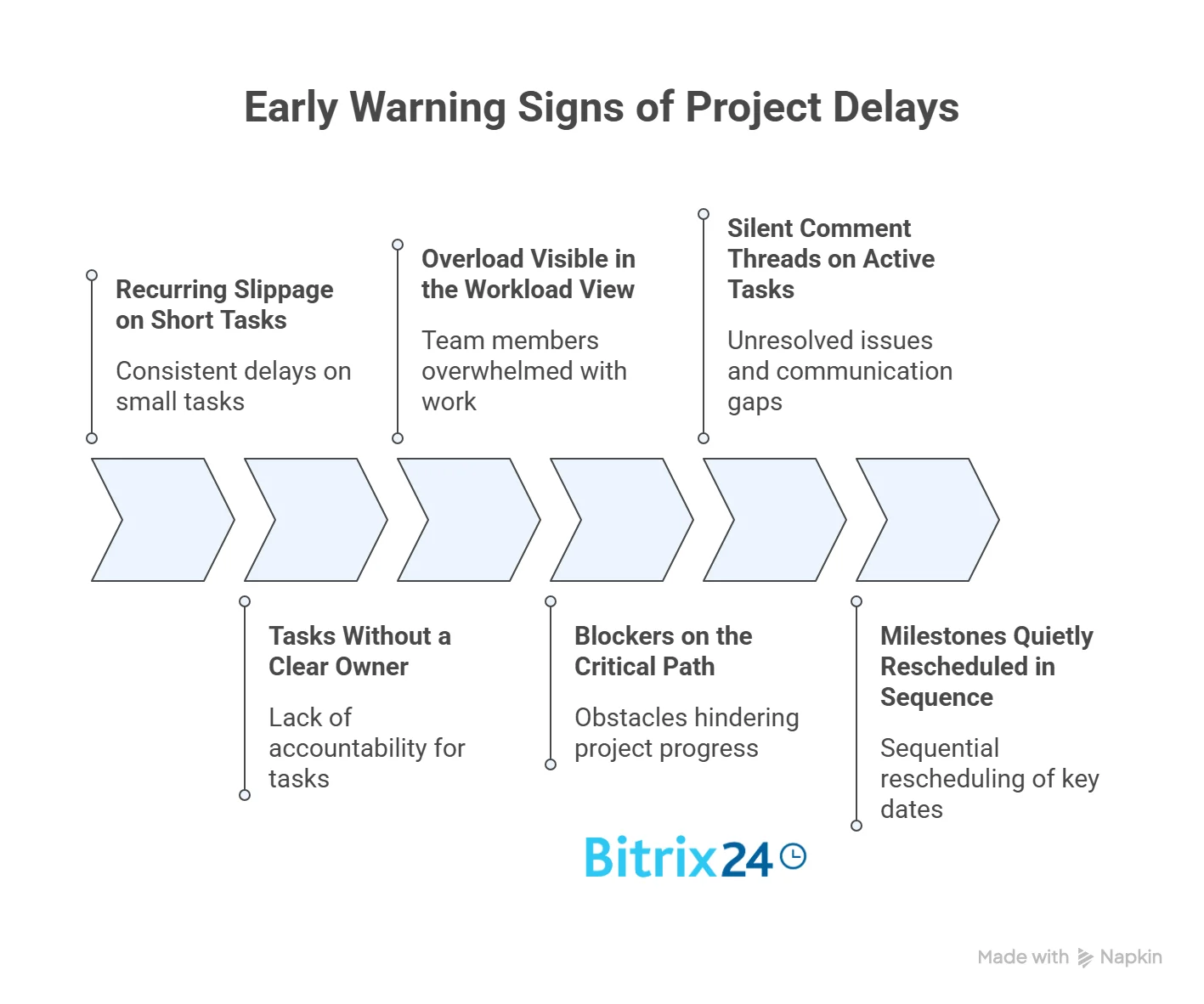
Six Early Warning Signs That Show Up Before a Project Misses Its Date
1. Recurring Slippage on Short Tasks
The first signal is almost always a small one. A two-hour task gets rescheduled. Then rescheduled again. Nobody flags it because it's small - but the repetition is the signal, not the size. When the same person slips the same task three times, something is off: unclear scope, a hidden blocker, competing priorities, or a task that should have been broken into subtasks.
The fix is diagnostic, not punitive. Look at the task history inside your project management software. Check the comment thread. Ask the assignee one direct question: "What's actually standing between this task and completion?" You'll usually get one of three answers - missing input from another person, a dependency that wasn't flagged, or a task that was scoped wrong from the start. What you're hunting for is the gap between the task history and the explanation: a task that's been rescheduled three times but has no comment explaining any of the three moves is almost always covering for a problem the assignee hasn't named out loud yet.
2. Tasks Without a Clear Owner
A task assigned to two people is assigned to nobody. This is one of the most common forms of project drift, and it tends to hide in software that allows multiple assignees without a single accountable owner. When both people assume the other is handling it, the task sits untouched until someone asks why it's late.
Run a weekly check. Filter your task list for any item without a single named owner, or any item where the "assigned" column has more than one person with no lead. Reassign to one person, make that person's name public on the task, and add a deadline counter so the task starts ticking visibly. Shared responsibility is fine for outcomes. Tasks need one name on them. The warning you're really looking for is a task that's been bounced between assignees without any of them posting a status update - that's the moment when ownership has genuinely collapsed, and the task is floating between people who each believe it's no longer theirs.
3. Overload Visible in the Workload View
A workload view for a project shows each team member's committed hours against their available capacity. When someone is booked at 130% for three weeks in a row, that's not a productivity concern - that's a prediction. Something on that person's plate will slip, and the project won't tell you which thing until it's already too late.
This is where task management in a project has to include capacity management. The workload view is the clearest leading indicator in most project management software. When you see sustained overload, two moves are available: reassign work to a lighter-loaded teammate or negotiate the deadline before it becomes a surprise. Both are easier to do in week two than in week five.
The trickier variant to spot is the underloaded-looking person who's actually overloaded outside the system - the developer helping three other teams through Slack DMs while their own task board looks calm. If someone's workload view reads light but their delivery is slipping, the overload is real; it's just not in the tool.
4. Blockers on the Critical Path
The critical path is the sequence of tasks that determines the project's earliest possible completion date. Any delay on a critical-path task delays the whole project. Any delay on a non-critical-path task does not. Most teams don't consistently know which is which - and that's where project risk management quietly breaks down.
If your project management software supports Gantt charts or dependency maps, mark the critical path explicitly. Then treat blockers on those tasks as a separate class of problem. A blocker on a non-critical task can wait a day. A blocker on the critical path gets escalated the same afternoon. The asymmetry is the point.
Critical-path blockers tend to cascade: one stalled task holds up the next three downstream, so the cost of ignoring a single blocker compounds across the timeline faster than most managers expect. A two-day delay on the right task can realistically push the delivery date by a week once dependent tasks start rescoping their schedules.
5. Silent Comment Threads on Active Tasks
This one is subtle. A task is open, the deadline is approaching, and the last comment was four days ago, asking a question nobody answered. The task isn't blocked in the software's eyes - no "blocked" status, no red flag - but it's blocked in reality.
Silent threads on active work are the clearest behavioral signal of drift. People ask for input when they need it. When nobody responds, progress stops, and the task quietly rolls forward on the timeline without work being done. The fix is a weekly scan for tasks with unanswered comments older than 48 hours. Most project management software lets you filter for this directly. It takes ten minutes. It prevents a week of silent slippage.
Patterns of silent threads also point to a team dynamic worth addressing: people who stop asking questions on the task and start pinging individuals privately are signaling that the public comment thread doesn't feel useful to them. Rebuilding the habit of answering in the tool is often more valuable than any specific fix to any specific task.
6. Milestones Quietly Rescheduled in Sequence
The sixth early warning sign is the one that embarrasses everyone the most after the fact. A milestone gets pushed three days. A week later, the next milestone slips by three days. A week after that, another milestone moves. Individually, each reschedule looks reasonable. Collectively, you've lost nine days on a project with four weeks of buffer.
Milestone planning in a project works only when reschedules are visible as a pattern. Your project management software should keep a changelog on dates - who moved what, when, and why. If it doesn't, rebuild milestone tracking somewhere that does. Project deadline tracking is not about the final date. It's about the pattern of small movements leading up to it. A useful rule for the weekly review: any milestone that has been rescheduled twice, for any reason, gets its next move reviewed by the project lead before it happens. That single gate catches most sequential drift because it forces the team to name what's actually changing, rather than quietly adjusting the calendar.
How to Set Up an Early-Warning System in Project Management
Knowing the six signs is step one. Building a team habit around detecting project drift is step two, and the harder one. Project management software will surface the data. Someone still has to look.
A rollout plan that works in most teams has four moves.
- Pick a weekly review slot. Thirty minutes, same day every week, project manager plus team leads. Review the six signs in order. Don't turn it into a status meeting - the point is to hunt for drift, not report progress.
- Build a saved filter or dashboard for each sign. Most project management software supports saved views. Set up one view for unowned tasks, one for overloaded people, one for silent comment threads, and one for rescheduled milestones. The review takes twenty minutes when the data is already filtered.
- Define an escalation threshold. Decide in advance what combination of signs triggers leadership involvement. Two signs in isolation are a team problem. Four signs overlapping on the same workstream are an executive problem.
- Document the fixes. When a sign appears and gets resolved, write down what worked. Over three months, you'll have a private playbook of your team's specific drift patterns and the remedies that work for your people.
Teams that do this for one quarter stop being surprised by missed deadlines. That's not hyperbole - it's what happens when you move from reactive to leading indicators.

Comparison Table: Project Management Software Views That Catch Each Early Warning Sign
Different views inside project management software catch different drift signals. Matching the view to the sign is how teams move faster during the weekly review.
|
View |
Catches Which Sign |
Best Used For |
|---|---|---|
|
Kanban board |
Tasks without clear owner, stalled columns |
Day-to-day flow, small teams |
|
Gantt chart |
Critical-path blockers, milestone rescheduling |
Projects with strong sequencing and cross-team dependencies |
|
Workload view |
Overloaded team members, hidden capacity issues |
Resource planning, cross-project staffing |
|
Task list with filters |
Silent comment threads, recurring slippage |
Weekly review, manager-led drift hunts |
|
Calendar view |
Deadline clustering, sequential milestone drift |
Client-facing timelines, launch planning |
|
Dashboard with deadline counters |
Overall project health at a glance |
Leadership check-ins, monthly reviews |
No single view catches everything. The weekly review should rotate through at least three of these, depending on the project phase.
When Early-Warning Systems Fail to Turn Signals Into Action
An early-warning system is not a substitute for judgment. Three mistakes show up regularly when teams first roll this out.
- The first is overreacting to a single sign. One rescheduled task is not drift. Three overlapping signs mean drift. Teams that escalate every small slip burn through their leadership bandwidth within a month.
- The second is letting the software become the work. Filling in task comments, updating statuses, and rescheduling milestones can itself eat into delivery time. The rule: if updating the tool takes more than 10% of someone's day, the process is too heavy. Simplify.
- The third is treating this as purely diagnostic. Catching drift is useful only if there's a standing habit of acting on it. Real project delay prevention comes from the follow-through, not the detection. A project that identifies four warning signs and takes no action is worse off than one that missed them entirely, because now leadership has documented evidence that problems were visible and ignored.
Early warning signs also look different in agile projects versus traditional waterfall setups. In agile work, sprint velocity replaces milestone drift as a leading indicator, and retrospective comments replace silent comment threads. The underlying principle holds - small, repeated signals predict bigger problems - but the specific signals change with the methodology.
Catch Project Drift Early with Bitrix24
The six warning signs covered above only help if your project management software surfaces them quickly and cheaply. That's where Bitrix24 earns its place in the stack.
Bitrix24's workload view shows every team member's committed hours against available capacity across all active projects, so sustained overload gets visible in week one, not week five. Built-in deadline counters tick down on every task and milestone, making sequential reschedules obvious at a glance in the dashboard. Task dependencies in project management are mapped through Gantt charts that mark the critical path explicitly, so blockers on high-impact tasks get flagged before they spread. Saved filters for unowned tasks and silent comment threads turn the weekly drift review from a thirty-minute discussion into a ten-minute scan.
Automation rules can trigger alerts, reassignment, or escalation the moment a task slips or goes inactive, so issues don’t sit waiting to be noticed. AI-assisted insights can surface patterns across tasks and projects faster, especially in larger teams, but the underlying signals remain the same.
Comments, messages, and updates live inside the same task record, reducing the risk of decisions being made outside the system.
Because tasks, communication, workload, and reporting live in one platform, early warning signals don’t get fragmented across multiple tools.
The platform also handles project risk management alongside task execution, which matters because drift signals are most useful when they live next to the work itself - not in a separate reporting tool that no one opens.
Sign up for Bitrix24 and start catching project drift before it turns into missed deadlines, escalations, and last-minute rework.
Catch Project Drift Early
With Bitrix24's project management features, you no longer have to worry about unseen problems. Identify early warning signs & navigate your success path.
Learn MoreFAQs
Which features in project management software with early warning signs surface drift the earliest?
Features in project management software that surface drift earliest are workload views, deadline counters, saved filters for unowned or stalled tasks, Gantt charts with critical-path marking, and comment-age reports. Workload overload and silent comment threads tend to be the two earliest signals, often visible a full week or two before milestone slippage becomes obvious.
How do you tell whether the problem is priority, timeline, or ownership in project management software?
To tell whether the problem is priority, timeline, or ownership in project management software, ask one direct question of the task assignee: What is standing between this task and being done? A priority issue sounds like "I'm working on something else first." A timeline issue sounds like "the scope is bigger than we estimated." An ownership issue sounds like "I thought someone else had this." The answer points you straight to the fix.
Can project management software with early warning signs automatically unblock stalled work?
Project management software with early warning signs cannot automatically unblock stalled work, but it can surface the block immediately so a human can act. Automation helps with notifications, escalation triggers, and reassignment workflows. The unblocking decision itself almost always requires human judgment about priority, capacity, or scope.
Which metrics show real improvement in project management software with early warning signs?
Metrics that show real improvement in project management software with early warning signs are on-time delivery rate, average days between a drift signal appearing and being addressed, number of escalations reaching leadership per quarter, and team members reporting fewer last-minute deadline crunches. The leading metric is usually the second one - response time to a drift signal.
At which combination of warning signs should project leadership step in?
Project leadership should step in when three or more warning signs overlap on the same workstream, or when a single sign on the critical path goes unaddressed for more than a week. Two unrelated signs across different projects is a team-level issue. Overlapping signs on the critical path is a leadership-level issue because the delivery date is genuinely at risk.
Do early warning signs look different in agile projects versus traditional projects?
Early warning signs do look different in agile projects versus traditional projects. Agile teams watch for drops in sprint velocity, rising backlog carryover, and silent retrospective participation as leading indicators. Traditional projects watch milestone rescheduling, critical-path blockers, and Gantt chart drift. The underlying pattern - small repeated signals predicting bigger problems - stays the same across both methodologies.