Overcoming Common SMB Challenges with Bitrix24

Short answer: SMB operations usually break down because the business keeps adding customers, people, tasks, and tools without adding a shared way to manage the work. The drag shows up in missed follow-ups, slow approvals, unclear ownership, scattered customer context, and revenue leakage.
Early on, simple tools make sense, of course. A spreadsheet tracks leads. Chat handles quick updates. Email stores customer conversations. A few point apps fill obvious gaps.
The problem starts when those separate systems have to support cross-team work. Sales promises need to reach delivery. Support issues affect renewals. Managers need reliable updates across projects and pipelines. Coordination becomes the constraint.
What Bitrix24 means for SMBs: A unified work and customer management platform
In plain business terms, Bitrix24 is a single platform for managing internal work and customer-facing processes. It combines CRM, task and project management tools, internal communication, document collaboration, workflow automation, and customer interaction tools.
For SMBs evaluating Bitrix24 as all-in-one business software, the key point is connection. Customer records, conversations, tasks, approvals, and updates can sit in the same working environment instead of being split across apps that depend on manual handoffs.
Separate apps vs. a connected work system
Separate apps can each perform their own function well. The problem is what happens between them.
A sales team tracking deals in one CRM, proposals in shared drives, delivery tasks in a project app, and follow-up notes in email will often spend more time reconciling information than moving the work forward. Someone has to remember to update the next system. Someone has to tell the next person what changed. Someone has to check whether the update was received.
A unified platform reduces those gaps by keeping teams, data, and recurring processes connected. For an SMB, the practical value is simpler: fewer updates have to be copied, forwarded, or reconstructed before the next person can act.
Pro tip
Before moving into an all-in-one platform, map three workflows first: lead capture to follow-up, customer issue to resolution, and internal request to approval. These usually reveal the biggest friction points.
Why Bitrix24 matters for small and medium-sized businesses
For SMBs, the value of a unified platform is less about convenience and more about operating control. When sales, tasks, communications, and customer records are linked, businesses can reduce handoff delays, improve visibility, limit software sprawl, and create more consistent customer experiences.
SMBs have less room for broken handoffs
In an enterprise, inefficiency can sometimes be absorbed by layers of management, larger teams, or dedicated operations staff. In an SMB, one person often plays multiple roles.
For example:
- The sales manager may also run account reviews.
- The operations lead may handle approvals, reporting, and vendor coordination.
- The founder may still check customer escalations directly.
- A project manager may also manage client communication.
There’s less slack in the system. When a workflow breaks, the cost is immediate. A missed message can become a missed deal. Poor task visibility can delay delivery. Weak reporting can hide a pipeline problem until cash flow feels the impact.
Fragmented work also consumes time that should go to customers and delivery.
Asana’s Anatomy of Work Index reports that knowledge workers spend 60% of their time on “work about work,” including chasing updates, attending unnecessary meetings, and switching between tools. Salesforce’s sixth State of Sales report found that sales reps spend only 30% of their time selling.
For a growing SMB, every extra handoff makes that imbalance worse.
What improves when work is connected
Bitrix24 matters because it can make those moving parts easier to control without forcing the company to maintain a wide stack of disconnected tools. The benefit is clearer execution, lower admin overhead, and fewer missed handoffs.
|
Area |
Disconnected tool stack |
Integrated SMB platform |
|---|---|---|
|
Cost control |
Multiple subscriptions, overlapping features, and hidden admin time |
Broader consolidation and a clearer software footprint |
|
Speed |
Frequent switching between apps and manual follow-up |
Shared workflows and faster movement from one stage to the next |
|
Accountability |
Ownership often buried in email or chat threads |
Tasks, records, and statuses tied to named owners |
|
Reporting |
Data spread across systems and assembled manually |
More centralized visibility into work and customer activity |
|
Scalability |
Complexity increases with every new tool and integration |
Growth supported through standard workflows in one environment |
How Bitrix24 helps solve common SMB challenges
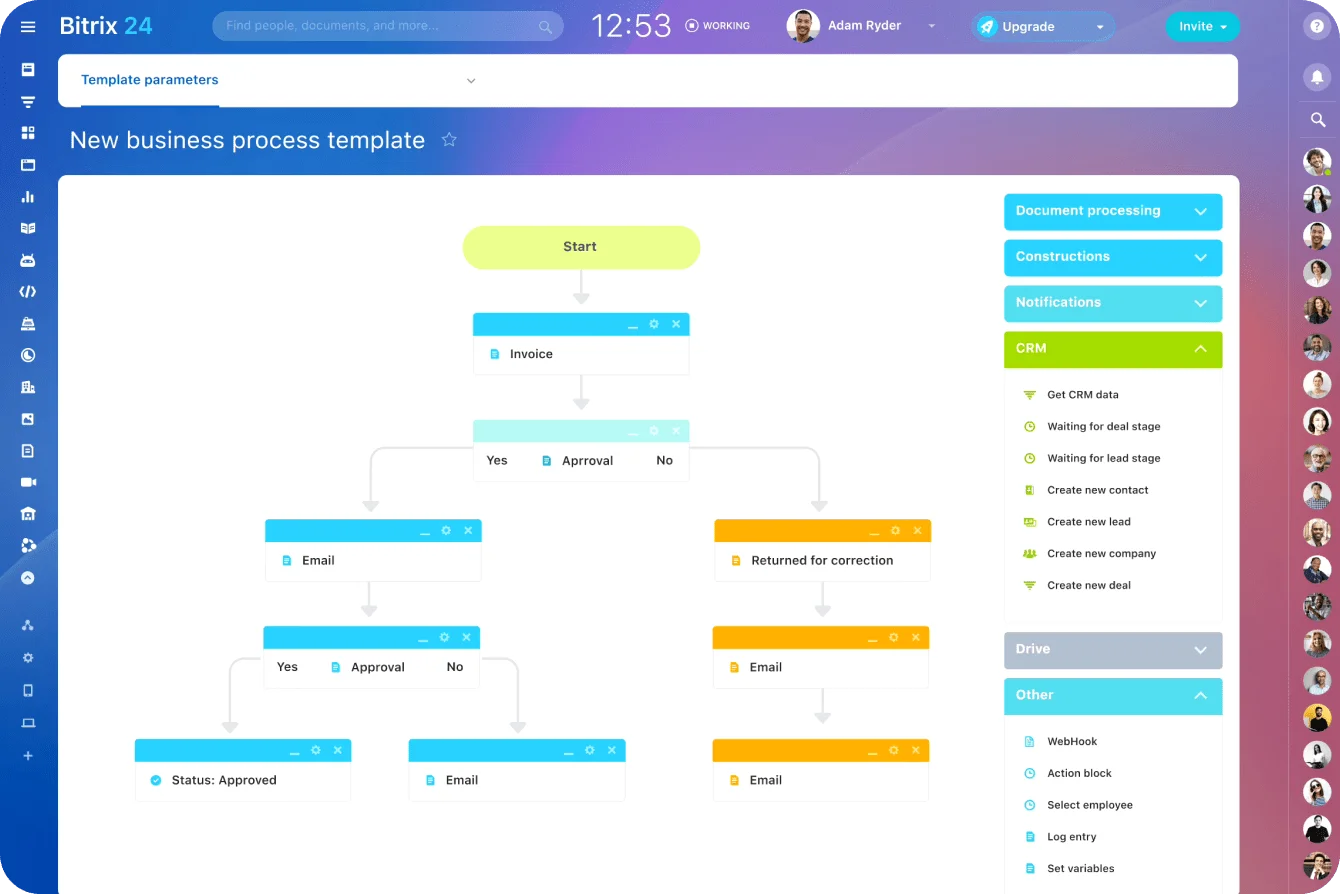
The core operating logic is simple: information enters once, becomes available across the system, and can trigger the next action automatically. That is where much of the efficiency comes from.
Example: Lead capture to follow-up
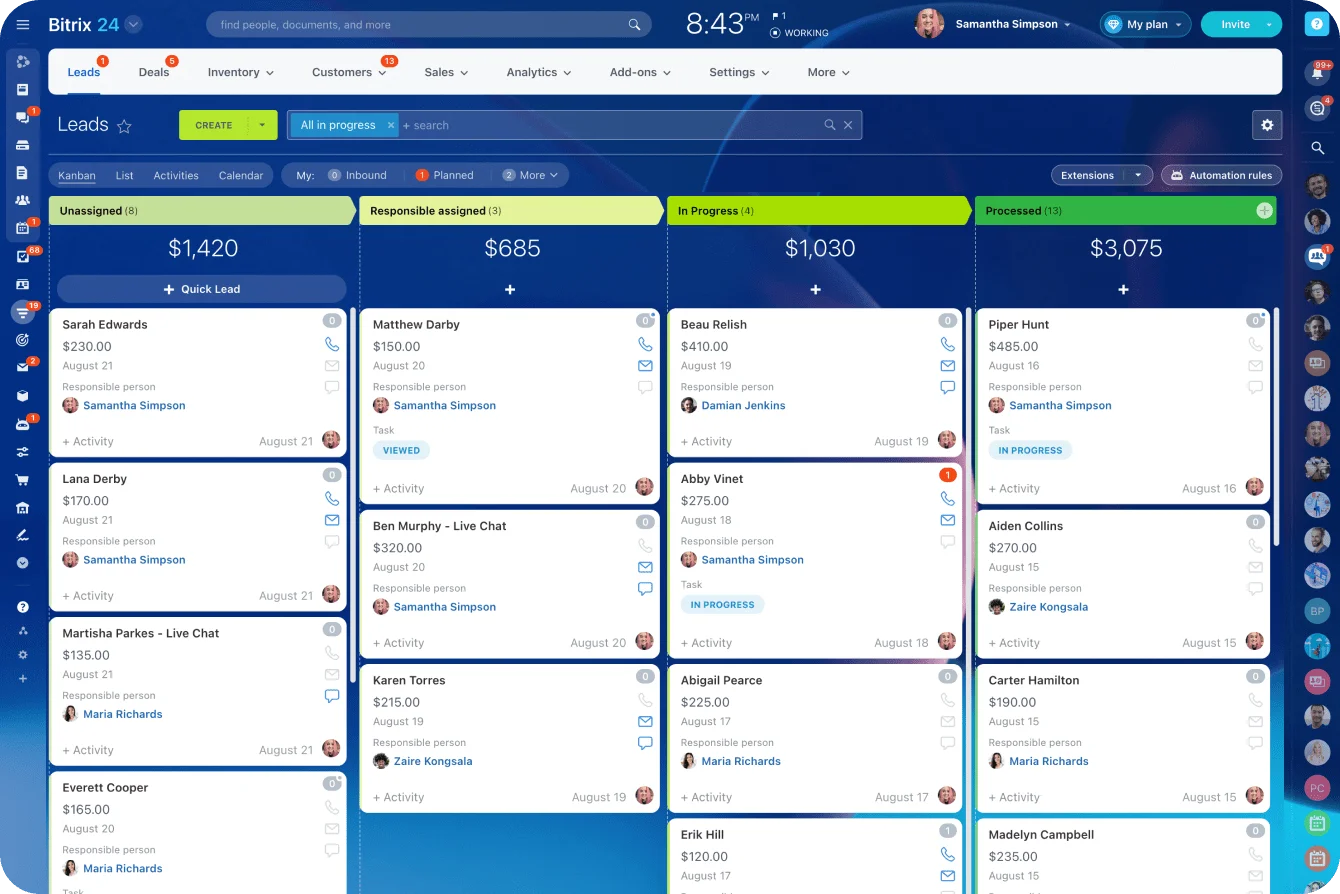
Take a common sales example. A lead comes in through a form, email, or message.
In a disconnected setup, someone may need to:
- Copy the lead into a CRM.
- Notify the right rep.
- Create a follow-up task.
- Check whether the rep responded.
- Update a separate pipeline report later.
In Bitrix24, the same event can create a record, assign ownership, schedule follow-up, and make the interaction visible to the team in one flow.
Example: Approval to delivery
The same logic applies outside sales.
If a manager approves a request, that approval can trigger a task for operations. If a customer issue is logged, support and account teams can see the same context. If a project milestone changes, related users can be updated without a separate round of status chasing.
The failure is rarely dramatic. More often, the operations manager discovers on Thursday that the “approved” request has been sitting in a private chat since Monday. Cue the end-of-week firefight…
Where SMB workflows usually break
This is how Bitrix24 helps with typical SMB pain points:
- Missed leads: Inbound inquiries can be captured in a structured system instead of sitting in inboxes or personal spreadsheets.
- Delayed approvals: Requests can move through defined workflows rather than informal messages.
- Siloed communication: Discussions, tasks, and records can sit closer together, so teams don’t need to reconstruct context from chat threads.
- Manual follow-up gaps: Reminders, recurring tasks, and repeated actions can be automated.
- Customer handoff issues: Sales, support, and delivery teams can work from the same customer record instead of separate notes.
A common mistake is automating too early. If your lead stages are unclear, or nobody agrees who owns follow-up after a demo, automation won’t fix that. It will move a bad process faster.
That warning matters because automation can hide a broken decision path behind faster notifications. Define the stages, owner, and exception rules first. Then automate the routine handoffs.
Pro tip
Start with one workflow that already causes pain, such as web-form lead to first response. Build the capture, assignment, task, reminder, and reporting path there first. Once that works, repeat the same logic in other areas.
Core capabilities behind the platform’s business impact
The table below shows which part of the platform addresses each recurring bottleneck. The larger gain comes when those features pass context to one another rather than operating as separate modules.
|
SMB challenge |
Bitrix24 feature area |
Expected operational impact |
|---|---|---|
|
Sales bottlenecks |
CRM |
Better lead tracking, clearer pipeline stages, and more reliable follow-up |
|
Collaboration gaps |
Tasks, projects, chat, and video |
Less status chasing and stronger cross-team coordination |
|
Manual admin work |
Workflow automation and document tools |
Fewer repetitive handoffs and more consistent process execution |
|
Customer response delays |
Contact center, website tools, and CRM |
Centralized inquiry handling and faster response continuity |
|
Reporting blind spots |
Analytics and shared system data |
Improved visibility into workload, pipeline, and operational performance |
How these capabilities work together
Look at a client onboarding workflow.
Sales closes the deal in the CRM. A task list is created for delivery. The signed proposal is stored with the account. The project manager gets a notification. The customer success manager can see what was promised. If the onboarding call is delayed, the task status and customer record can show that delay without a separate update chain.
That is where connected systems matter. Each function has value on its own, but the business impact comes from the handoff between them.
Common misconceptions about using Bitrix24 in SMB environments
One of the biggest misconceptions is that all-in-one platforms are mainly for large companies. In reality, SMBs often have more to gain from integration because lean teams feel every gap between tools more sharply.
A ten-person company doesn’t have spare capacity for duplicate entry, reporting workarounds, or constant internal clarification.
Misconception 1: Software will fix the process by itself
Adding software doesn’t automatically fix process issues. Technology improves outcomes when workflows are defined, ownership is clear, and data is maintained with reasonable discipline.
If a business has no agreed sales stages, unclear approval paths, or inconsistent record keeping, the platform will expose those issues more than solve them.
Teams often blame the CRM when reports are wrong. Then someone checks the records and finds half the sales team has been using the same stage to mean three different things.
Misconception 2: Bitrix24 is only a CRM or only a collaboration tool
Some companies approach Bitrix24 as if it is only a CRM. Others treat it as only a collaboration tool. Both views leave value on the table.
The platform becomes more useful when teams use its cross-functional links rather than isolated modules.
That doesn’t mean every business must use every feature heavily. It means the operational value comes from connection. If customer records, internal tasks, and communication remain separated in practice, the company recreates the same fragmentation inside a broader platform.
What to avoid during setup
SMBs usually run into trouble when they:
- Move every old workflow into the new platform without cleaning it up first.
- Give every user the same permissions and then lose control of data quality.
- Build too many automations before the team understands the process.
- Treat CRM, tasks, chat, and documents as separate tools inside the same account.
- Skip reporting setup until managers urgently need answers.
Pro tip
Assign one workflow owner for each major process. For example, sales owns pipeline stages, operations owns delivery task templates, and support owns customer issue handling. Shared platforms work best when ownership is explicit.
Practical SMB use cases for Bitrix24
Picture a 20-person services firm.
A salesperson promises a custom reporting pack in an email, then marks the deal as won in the CRM. Delivery receives a project task but never sees the promise. Two weeks later, the customer asks why the first report doesn’t include it.
This is the kind of mistake that doesn’t appear on a dashboard. It appears on an awkward customer call, when delivery learns about the promise at the same time as the client asks for it.
In a connected setup, the account record, proposal, delivery tasks, and customer commitments can stay linked. Sales can see whether onboarding has started. Delivery can see what was agreed. Managers don’t have to reconstruct the handoff from inboxes and chat messages.
Retail and e-commerce teams
Retail and e-commerce teams face a different version of the same problem. Customer inquiries may come from forms, chat, social channels, or phone.
If those interactions are scattered, follow-up becomes inconsistent and service quality depends too much on individual memory. A centralized setup allows the team to track inquiries, assign responses, and keep customer history visible across touchpoints.

Distributed and hybrid SMBs
Then there is the distributed SMB, where employees work across locations or hybrid schedules. Fragmented communication becomes expensive quickly in that environment.
Shared tasks, internal chat, video, documents, and customer records in one platform create more structured collaboration. Fewer updates get lost in side channels. Work becomes easier to trace.
Cross-department visibility is the common theme in these scenarios. Sales, operations, and support benefit when they can work from the same source of truth instead of maintaining separate narratives.
That can improve pipeline control, task completion, delivery consistency, and customer responsiveness without adding more management layers.
Operational impact, scalability, and limits SMBs should understand
As SMBs grow, one of the biggest risks is dependence on tribal knowledge. A few experienced employees know where things are, how exceptions get handled, and which customers need special treatment.
That may hold for a while, but it doesn’t scale cleanly.
What improves as the company grows
Bitrix24 supports growth by helping businesses standardize workflows, centralize reporting, and make work more visible beyond individual memory.
That can help SMBs:
- Bring new team members into established processes faster.
- Review activity without reconstructing it from scattered systems.
- Keep customer context visible across sales, support, and delivery.
- Reduce dependence on one or two experienced employees.
- Turn recurring work into repeatable templates and workflows.
Operational consistency improves because the process lives in the platform, not only in people’s heads.
Where Bitrix24 needs discipline
There are limits worth understanding. The platform’s value depends heavily on adoption, process clarity, and configuration quality.
If teams don’t use it consistently, reporting weakens. If workflows are poorly designed, automation can accelerate confusion. If managers don’t review naming conventions, task ownership, and customer record quality, the system can become messy over time.
Not every company needs every module at the same depth. A business should match platform use to its actual operating priorities.
When consolidation makes sense
There is a strategic tradeoff between broad consolidation and specialized tools.
Specialized software can offer deeper functionality in narrow areas. An integrated operating model creates the most value when the business suffers more from coordination failures than from missing edge-case features.
For many SMBs, that is exactly the situation. But it is still a business decision, not a default rule.
Practical takeaway
Bitrix24 scales best when the company wants one connected system for recurring work, shared customer context, and cross-team accountability. It’s less compelling if the business mainly needs one isolated function and already runs smoothly around that constraint.
FAQs
Is Bitrix24 suitable for very small teams, or does it only make sense after a company reaches a certain size?
It can make sense for very small teams if operational complexity already exists. Team size is not the only trigger.
A five-person company with multiple lead sources, active projects, and scattered customer communication can benefit earlier than a larger but simpler business.
A good test is simple: are people regularly asking where something is, who owns the next step, or whether a customer was followed up with? If yes, the business may already need a more structured system.
Can Bitrix24 replace separate CRM, project management, and communication tools without disrupting existing workflows too much?
It often can, but the real question is how tightly those current workflows depend on separate tools and habits.
Replacement tends to go more smoothly when a business is already feeling friction from tool switching, duplicate updates, and inconsistent handoffs. The more fragmented the current setup, the stronger the case for consolidation.
A practical rollout usually works better in phases:
-
Start with CRM and core tasks.
-
Add communication and document workflows.
-
Build automation once the process is clear.
-
Set up reporting after the team is using the system consistently.
-
Connect integrations only where they support a real workflow.
What are the most common reasons SMBs fail to see value from Bitrix24, and how can they evaluate fit before consolidating tools?
The most common reasons are weak process definition, unclear ownership, poor adoption, and overly narrow use of the platform.
Before consolidating tools, SMBs should evaluate where work breaks down today:
-
Lead handling
-
Approvals
-
Delivery coordination
-
Customer response
-
Reporting
-
Cross-team handoffs
If those issues are connected, an integrated platform is more likely to create real value.
Connect SMB work before handoffs break
Bitrix24 brings CRM, tasks, approvals, chat, and documents into one workspace, helping teams move faster with clearer ownership.
Get Started NowFix the handoffs before they become revenue leaks
Operational breakdown rarely arrives as a crisis. It builds quietly: a lead left in an inbox, an approval buried in chat, a promise delivery never saw, or a Friday report rebuilt from scratch. By the time the problem is obvious, the team is already spending too much time chasing work instead of doing it.
Don’t start by migrating everything. Start with the handoff costing you the most time or revenue. Name the owner, define the next action, and build that workflow in one shared system.
Bitrix24 connects the CRM record, task, conversation, approval, document, and follow-up behind that process, so the next step doesn’t depend on memory.
Sign up for Bitrix24 for free and fix your most fragile handoff today.