Mobile CRM: Empowering Field Sales Teams on the Go

Field sales aren't static. You’re in hospitals, on job sites, in stores — meeting people where they are, not behind a desk.
But most CRMs still expect you to be at one.
They’re built for offices, not the road. Which means updates get postponed, notes fall through the cracks, and follow-ups lose their edge.
Here’s the reality: reps using mobile CRM hit quota nearly 3x more often than those without it.
That’s why forward-thinking teams are switching to mobile-first tools — built for speed, clarity, and real-world selling. From instant customer insights to real-time task updates, mobile CRM helps reps close faster, collaborate better, and stay sharp on the move.
In this article, you’ll learn:
- Why traditional CRMs slow field teams down
- What a mobile CRM actually unlocks
- Real use cases, rollout advice, and how Bitrix24 makes it simple
If your team works in the field, it’s time your tools did too.
Bitrix24 offers mobile CRM, offline sync, built-in automation, and real-time team updates, all in one app.
Bitrix24 is field-tested, field-ready, and built to make reps faster, sharper, and more in control — wherever they are.
Start Using Bitrix24 TodayWhy traditional CRM holds field sales teams back
Legacy CRM systems were never built for the field; they assume you’re at a desk. But you’re not — you’re driving between appointments, managing relationships on the fly, and juggling client needs in real time. And when your CRM can’t keep up, here’s what breaks down:
Delayed data entry
When the only way to update your CRM is back at the office, important details get logged hours late — or not at all.
The result?
- Meeting notes get shortened or forgotten
- Client insights never make it into the system
- Your follow-ups lose precision
Over time, this creates gaps in your CRM that affect not just you, but your whole sales team.
Incomplete customer context
Heading into a meeting without knowing the client’s recent issues, purchase history, or open proposals? That’s what happens when your CRM isn’t in your pocket.
You’re left relying on memory — and risking misalignment, missed cues, and a less polished experience.
Slower response times
Clients expect answers fast. But with a traditional CRM:
- You often need to call HQ to check a detail
- You promise to “send an update later”
- Follow-ups drag
That lag time adds friction. And friction slows deals down.
If lag and blind spots are the problem, mobile CRM is how you fix it — putting speed, visibility, and control back in your reps’ hands.
The benefits of mobile CRM for field sales
Mobile CRM isn’t just about convenience. It’s about removing roadblocks so your team can sell better, faster, and more effectively — wherever they are.
Here’s how a mobile CRM, like Bitrix24, transforms your workflow in the field:
1. Real-time access to customer insights
Before walking into a client meeting, a rep quickly checks the Bitrix24 app. They see the client’s recent orders, open support tickets, and deal status — all in seconds.
Armed with this context, they tailor their pitch on the spot.
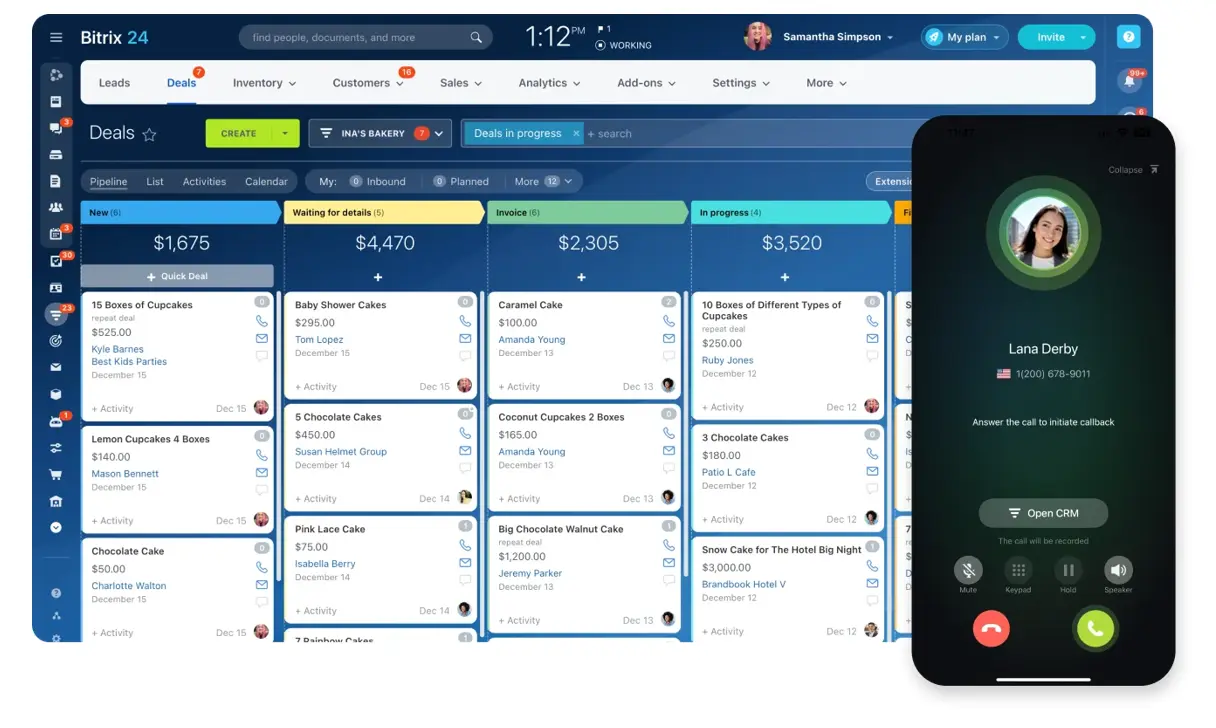
The result? More relevant conversations and faster decisions.
2. Seamless task and activity tracking
Reps can log meeting notes right after a visit, create follow-up tasks before leaving, and update deals in real time.
Automated reminders keep the day on track:
- Appointments
- Follow-ups
- Deal stage deadlines
No post-it notes. No mental to-do lists. Just focused selling.
3. More time selling, less time on admin
Manual updates eat into your selling hours. With Bitrix24, mobile updates trigger:
- Deal stage changes
- Follow-up emails
- Internal handoffs
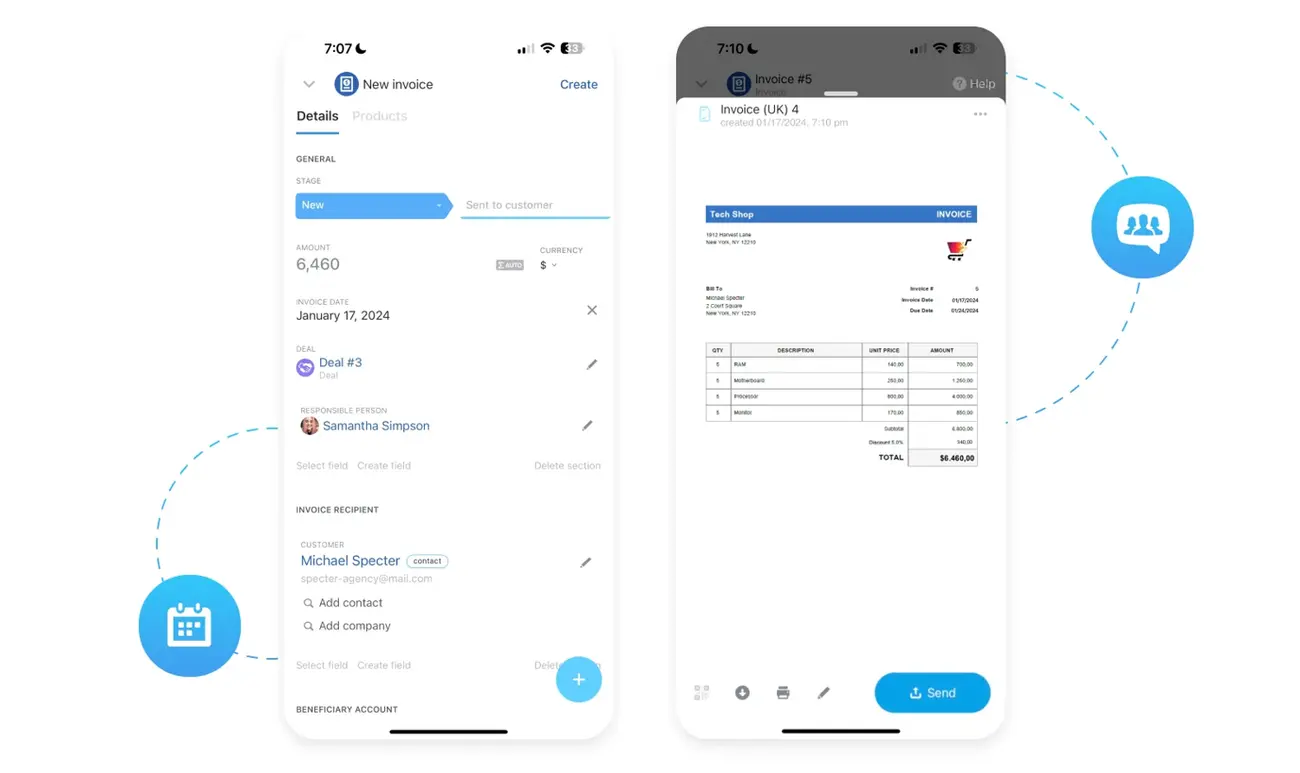
That means less back-office drag — and more time closing.
4. Instant collaboration with HQ
Need a pricing approval or marketing asset? Reps can ping HQ directly from the app, share notes, and resolve blockers fast.
No more waiting until you're back at your laptop. Just quick answers, smoother teamwork, and faster deal flow.
Must-have features that keep your field team moving
The wrong tool slows your team down; the right one disappears into the background, helping reps move faster, stay sharp, and stay connected.
Here’s what that takes — and how Bitrix24 stacks up.
1. Offline access when it counts
Field reps don’t always have a strong signal — whether they’re at remote job sites, hospitals, or crowded trade shows.
Your mobile CRM should let them:
- View customer records
- Add meeting notes
- Update deals
…even without an internet connection. Syncing should happen automatically once they’re back online.
Bitrix24’s mobile app handles offline updates and syncs automatically once you're back online.
2. Fast, intuitive interface
Clean layouts. Quick access. Minimal taps. If your reps can’t update a deal in 30 seconds before leaving the parking lot, the app’s getting in the way.
Bitrix24’s app puts CRM, tasks, and calendars front and center — no digging required.
3. Integration with your existing stack
Your mobile CRM shouldn’t be a silo. It should plug into:
- Calendars and email
- Inventory or product catalogs
- Your full CRM or ERP suite
That means less double entry, smoother workflows, and a single source of truth.
Bitrix24 brings your CRM, scheduling, product catalog, and task management together in one place.
4. Automation that keeps pace in the field
Reminders, follow-ups, stage changes — your reps shouldn’t have to remember it all.
Bitrix24 lets reps trigger automated workflows directly from mobile updates.
Automate your work with Bitrix24!
Save time and boost efficiency with automated workflows, CRM, and task management in Bitrix24.
START NOW FREE5. Strong data security
Customer data is sensitive. A secure mobile CRM should offer:
- Encrypted data transfer
- Role-based access control
- Login safeguards like biometrics or two-factor authentication
Beyond compliance, strong security builds client trust — and protects your brand.
Bitrix24 offers encrypted sync, custom permissions, and biometric login support.
Fast access, clean updates, built-in automation, and nothing left behind when the connection drops. That’s what field-ready really means. And Bitrix24 offers it all.
Explore our Mobile CRM solutions.
Different industries, same result: faster, sharper field sales
Mobile CRM is transforming field sales across industries — from pharma to distribution. Here's how different teams use it to boost productivity, accuracy, and customer service.
Healthcare and pharma sales
Pharmaceutical reps visit multiple clinics each day. With mobile CRM, they can:
- Pull up physician profiles before each visit
- Reference past conversations or samples
- Check recent orders to guide recommendations
Example in action: A rep sees a doctor’s prescription history in-app, tailors their product pitch on the spot, and increases order volume with a better-targeted conversation.
Industrial B2B sales
Reps selling machinery or parts often visit worksites to assess needs in person. Mobile CRM helps them:
- Log technical specs and notes right after inspections
- Capture photos and client pain points in context
- Update deal stages while still on site
This means: Faster, more accurate proposals — and fewer follow-up delays.
Consumer goods distribution
Route sales reps visit dozens of stores daily. With mobile CRM, they can:
- Record stock levels during store walks
- Log new orders in real time
- Track outstanding payments or invoices
Why it matters: Less paperwork at day’s end, fewer data entry errors, and faster order processing — all while staying in motion.
Whether you're selling prescription meds or industrial parts, mobile CRM adapts to your team’s rhythm — not the other way around. Bitrix24 makes that flexibility feel effortless.
Best practices for rolling out mobile CRM
Investing in a mobile CRM is a smart move — but it’s the rollout that makes or breaks success. Here’s how to set your team up for adoption and impact from day one.
1. Train reps with real scenarios
Your team doesn’t need a lecture; they need to see how mobile CRM makes their day easier on a practical level.
- Focus training on everyday field tasks
- Use live examples from your own sales process
- Offer in-app tips or cheat sheets for ongoing support
When they see how using it helps them hit targets faster, adoption takes care of itself.
2. Customize fields and pipelines
Every team tracks different details. Make the CRM feel like it fits — not like a generic template.
- Tailor pipelines to your sales stages
- Add custom fields (e.g. stock counts, visit frequency, territory codes)
- Hide irrelevant data to reduce clutter
Result: Reps spend less time navigating and more time closing.
3. Standardize what good data looks like
Set clear expectations around:
- What to log after each visit
- How to write follow-up notes
- Which deal fields are mandatory
Regularly review data quality to spot gaps or inconsistent entries. Clean, consistent data helps everyone — from sales managers to marketing to finance.
4. Track usage and improve continuously
Don’t treat rollout as a one-and-done.
- Monitor logins, task completion, and data freshness
- Ask reps what’s working and what’s not
- Iterate based on feedback
The best mobile CRMs move with your team — and improve as they do.
How Bitrix24 empowers field sales teams in motion
You can have all the features in the world, but what matters is how they work together when your team’s in the field. Bitrix24 isn’t just mobile-friendly. It’s field-tested, field-ready, and built to make reps faster, sharper, and more in control — wherever they are.
Here’s what sets it apart in daily use:
Everything in one place, nothing left behind
From lead details to product catalogs and documents, reps can prep, pitch, and close — all from their phone. No juggling between apps. No gaps in handoffs. Just smooth, end-to-end selling.
Real-time clarity, even when offline
Whether you're underground, out of range, or in transit, Bitrix24 keeps reps working. Offline edits sync automatically, so nothing gets lost — and no one wastes time backtracking.
Fewer clicks, more selling
Quick-add shortcuts, custom workflows, and tap-to-update fields keep admin to a minimum. Reps can log calls, update deals, and move to the next task in seconds.
Instant backup from HQ
Need pricing input, product specs, or manager sign-off mid-meeting? With built-in chat and feed access, reps don’t wait hours — they get what they need, when they need it.
Built-in trust and security
Bitrix24 locks things down without slowing anyone down. With role-based access, encrypted sync, and mobile-friendly login options, your data stays safe — even on the move.
Power your field team with a CRM that moves like they do
When your reps are in motion, they need more than a mobile interface. They need a tool that keeps pace — helping them respond faster, stay organized, and close with confidence wherever the job takes them.
That’s what Bitrix24 delivers. With full CRM access, offline sync, built-in automation, and real-time team updates — all in one app — your reps can focus less on admin and more on what moves deals forward.
Put Bitrix24 in their pocket — and turn every visit, call, or check-in into real progress.
FAQs
1. Will my team actually use it — or is this just another tool they’ll ignore?
Adoption comes down to friction. Bitrix24’s mobile CRM is built for speed: quick taps, clean layout, and minimal manual input. Reps can log updates in seconds and access everything they need without jumping between apps. If it saves them time (and helps them close), they’ll use it.
2. How does Bitrix24 handle syncing across devices and teams?
Bitrix24 syncs updates in real time across mobile and desktop, so there’s no version conflict or delay. Reps can log a deal stage change on-site, and HQ sees it instantly — along with notes, files, or follow-ups. Even offline updates sync automatically once back online.
3. Can it really replace our current tools — or is this just another layer?
Bitrix24 isn’t just a mobile CRM — it combines task management, chat, calendar, and document sharing into one platform. That means fewer tools to juggle, lower training time, and tighter visibility across the entire sales cycle.