How Bitrix24 Enhances Communication and Collaboration in Remote Work Environments

It’s Thursday afternoon. The operations manager is chasing three people for an update that was supposedly approved on Monday. The final proposal is buried in chat, the shared drive contains two versions, and the client has already received the wrong one.
That’s how remote communication usually breaks down: not through one major failure, but through small gaps between the conversation and the work that should follow it.
Microsoft found that 62% of employees spent too much time searching for information, while Asana found that workers switched between 10 apps 25 times a day. Each extra tool creates another place for ownership, files, decisions, and deadlines to drift apart.
Bitrix24 brings those pieces back together in one workspace, connecting communication with tasks, documents, calendars, CRM records, and approvals. This article shows where remote teams lose control, the mistakes that create the most friction, and how to set up Bitrix24 so decisions turn into visible action.
What Bitrix24 means for remote collaboration: A unified digital workspace
Bitrix24 is a business collaboration platform that combines team communication, video calls, task management, document sharing, calendars, CRM, and workflow tools in one system.
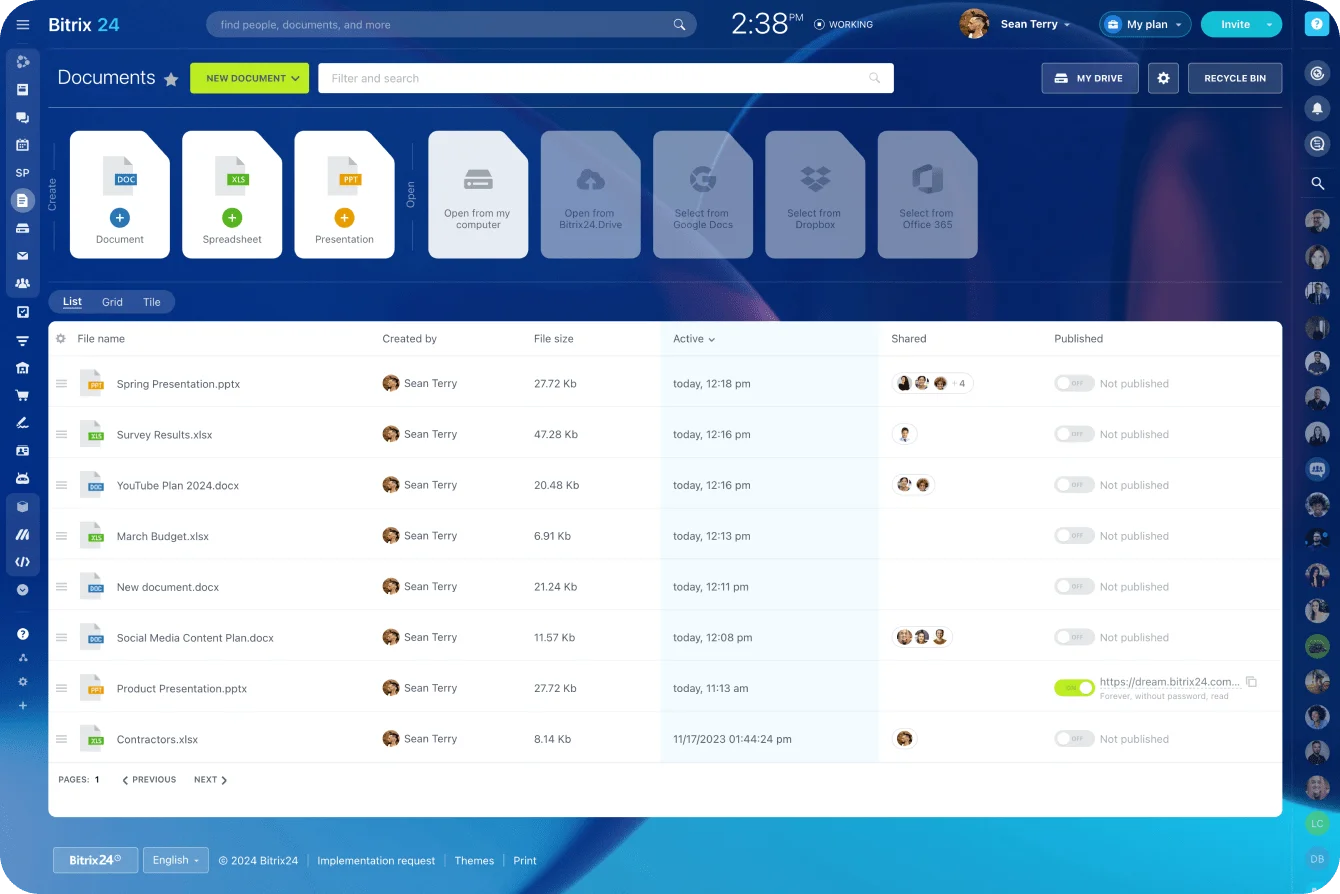
For remote collaboration, its value comes from keeping communication tied to the work itself. Plenty of tools include messaging, but fewer keep the discussion, task, deadline, file, and customer record close together.
A discussion can sit next to a task. A deadline can connect to a project. A customer record can remain linked to internal follow-up activity.
That structure matters more than the length of the feature list.
Why the workspace idea matters
A chat tool gives people somewhere to talk. A shared workspace gives that conversation somewhere to go.
Remote teams need work to be assigned, tracked, updated, documented, and reviewed after the call or chat has ended. Without that structure, each employee has to reconstruct the context from messages, inbox searches, meeting notes, and memory.
A unified workspace reduces that reconstruction work. People can see the conversation, assignment, file, deadline, and current status without asking whoever happened to attend the last meeting.
What this looks like in practice
A marketing team planning a product launch may need creative briefs, approvals, campaign tasks, launch dates, and sales enablement documents in one place. If those sit across chat, email, spreadsheets, and shared drives, every update creates another chance for somebody to miss a change.
In Bitrix24, that work can sit closer together through communication tools, project tasks, shared files, calendars, and workspace activity.
Pro tip
Before rolling out any remote work platform, define the home for each type of information.
Tasks go in tasks. Decisions go in task comments or project updates. Files go in the relevant workspace. Approvals go through the agreed workflow.
The platform works best when people know where to look first.
Why Bitrix24 matters for distributed teams and hybrid organizations
The benefit becomes clearest when work passes between people, departments, or time zones. A fast reply has limited value if the task is still unclear, the wrong file is attached, or nobody owns the next action.
Bitrix24 keeps communication and execution closer together, reducing the need to jump between chat apps, project boards, shared drives, calendars, and CRM systems.
The business impact
This creates several direct benefits:
- Missed updates become less common because activity is visible where the work lives.
- Duplicated effort drops when employees can see existing tasks, ownership, and project status.
- Accountability improves because assignments are attached to named owners and deadlines.
- Managers spend less time requesting updates because they can check progress directly.
- Work is less likely to stall when it passes between teams or shifts.
For growing businesses, the value goes beyond convenience. More visible and structured work gives managers a clearer basis for resolving delays, reallocating resources, and making decisions.
Why hybrid teams feel the pain differently
Office-based employees often receive information informally; remote employees depend on systems.
If decisions are made in hallway conversations, side chats, or discussions after a meeting, remote colleagues can fall behind even when nobody intends to exclude them. The remote employee joins the next morning to discover that the deadline moved during an office conversation, but the project board still shows the old date.
A unified platform creates a more consistent operating model. Decisions and updates become less dependent on physical proximity.
Gallup’s hybrid-work research supports that concern. Leaders and managers identify communication as the largest challenge their teams face in a hybrid environment, at 48%.
How Bitrix24 enhances communication and collaboration in remote work environments
Bitrix24 connects synchronous communication with asynchronous collaboration.
Synchronous communication covers real-time interaction such as chat and video calls. Asynchronous collaboration covers work that continues without everyone being present at once, including task comments, shared documents, activity feeds, and recorded updates.
Remote teams move between those two modes throughout the day. A useful workspace must support both without allowing the context to disappear between them.
From conversation to action
A call may clarify a problem, but the follow-up work often happens later and across different schedules.
Bitrix24 connects discussions to projects, deadlines, owners, and records. A conversation can lead directly to a task assignment. A project update can notify the people responsible for the next stage. A document change can remain visible beside the work it affects.
This closes the common gap between “we discussed it” and “someone moved it forward.”
Where the workflow changes
In a disconnected setup, a remote team might discuss a client issue on a video call, agree on the next steps in chat, store the revised proposal in a drive, and track the follow-up in somebody’s personal task list.
By Friday, nobody is completely sure which proposal is final or whether the client-facing action happened. One person has updated the shared drive, another has attached a newer version to an email, and the account manager is checking timestamps five minutes before the client call.
In Bitrix24, the same workflow can run through a connected task with attached documents, comments, deadlines, and related CRM activity. The discussion still happens, but the next action has a visible owner and a defined place to live.
|
Tool model |
What it does well |
Where it falls short |
|---|---|---|
|
Communication-only tools |
Fast contact, quick questions, meetings, and instant updates |
Weak traceability, scattered ownership, and limited links to execution |
|
Integrated work hubs such as Bitrix24 |
Connect communication with tasks, records, files, deadlines, and status |
Require clearer setup and stronger usage discipline |
The main advantage is coordination. Teams can act on information while the original context remains attached, making collaboration more reliable when work passes between people or departments.
Pro tip
Before ending a remote meeting, create or update the related task. Add the owner, deadline, next action, and relevant file. It takes two or three minutes and prevents the Monday-morning problem where everyone remembers the conversation differently.
Core features that make Bitrix24 effective for remote work
Bitrix24’s usefulness for remote teams comes from three connected layers: communication, collaboration, and operations.
Each layer is familiar on its own. Together, they create a system through which teams can discuss, organize, and complete work.
Communication layer
Team chat, video conferencing, announcements, calendars, and internal activity feeds help employees stay informed across locations.
Teams can use live interaction for urgent issues and written updates for information that people may need to review later. A manager can post weekly priorities, a team can discuss blockers in chat, and a project lead can use calendars to keep milestones visible.
The aim is to avoid turning every update into a meeting. Microsoft’s 2023 Work Trend Index found that employees ranked “inefficient meetings” as their largest productivity disruptor.
Remote teams still need real-time discussion, but they also need written, trackable updates that remain available after the conversation ends.
Collaboration layer
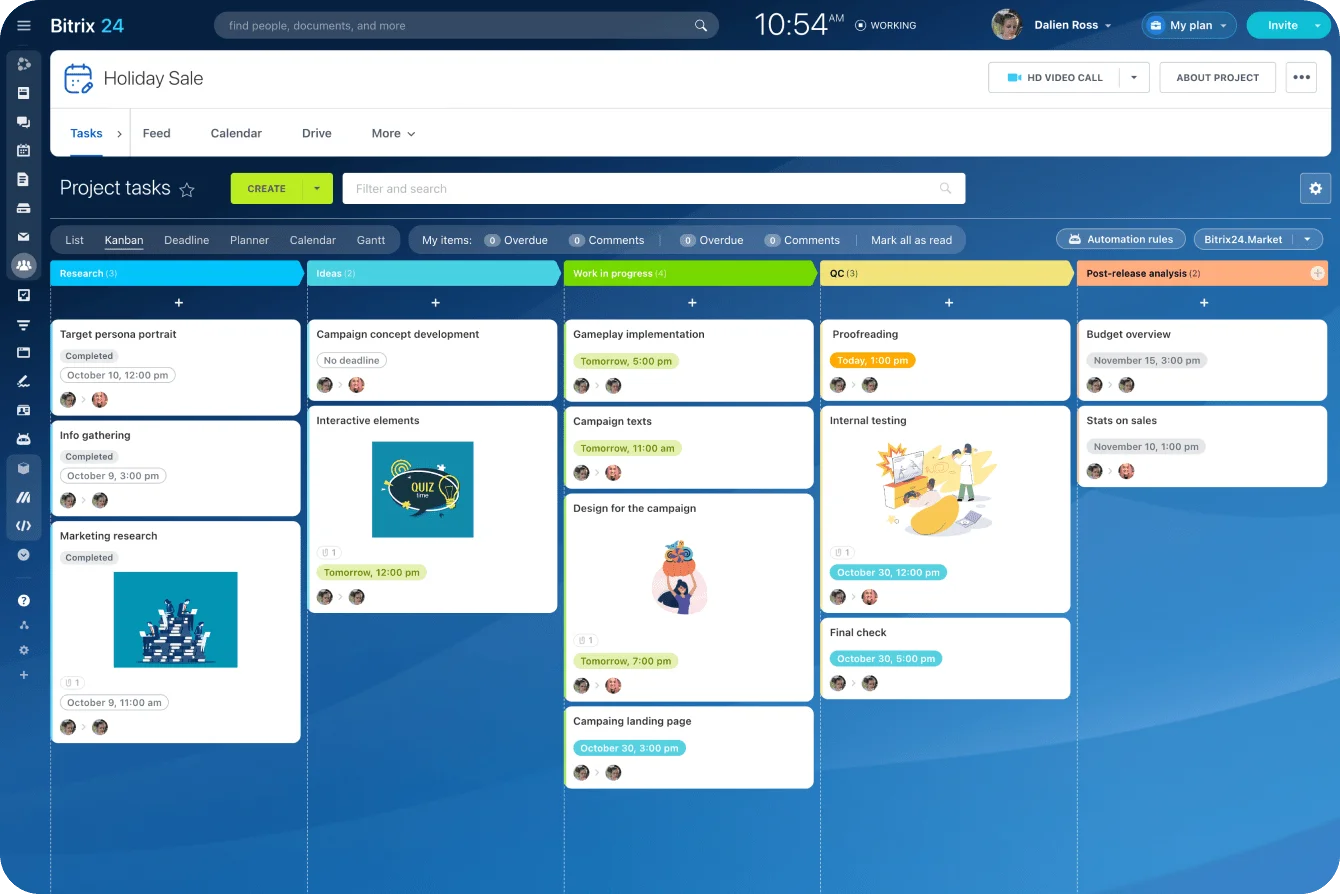
Task and project management, shared workspaces, file storage, co-editing, knowledge capture, and activity tracking support execution.
Teams can assign work, set deadlines, attach files, add comments, and monitor progress from one place. That gives employees a clearer view of current status without requiring repeated check-ins.
A design team, for example, might use tasks for creative requests, a shared workspace for campaign planning, and document tools for briefs and feedback. Everyone can see which version is under review and who must respond next.
Operations layer
Workflow automation, approvals, CRM connections, reporting, and role-based access turn collaboration into repeatable business processes.
This becomes particularly useful when work involves handoffs, service delivery, compliance, customer management, or internal authorization.
A sales team managing deals through private notes and messages can lose context when a lead passes from marketing to sales or from sales to onboarding. With CRM, follow-up activity stays connected to the customer record.
The same principle applies internally. Purchase approvals, new-hire requests, and service tickets shouldn’t depend on somebody remembering to forward an email.
The simple way to understand the feature set
Together, the three layers move a company beyond basic contact:
- Communication tools keep teams connected.
- Collaboration tools keep work organized.
- Operational tools keep repeated processes consistent.

Common misconceptions and remote work mistakes when using Bitrix24
Most Bitrix24 problems don’t come from missing features. They come from unclear rules, inconsistent usage, and teams carrying old habits into a new system.
The platform can centralize communication and work, but only if people agree on where tasks, files, decisions, and approvals belong. These are the mistakes that most often turn a shared workspace into another source of noise.
Mistake 1: Rolling out Bitrix24 without retiring old ways of working
The most common problem isn’t that teams misuse Bitrix24. It’s that they add it on top of everything they already use.
Chat moves into Bitrix24, but approvals still happen by email. Tasks remain in personal notes. Files stay scattered across shared drives. Customer follow-ups continue in spreadsheets or private inboxes.
The company now has one more platform, but the work is still fragmented.
Unless leaders decide which processes are moving into Bitrix24 and which old tools or habits are being retired, adoption creates duplication instead of clarity.
Mistake 2: No rules for where work lives
Teams often fail to decide where different types of work should be recorded.
A manager approves a purchase in a direct message, assumes finance has seen it, and only discovers two days later that the request never entered the approval queue. Finance asks for the approval again, so the manager forwards a screenshot of the chat and everyone loses another morning reconstructing what should have been a standard process.
The same problem appears when decisions remain in calls, tasks live in personal notes, files sit in several folders, and approvals stay in email. Bitrix24 can’t solve that fragmentation without basic operating rules.
A simple set of rules helps:
- If work requires action, put it in a task.
- If it will be needed again, place it in a shared workspace or knowledge base.
- If it affects a customer, connect it to the CRM record.
- If it needs authorization, use the agreed approval flow rather than a private message.

Mistake 3: Too many notifications
Remote teams often overcorrect by notifying everybody about everything. Alert fatigue follows quickly.
Employees start ignoring notifications, checking only direct messages, or missing important changes because every update appears equally urgent.
Separate urgent communication from normal project activity. Use calls and direct messages for genuinely time-sensitive issues. Use task comments, project updates, and activity feeds for work people can review later.
Mistake 4: Poor naming and permissions
As a workspace grows, unclear naming becomes a practical problem.
“Client files,” “Client files final,” and “Client files 2026” may all make sense to the person who created them, but they give the rest of the team little guidance about which folder is current.
Permissions can cause similar trouble. Excessive access creates clutter and risk. Restricted access pushes employees back toward private messages and emailed attachments.
Remote teams need simple naming rules, assigned workspace owners, and role-based permissions that match the way work moves.
Pro tip
Review the workspace structure once a month during the first quarter after rollout.
Archive inactive groups, merge duplicates, rename unclear spaces, and check whether teams are still using side channels for official work. Early cleanup prevents temporary shortcuts from becoming permanent operating habits.
The platform doesn’t remove the need for discipline. It makes good coordination easier and exposes weak practices quickly.
Business use cases: How different remote teams use Bitrix24 in practice
Bitrix24 works best where communication must remain connected to records, ownership, timelines, and repeatable actions.
The exact workflow differs by department.
Sales and customer-facing teams
Sales and customer-facing teams can use Bitrix24 to connect internal conversations with CRM activity.
Customer work often breaks when discussions and follow-ups are separated. A representative may discuss a lead internally, but unless the next action is tied to the customer record, details can disappear during the handoff.
A sales manager can review deal status, a representative can record the next action, and an onboarding or support colleague can see the relevant history before taking over.
This is particularly useful when a customer issue crosses several departments. Instead of rebuilding the story from private messages, each team can work from the related record and task.
Project-based teams
Marketing, product, consulting, and operations teams usually face a different problem: coordinating briefs, timelines, files, feedback, and changing priorities.
A shared workspace centralizes project discussions, task ownership, status, and supporting documents. That reduces “latest version” confusion and lets managers review progress without chasing people through several tools.
A remote content team, for example, may include writers, editors, designers, and reviewers in different time zones. Bitrix24 can keep the brief, draft status, review notes, publishing deadline, and final assets attached to one project flow.
HR and internal administration teams
HR and administration teams can use Bitrix24 to coordinate processes that involve multiple people, documents, and deadlines.
A remote onboarding flow, for example, might combine a checklist, document folder, welcome messages, training tasks, calendar events, and a knowledge base containing policies, setup instructions, and answers to common questions. New employees get a clear route through the process, while HR can see what has been completed, what is overdue, and where somebody is stuck.
Leadership and operations teams
Leadership teams need visibility across departments without attending every meeting.
Bitrix24 gives managers a place to review task progress, bottlenecks, project ownership, and cross-functional updates. They can identify where work has stalled without turning each project into another status call.
That becomes increasingly useful as more work passes between teams and individual managers can no longer hold the full operating picture in their heads.
Scaling impact, operational benefits, and limitations to consider
The scaling question is whether the business wants to keep adding specialist tools or create a more consolidated system for communication, tasks, files, approvals, and customer work.
Bitrix24 is most useful when leadership wants a more connected platform strategy.
Where Bitrix24 helps as teams grow
A consolidated workspace can provide several longer-term benefits:
- Cross-department work becomes easier to track.
- Managers can identify bottlenecks earlier.
- Shared processes depend less on individual memory.
- Work history remains available when employees are absent or leave the business.
- New employees can review tasks, workspaces, and documentation to understand how work moves.
- Administration becomes simpler than maintaining a larger collection of disconnected tools.
Where teams need to be careful
Bitrix24 has a broad feature set, which can create adoption friction during the early stages.
Teams accustomed to lighter single-purpose tools may initially find the platform more complex. Governance also matters. Without clear naming, permissions, workspace ownership, and communication rules, the system can become cluttered.
The platform must be configured around the way the business operates. Turning on every feature at once is more likely to create confusion than clarity.
A better rollout path
A practical rollout follows five steps:
- Identify the workflow currently causing the most delay, lost information, or repeated chasing.
- Set up the communication space, tasks, documents, owners, and deadlines needed for that workflow.
- Agree where decisions, files, approvals, and status updates will live.
- Review usage and remove side channels or duplicate processes.
- Add CRM, automation, reporting, or further departments once the basic workflow is stable.
Companies should also compare Bitrix24 pricing plans and decide which teams need which capabilities before rollout.
A small company may need a relatively simple setup. A larger organization may require several departments, access levels, customer-facing processes, and formal approval routes.
Bitrix24 can support both, but its value depends on thoughtful setup and consistent use.
FAQs
Is Bitrix24 better for fully remote teams or hybrid teams?
It can work for both.
Fully remote teams benefit from having a clear digital center because nearly all coordination must happen through systems. Hybrid teams benefit because Bitrix24 reduces the information gap between people in the office and colleagues working elsewhere.
The platform is particularly useful when an organization wants work to remain visible regardless of location.
How does it handle asynchronous work across time zones without creating notification overload?
Bitrix24 supports asynchronous collaboration through task comments, activity feeds, shared documents, and persistent project records. Employees don’t need to be present at the same time to see what changed or what they must do next.
Avoiding overload still depends on configuration and team rules. Companies should limit unnecessary channels, use structured updates, and attach conversations to the relevant work instead of broadcasting every change.
A practical rule is to use chat for quick clarification, tasks for action, project spaces for shared progress, and the knowledge base for reusable guidance.
Can Bitrix24 replace separate tools for chat, project tracking, document collaboration, and CRM?
It can, particularly when the main problem is fragmentation rather than a need for highly specialized software.
Its all-in-one design makes it a realistic replacement for several standalone tools when a business wants tighter links between communication and execution.
Some companies may still prefer a mixed stack because they have specialist requirements or established legacy systems. The decision depends on whether one connected workspace will remove more friction than a collection of specialist tools.
What should teams set up first?
Start with the workflows creating the most confusion today.
For many remote teams, the initial setup will include:
Don’t enable every feature at once. Start with work the team already performs every week, establish consistent habits, and expand from there.
Turn remote conversations into clear action
Bitrix24 connects chat, tasks, files, calendars, CRM, and approvals so remote teams work from one shared source of truth.
Get Started NowBottom line
Which remote workflow creates the most chasing in your business?
It may be a client handoff that disappears between sales and onboarding, an approval left in a private message, or a project that stalls because three people are working from different versions of the same file.
Start there. Define the owner, deadline, next action, and source of truth, then build that workflow in Bitrix24 so the work can’t disappear when the conversation ends.
Sign up for Bitrix24 for free and move one fragile remote workflow into a shared system today.