From Start-up to Scale-up: Leveraging Bitrix24 for Business Growth

Spreadsheets work. So do chat threads, shared folders, and the founder who remembers what everyone else has forgotten.
Then the company grows.
What worked for six people becomes unreliable at twenty. Sales updates disappear into private messages. Project details sit in separate files. Approvals depend on whoever remembers the last conversation. New hires join, but the process they’re meant to follow still lives in someone’s head.
The challenge is knowing where to add structure first without burying the team in heavy software and unnecessary process.
This article shows where early-stage tools usually fail, which workflows growing companies should standardize first, and how Bitrix24 can connect CRM, projects, communication, and automation before operational friction starts slowing growth.
What Bitrix24 means in a business growth context
In a growth context, Bitrix24 is a unified business operations platform. It brings together CRM, communication, task and project management, document collaboration, and workflow automation in one environment.
That matters because growing companies rarely struggle with one isolated tool. They struggle with the gaps between tools.
A chat app may handle internal updates. A CRM may track deals. A file tool may store documents. A project tool may manage delivery. Each one can work well on its own, but growth exposes the spaces between them.
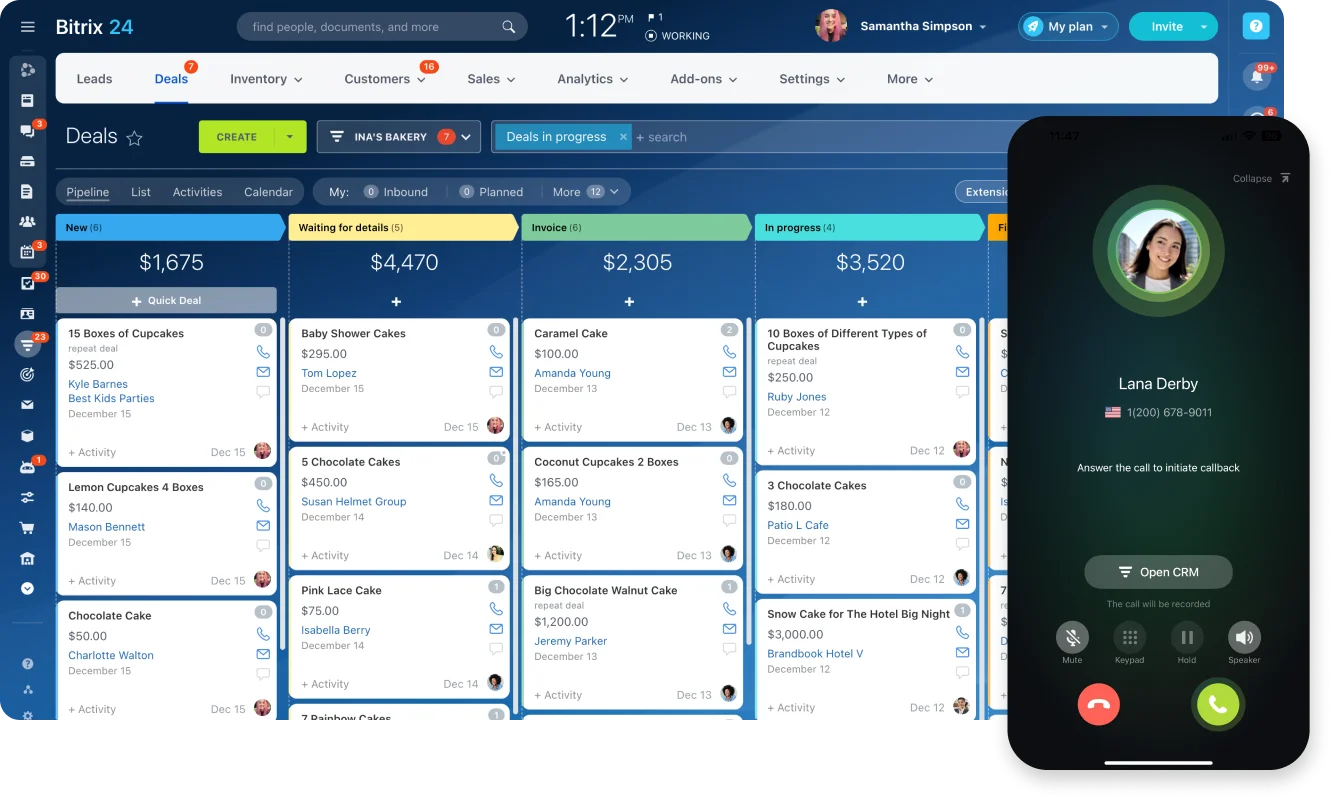
Where disconnected tools start to break
The problems usually appear in handoffs:
- Sales closes a deal, but implementation misses key requirements.
- Customer history sits in the CRM, while support updates stay in email.
- Project files are saved in one place, but task ownership lives somewhere else.
- Managers ask for status updates because reporting can’t show the full picture.
- New hires need context, but context is scattered across chats, folders, and old calls.
A small team can often work around this because everyone knows what’s going on. A larger team can’t.
Once people stop sharing the same context naturally, the business needs a system that carries context for them.
Bitrix24 as an operating layer
Here, an operating layer means the shared system that carries context from one stage of work to the next. Bitrix24 fills that role by centralizing more of the work data.
Deals, tasks, discussions, documents, calendars, and approvals can sit closer together, so teams don’t have to reconstruct the story of a customer, project, or decision from five different apps.
Every company still needs judgment about what belongs in the system. The important work should have a shared home, especially when it affects revenue, customer delivery, approvals, or team capacity.
For a business moving from start-up habits to scale-up discipline, that shift is valuable. It reduces dependence on memory, side conversations, and individual heroics.
Why Bitrix24 matters when a business starts scaling
Scaling creates more handoffs, customer touchpoints, and decisions. Tools built around personal ownership start to fail once work depends on shared execution.
Growth increases communication load
Communication volume rises quickly as teams grow. More people need updates. More decisions need context. More projects need follow-through.
Without shared workspaces, searchable records, and visible task ownership, teams spend too much time asking basic questions:
- Who owns this?
- What was promised?
- Has the customer been updated?
- Where is the latest version?
- Are we waiting on sales, finance, support, or delivery?
Bitrix24’s communication tools and workspaces help reduce that back-and-forth by keeping conversations closer to the work they relate to.

Customer activity becomes harder to manage
CRM discipline also becomes more important as the business scales.
When customer activity lives in rep-owned spreadsheets or inboxes, the company becomes exposed. Pipeline health is harder to read. Follow-up quality varies. Forecasting depends too much on individual updates. If someone leaves, valuable customer context may leave with them.
With Bitrix24 CRM, customer records, deal stages, activities, and communication history are easier to keep visible. That gives sales managers and leadership a clearer view of what’s moving, what’s stuck, and where follow-up is needed.
Manual admin quietly multiplies
Repetitive work also expands during growth. Reminders, status changes, approvals, lead routing, internal follow-ups, and task creation may seem small on their own. At scale, they become a major drag.
That’s where automation starts to matter.
Bitrix24 task automation can help teams trigger routine actions when a deal moves stage, a task changes status, or a process needs approval. The aim is practical: stop people from manually repeating the same admin steps all week.
Pro tip: Start with low-judgment automation
Start automation with high-frequency, low-judgment tasks. Good examples include reminders, task creation, status updates, and approval notifications. Avoid automating complex exceptions until the core process is stable.
For leadership, this is more than an efficiency issue. Better visibility into pipelines, workloads, and internal activity supports better decisions about hiring, priorities, and expansion timing.
How Bitrix24 supports the transition from start-up agility to scale-up structure
The transition works when information follows the work instead of relying on people to relay it manually.
The real shift: from memory to process
Scale-up problems usually come from separation.
Sales knows one thing. Delivery knows another. Finance is waiting on approval. Leadership sees fragments. The founder still gets pulled in because they’re the only person who remembers the full story.
A connected system reduces those fractures.
Its collaboration layer helps teams coordinate without informal founder intervention. Its CRM organizes revenue activity in a way that can survive staff changes and higher lead volume. Its automation layer introduces repeatability where it helps, while still allowing exceptions when teams need them.
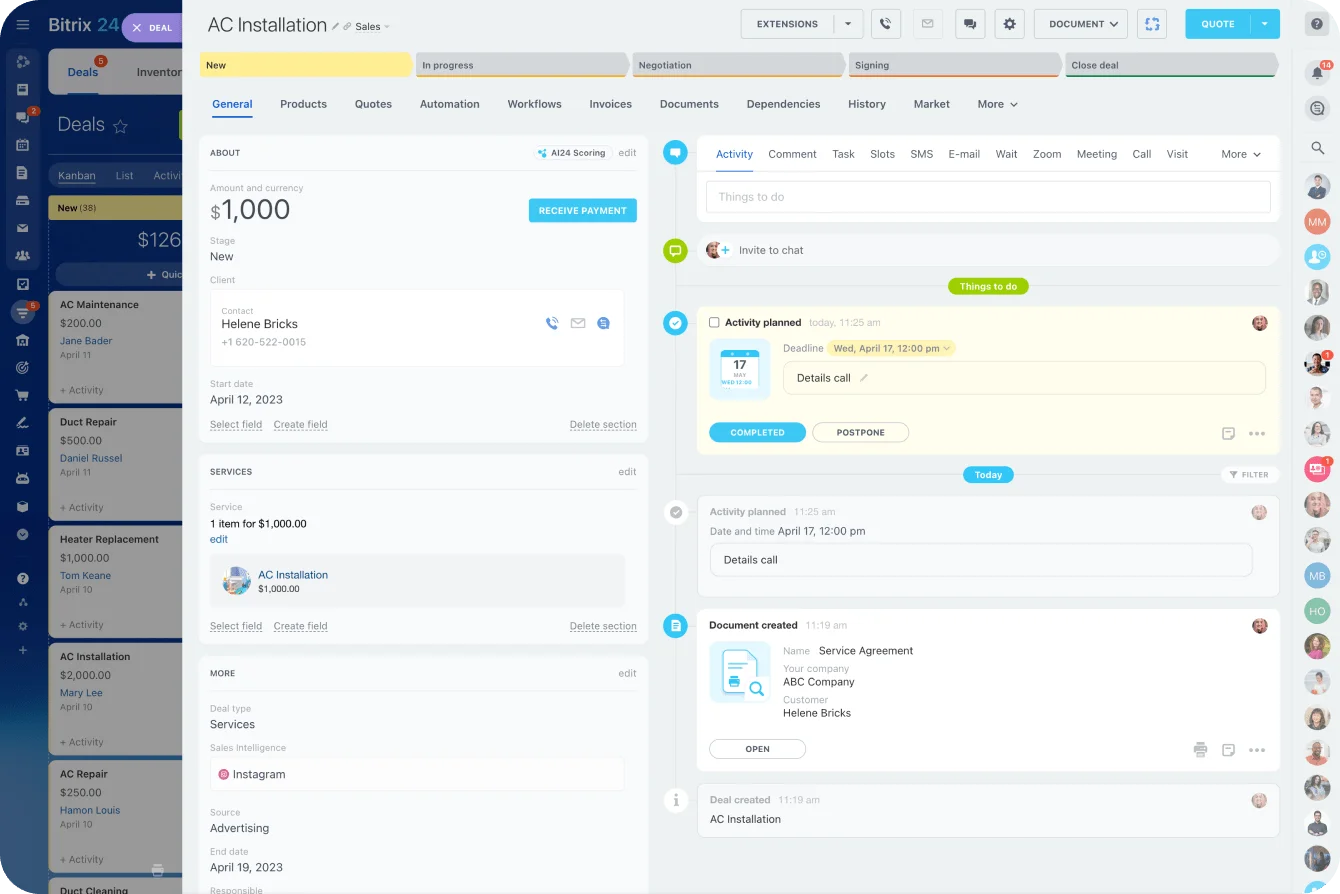
What the shift looks like in practice
|
Operational area |
Typical start-up mode |
Scale-up workflow with Bitrix24 |
|---|---|---|
|
Sales |
Leads tracked in spreadsheets and personal inboxes |
Shared pipeline, standardized stages, visible follow-up history |
|
Project delivery |
Tasks managed through chat and ad hoc check-ins |
Project workspaces, assigned tasks, deadlines, centralized files |
|
Customer support |
Requests handled by whoever sees them first |
Structured records, tracked communication, clearer ownership |
|
Internal approvals |
Founder approves requests through messages or memory |
Workflow routing, status tracking, visible approval history |
A sales team tracking deals manually will often know the top opportunities, but lose sight of older leads, follow-up timing, or stalled negotiations. In a shared CRM, those risks are easier to spot because the pipeline isn’t dependent on one person’s memory.
The practical value is reduced confusion without forcing the business into a rigid operating model.
Core capabilities that enable scalable growth in Bitrix24
Once the biggest failure points are clear, teams can use three connected capability groups to address them: collaboration, CRM, and automation.
1. Collaboration that keeps work visible
Collaboration mechanisms help larger teams stay aligned as communication volume rises.
Bitrix24 gives teams ways to manage:
- Team conversations
- Shared calendars
- Project workspaces
- Assigned tasks
- File collaboration
- Internal knowledge sharing
This matters once “just ask in chat” stops working.
A project manager may need to know whether design, sales, finance, and customer support are all aligned on a customer launch. If that information lives across private messages and separate folders, the manager spends too much time chasing updates. With shared workspaces and visible tasks, the work is easier to track without constant interruption.
2. CRM that keeps customer activity connected
CRM mechanisms make customer growth easier to manage.
Lead capture brings new opportunities into a common system rather than leaving them scattered across forms, email, and manual logs. Deal pipelines make sales stages visible. Contact history keeps context attached to the customer, not only to the rep.
A more structured CRM also helps with:
- Lead ownership
- Follow-up consistency
- Sales pipeline visibility
- Customer segmentation
- Reporting and forecasting
- Handoff quality between sales and delivery
This becomes especially useful when a business adds new reps, new markets, or new customer segments.
3. Automation that protects consistency
Automation mechanisms support consistency as transaction volume increases.
Workflow rules can move tasks or update records based on status changes. Reminders reduce silent delays. Triggers can start the next action when a condition is met. Approval routing is useful once more than one person needs to sign off on spend, contracts, or internal requests.
Repeatable process templates also help teams handle common work patterns without rebuilding them each time.
Pro tip: Stabilize the process before automating it
Don’t automate a broken process. First, map how the work should move, who owns each step, and what counts as “done.” Then automate the steps that are stable enough to repeat.
The combined effect
Collaboration keeps teams aligned. CRM keeps customer activity visible. Automation keeps repeatable work from becoming a manual bottleneck.
The growth benefit comes from how these pieces connect, rather than from one feature in isolation.
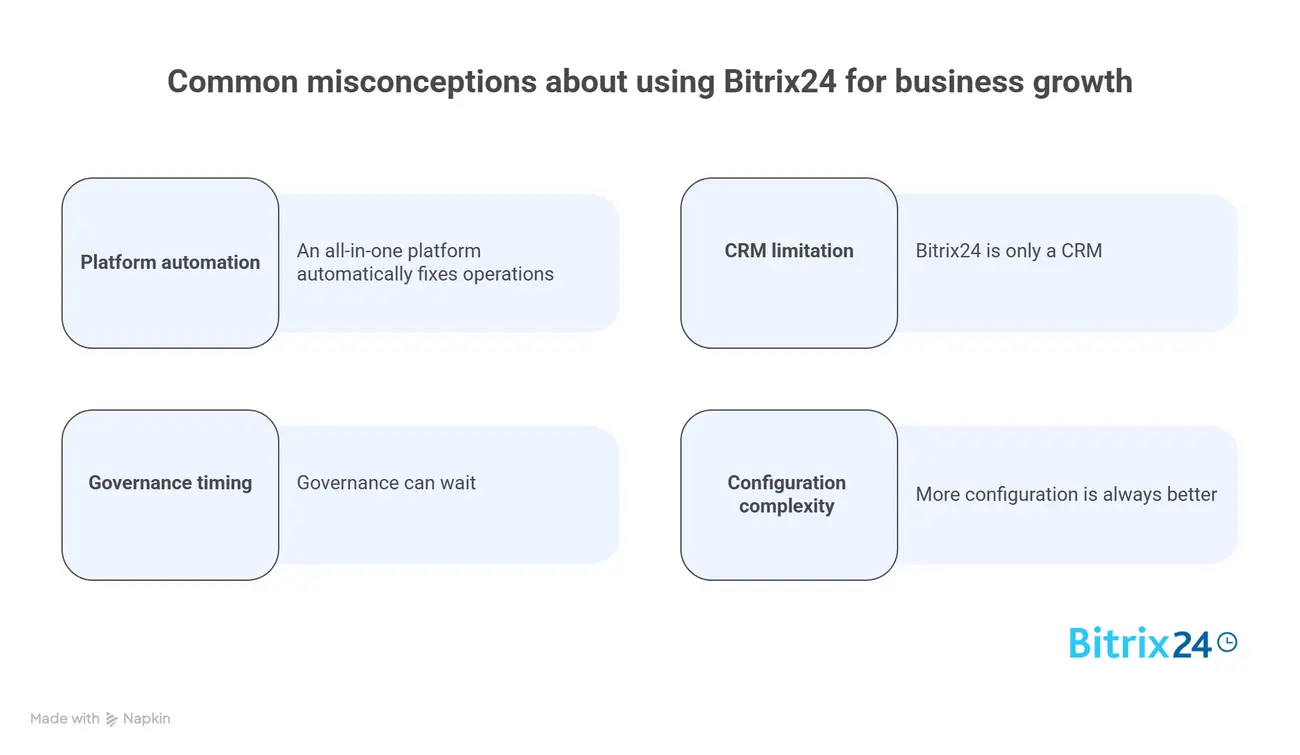
Common misconceptions about using Bitrix24 for business growth
Bitrix24 can support growth, but it won’t fix every scaling problem by itself. The platform works best when the business also improves how work is defined, assigned, tracked, and reviewed.
Misconception 1: An all-in-one platform automatically fixes operations
It doesn’t.
If teams don’t use shared processes, maintain records consistently, or agree on how work should move, software alone won’t create order. Bitrix24 can support scale, but it still depends on operating discipline.
For example, a CRM pipeline is only useful if teams agree what each stage means. If one rep moves a deal to “proposal sent” after a call and another does it only after a formal quote, reporting becomes unreliable.
Misconception 2: Bitrix24 is only a CRM
Treating Bitrix24 only as a CRM narrows its value too much.
For scale-ups, a big part of the benefit comes from connecting commercial activity to internal execution. If sales sits in one system and delivery coordination lives somewhere else entirely, the business keeps paying the handoff penalty.
A better use case is connecting the CRM to tasks, projects, documents, calendars, and communication. That way, the work after the deal gets more structure too.
Misconception 3: Governance can wait
Governance sounds dull, but it matters quickly.
Small decisions affect whether the system stays useful:
- Naming conventions affect searchability.
- Pipeline design affects reporting quality.
- Permissions affect trust and control.
- Required fields affect data quality.
- Reporting standards affect whether managers compare real patterns or messy inputs.
If every team names projects differently, saves files differently, or updates statuses differently, the system becomes harder to trust as it grows.
Misconception 4: More configuration is always better
Overbuilding workflows too early can make the platform feel heavier than the business needs.
Growing companies often get more value from clear core structures than from trying to model every exception from day one. Start with the workflows that happen often and carry real risk, such as lead follow-up, onboarding, approvals, customer requests, and project delivery.
Pro tip: Review workflows as headcount changes
Review workflows every quarter during periods of fast growth. Processes that worked for a 12-person team may feel too loose at 30 people and too clunky at 80.
The broad misunderstanding is simple: Bitrix24 is most useful when companies treat it as a shared operating layer and manage it accordingly.
Real-world business use cases: Where Bitrix24 helps growth
Bitrix24 creates the most value where growth creates repeatable coordination problems. These problems usually appear first in sales, delivery, support functions, and leadership reporting.
Sales: from personal tracking to shared pipeline control
Sales teams often feel the need for structure first.
A company that once handled a small number of inbound leads may suddenly be handling many more across website forms, referrals, social channels, paid campaigns, and partner activity. Without a shared pipeline and standardized follow-up, opportunities slip.
A prospect might reply to a proposal while the account owner is away, for example. If the response remains in a personal inbox and no follow-up task exists, a live opportunity can sit untouched for days without anyone else knowing.
In Bitrix24, sales leaders can track lead flow, review stage movement, and see which deals are stalled instead of depending on rep updates alone.
That matters during rapid expansion because missed follow-up affects more than sales. It wastes marketing spend, weakens forecasting, and lowers confidence in revenue planning.
Operations and delivery: from scattered updates to shared execution
Operations and delivery teams use Bitrix24 differently. Their problem is usually coordination.
As more departments get involved in serving customers, project execution becomes vulnerable to scattered communication and unclear ownership. Shared workspaces, assigned tasks, and centralized client-related documents help teams keep delivery quality intact as the business grows.
A common pattern is an agency, consultancy, or implementation team winning more client work while still managing delivery through chat threads, email chains, and folders. Account managers, creatives, finance, and leadership may all need the same client context, but each team sees a different slice of the work.
Example-in-action: A client might approve a revised launch date in an email on Monday, while the delivery team continues working from the original project plan. Finance still has the old scope, the account manager assumes everyone saw the update, and the mistake only surfaces when the client asks about it later in the week. Nobody ignored the change. It never became part of the shared workflow.
Bringing that activity into a common operational environment reduces friction because people can see tasks, deadlines, files, and customer context in one place.
HR, finance, and leadership: from ad hoc requests to repeatable workflows
HR, finance, and leadership teams also get value from the platform.
Onboarding workflows can standardize what happens when new hires join. Approval processes can make budget, expense, or contract review less dependent on chasing executives in chat. Leadership can use shared visibility to monitor workload distribution, commercial performance, and process bottlenecks with less guesswork.
Sustainable growth depends on more than revenue operations. Once the business starts scaling, internal support functions need structure too.

Scaling impact, operational trade-offs, and what to expect as complexity increases
As organizations grow, Bitrix24 can reduce tool sprawl, improve process consistency, and strengthen cross-team coordination.
Those changes often show up in business terms as lower operational drag, fewer missed handoffs, and clearer accountability.
The strongest results come from standardizing high-frequency, high-risk work without turning every exception into another field, status, or approval.
Where Bitrix24 has the strongest scaling impact
|
Area |
Strongest scaling impact |
Where discipline is required |
Potential limitation |
|---|---|---|---|
|
Collaboration |
Better visibility across teams and projects |
Consistent use of shared workspaces and task ownership |
Can become noisy if communication norms are weak |
|
CRM |
Clearer pipeline management and customer history |
Clean pipeline design and reliable data entry |
Complex sales models may require careful customization |
|
Automation |
Less manual admin and more repeatable execution |
Thoughtful workflow design and exception handling |
Over-automation can create rigidity |
|
Management reporting |
Improved operational visibility for leaders |
Standard metrics and reporting conventions |
Insights depend on input quality |
What to expect as complexity increases
As complexity increases, expectations should stay realistic. Bitrix24 can create a stronger operating foundation, but it works best when the business actively manages process design, adoption, and data quality.
That means someone needs to own the system.
In a small company, that may be an operations lead or founder. In a larger scale-up, it may become a sales ops, RevOps, project operations, or systems role.
Without ownership, even a strong platform can become messy. Workflows drift. Fields multiply. Reports lose meaning. Teams create workarounds.
With ownership, the platform becomes easier to refine as the company grows.
FAQs
Does Bitrix24 still fit if a company already uses several specialist tools?
Often, yes. The question is whether operational fragmentation is hurting the business. Some companies keep certain specialist systems and use Bitrix24 as the main coordination layer around them.
For example, a company may keep a finance platform but use Bitrix24 for sales activity, project coordination, approvals, and internal communication.
How does it support hybrid or remote teams?
Bitrix24 is well suited to distributed work because communication, tasks, calendars, documents, and customer records sit in a shared environment.
That reduces dependence on physical proximity and informal hallway coordination. Remote teams still need clear communication norms, but they’re less likely to lose context when work is tied to shared records and tasks.
When does customization become necessary?
Customization usually becomes necessary when standard workflows no longer match the company’s sales process, service model, approval logic, or reporting needs.
It becomes more valuable as process volume and cross-team dependencies grow. The key is to customize around stable patterns, not every one-off exception.
Is it suitable for service businesses as well as product companies?
Yes, but the value shows up differently.
Service businesses often benefit more from project coordination, client communication, and resource visibility. Product companies may lean more heavily on CRM, internal workflows, and cross-functional coordination between sales, operations, and support.
How does reporting change as teams scale?
Early reporting often focuses on activity and rough pipeline numbers.
As teams grow, reporting needs become more structured. Conversion by stage, workload by team, response times, approval delays, and delivery bottlenecks start to matter more.
This is where analytics and reporting tools can help managers move from anecdotal updates to more consistent operating reviews.
What happens when processes vary by department?
That’s normal.
The goal is to create shared visibility and enough consistency inside each function that the wider business can coordinate effectively.
A sales workflow, onboarding workflow, and customer support workflow won’t look the same. They should still be clear enough that ownership, status, and next steps are visible.
Scale workflows before growth creates friction
Bitrix24 unites CRM, projects, communication, and automation so growing teams keep context, ownership, and follow-ups visible.
Get Started NowFix the first workflow growth has already broken
Companies rarely need to replace every early-stage habit at once. They need to stop the same failures recurring in the workflows that carry the most risk: leads going cold, client requirements disappearing during handoff, approvals sitting with one person, or new hires relying on verbal context.
Start with one of those workflows. Define the owner, stages, required information, and point at which the next action should trigger. Once it works, extend the same discipline elsewhere.
Bitrix24 gives you the CRM, project tools, communication, and automation to make that change in one shared environment.
Sign up for Bitrix24 for free and turn your most fragile growth process into a visible, repeatable workflow today.