Bitrix24 vs. Salesforce: Evaluating CRM Capabilities for Businesses
CRM problems usually show up as everyday friction first. Sales reps update deals differently. Managers don’t trust the forecast. Service teams can’t see what was promised during the sales process. Customer work starts spreading across spreadsheets, chats, inboxes, and task lists.
That’s when the Bitrix24 vs. Salesforce comparison becomes useful.
Bitrix24 is usually the better fit when you need CRM, communication, task management, calendars, and collaboration in one shared workspace. Salesforce may be the better fit when CRM needs to become a controlled system of record for pipeline management, forecasting, governance, and revenue operations.
This article gives you a practical way to compare both platforms by how they work in real operations.
You’ll see where each one fits best, what scaling problems to watch for, and how to avoid choosing a CRM that creates more admin than value.
What teams should evaluate before choosing Bitrix24 or Salesforce
Before comparing feature lists, you need to identify the operating problem the CRM needs to solve.
Some businesses need tighter control over revenue processes and reporting. Others need to bring customer records, communication, tasks, and internal coordination into one workspace.
Start with operational complexity
A founder-led sales team with one pipeline can usually tolerate a looser CRM setup. The owner may still know every major deal, every stuck customer, and every follow-up risk.
That changes when the business adds SDRs, account executives, renewals, customer success, finance approvals, and service interactions tied to the same customer record. At that point, CRM becomes less about storing contacts and more about controlling how work moves.
Teams should ask:
- How many teams touch the same customer record?
- Do different products, regions, or customer types need different pipelines?
- Who owns lead routing, deal stage rules, approvals, and reporting?
- How often do managers audit records for missing fields or stale opportunities?
- Can the business support a formal implementation project, or does it need faster adoption?
Define reporting expectations early
Simple deal-stage visibility may be enough for smaller teams. Reliable forecasting, conversion analysis, territory reporting, and business-unit segmentation require more admin discipline.
Salesforce’s 2026 State of Sales report says the average seller spends only 40% of their time selling. That’s a useful reminder: poor CRM design doesn’t only affect reporting. It also adds manual admin, duplicate updates, and internal chasing to the seller’s week.
Bitrix24 can help teams reduce tool switching by putting CRM activity, tasks, conversations, and calendars in one place. Salesforce usually gives operations teams more control when the business needs strict forecasting, permission layers, and formal CRM governance.
Run a 20-deal CRM audit
Before choosing either platform, run a two-week CRM audit. Pick 20 recent deals and check whether stage, owner, next step, close date, source, and customer context are complete.
If the audit fails because people work across too many disconnected tools, Bitrix24 may solve the bigger problem. If it fails because rules, governance, and reporting logic are missing, Salesforce may be the better fit.
Common CRM and scaling problems that push teams to compare Bitrix24 and Salesforce
CRM pressure changes as the business grows. Inconsistent stages, incomplete fields, and conflicting sources of customer information turn a basic pipeline into an operational problem.
Pipeline sprawl
Pipeline sprawl is one of the first warning signs.
A team may start with one simple pipeline: new lead, qualified, proposal, negotiation, closed. Then the business adds partner leads, enterprise deals, renewals, service requests, or regional sales teams. Suddenly, the same stage names mean different things to different people.
A sales team tracking deals manually will often create side spreadsheets for “priority deals” or “forecast commits.” That may feel practical for one manager, but it weakens the CRM. Once managers trust spreadsheets more than the system, CRM adoption usually drops.
The warning sign often appears before anyone admits there’s a CRM problem. Friday’s forecast meeting starts with a manager asking which spreadsheet is current, while two reps argue that the same opportunity belongs in different stages.
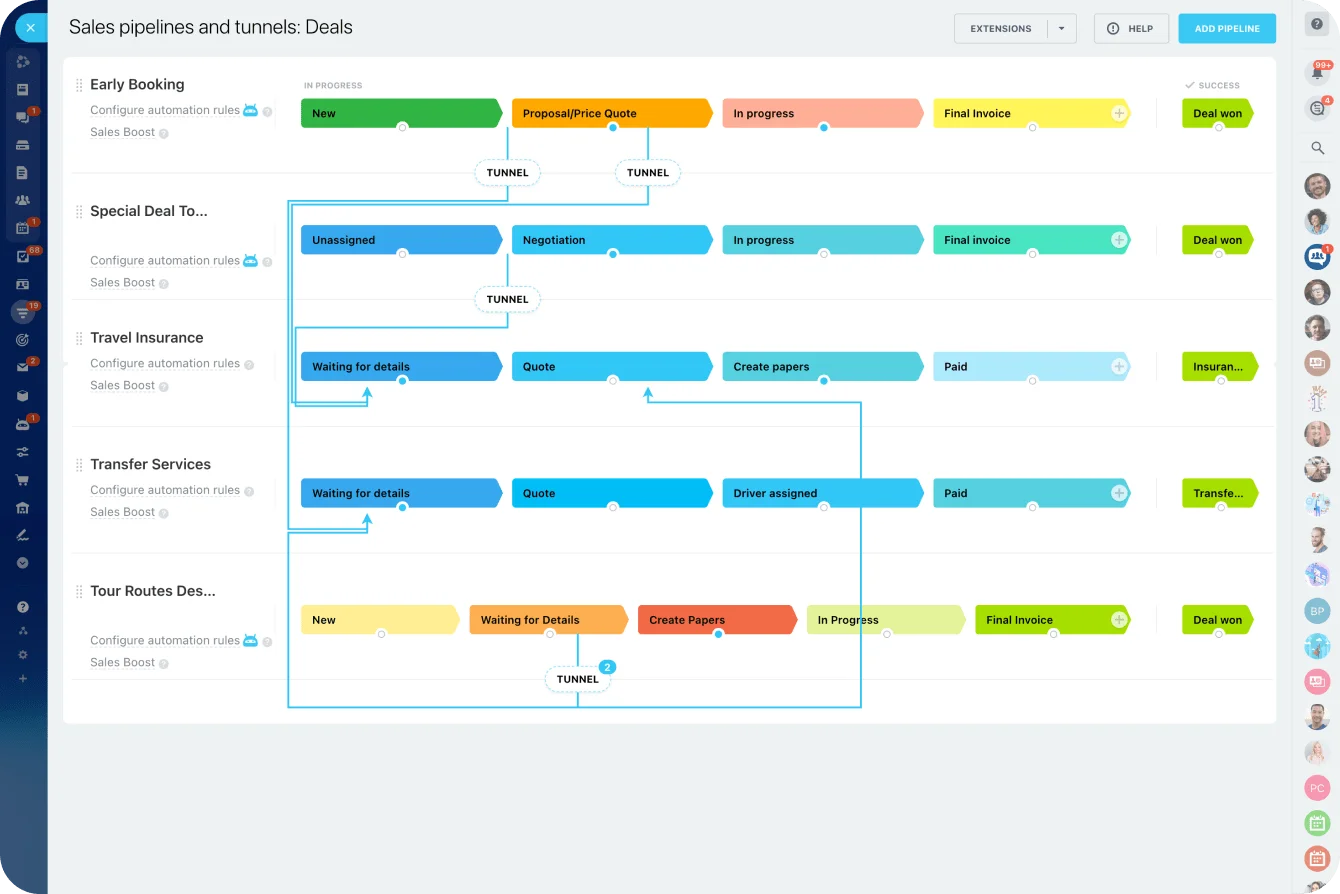
Bitrix24 can support standard sales pipelines and routine workflows through its CRM and sales pipeline tools. Salesforce is usually stronger when every pipeline needs formal definitions, required fields, approvals, and reporting rules.
Governance pressure
Governance issues become harder to ignore as teams grow.
Permissions may need to reflect management layers, regional ownership, or role-based access. Territory assignments need structure. Forecasting must be trustworthy enough for hiring, budgeting, and board-level decisions.
This is where teams often discover the difference between having a CRM and having a controlled operating model.
Cross-functional visibility
Sales may close the deal, but onboarding, support, account management, and finance often need customer lifecycle context.
If that context lives across chat threads, tasks, spreadsheets, inboxes, and separate tools, teams waste time reconstructing what already happened. A customer success manager may open a renewal task without seeing the original sales promise. A finance team may chase billing details that were already discussed in a sales conversation.
Bitrix24 is helpful when the immediate problem is scattered work. Teams can connect customer records with tasks, chats, workgroups, and calendars in one workspace. Salesforce is stronger when that customer lifecycle needs strict CRM governance across multiple functions.
A practical framework for evaluating Bitrix24 vs. Salesforce
A useful comparison starts with how each platform behaves in daily CRM operations.
|
Platform |
Typical team size |
Operational fit |
Main limitation |
Implementation and migration |
|---|---|---|---|---|
|
Bitrix24 |
Small to mid-sized teams |
CRM plus collaboration, tasks, calendars, and communication in one environment |
Less suited to heavily governed enterprise CRM structures |
Moderate and often faster, particularly from spreadsheets or a basic CRM |
|
Salesforce |
Growing mid-market to enterprise teams |
Structured revenue operations, deep customization, and stronger admin control |
Higher implementation overhead and ongoing administration demands |
High, particularly when migration includes process redesign |
Both platforms cover contacts, companies, leads, and deals. The difference is how far those objects can be shaped into a controlled operating model.
CRM structure
Salesforce generally offers greater flexibility for structured data models, process stages, permissions, and complex sales motions. It fits businesses that need CRM to define how revenue work happens.
Bitrix24 can handle standard pipelines well, especially when teams also need daily coordination around tasks, messages, meetings, and customer follow-up. It’s less suited to highly segmented environments where every team needs different governance logic.
Pipeline customization
Bitrix24 supports configurable pipelines and stage-based workflows. That works well when sales stages are clear and the business wants to automate routine handoffs, reminders, and follow-up tasks.
Salesforce better supports layered process design when stages, approvals, field dependencies, and downstream actions must be managed across teams, regions, or business units.
Reporting depth
Reporting depth is one of the clearest separators.
Salesforce is usually stronger for formal forecasting, multi-dimensional reporting, and analytics tied to CRM activity. Bitrix24 can provide operational visibility, but companies with strict revenue reporting expectations may eventually need deeper CRM analytics and governance.
Workflow automation
Workflow automation matters for both efficiency and process quality.
Bitrix24 can automate routine actions, notifications, follow-ups, assignments, and task creation. Its task automation features are especially useful when sales work needs to trigger internal coordination.
Salesforce is stronger when automation requires complex logic, role-based approvals, exception handling, or tightly controlled sales operations.
Total cost of fit
Total cost should be evaluated beyond license pricing.
Bitrix24 may reduce tool sprawl and initial software costs because CRM, communications, tasks, and collaboration sit in one environment. Teams can compare pricing plans against the cost of separate CRM, chat, task, and calendar tools.
Salesforce often requires more setup, administration, and consulting. That investment can make sense when CRM discipline, reporting maturity, and long-term process control are business-critical.
Compare total cost, not license price
Build a simple cost map with five columns: software, implementation, admin time, training, and extra tools.
A cheaper CRM can become expensive if managers spend hours every week fixing reports, exporting data, or chasing missing updates.
Where Bitrix24 fits better and where Salesforce fits better
Bitrix24 fits better when teams need a shared operational workspace
Bitrix24 fits better when a business wants one operational environment rather than a dedicated CRM spine with separate collaboration layers.
Teams that value built-in chat, tasks, telephony, calendars, workgroups, and shared customer work often find Bitrix24 easier to justify. The platform is practical when CRM is important, but internal coordination is just as urgent.
Bitrix24 is usually the better fit when:
- Sales, service, and internal teams need shared visibility without stitching together multiple tools.
- The business wants CRM, tasks, communication, and calendars in one place.
- Teams need faster adoption without a large admin function.
- The sales process is standard or moderately complex.
- Tool consolidation matters as much as CRM depth.
For example, a growing service business may need sales reps to capture leads, managers to assign follow-ups, service staff to track delivery tasks, and leadership to see customer activity. Bitrix24 can keep that work closer together through CRM, communication, and task workflows.
Salesforce fits better when CRM must enforce revenue processes
Salesforce fits better when CRM needs to become the core system of record for revenue and customer workflows. Businesses that depend on formal pipeline governance, cleaner forecasting, deeper customization, and mature analytics usually benefit from Salesforce’s CRM orientation.
Salesforce is usually the better fit when:
- Multiple departments need strict CRM permissions and process control.
- Forecasting accuracy affects hiring, budgeting, or investor reporting.
- Sales stages require approvals, exceptions, and business-unit logic.
- CRM must connect deeply with ERP, finance, marketing automation, or custom applications.
- The business has admins or consultants who can maintain the system properly.

Operational differences in automation, collaboration, and day-to-day CRM use
Automation in live operations
In live operations, automation differences show up in lead routing, follow-up discipline, and how consistently deals move through stages.
Bitrix24 can automate assignments, reminders, status changes, task creation, and common internal actions for fast-moving teams. That’s useful when a new lead needs to become a CRM record, a sales task, a calendar follow-up, and a manager notification without manual copying.
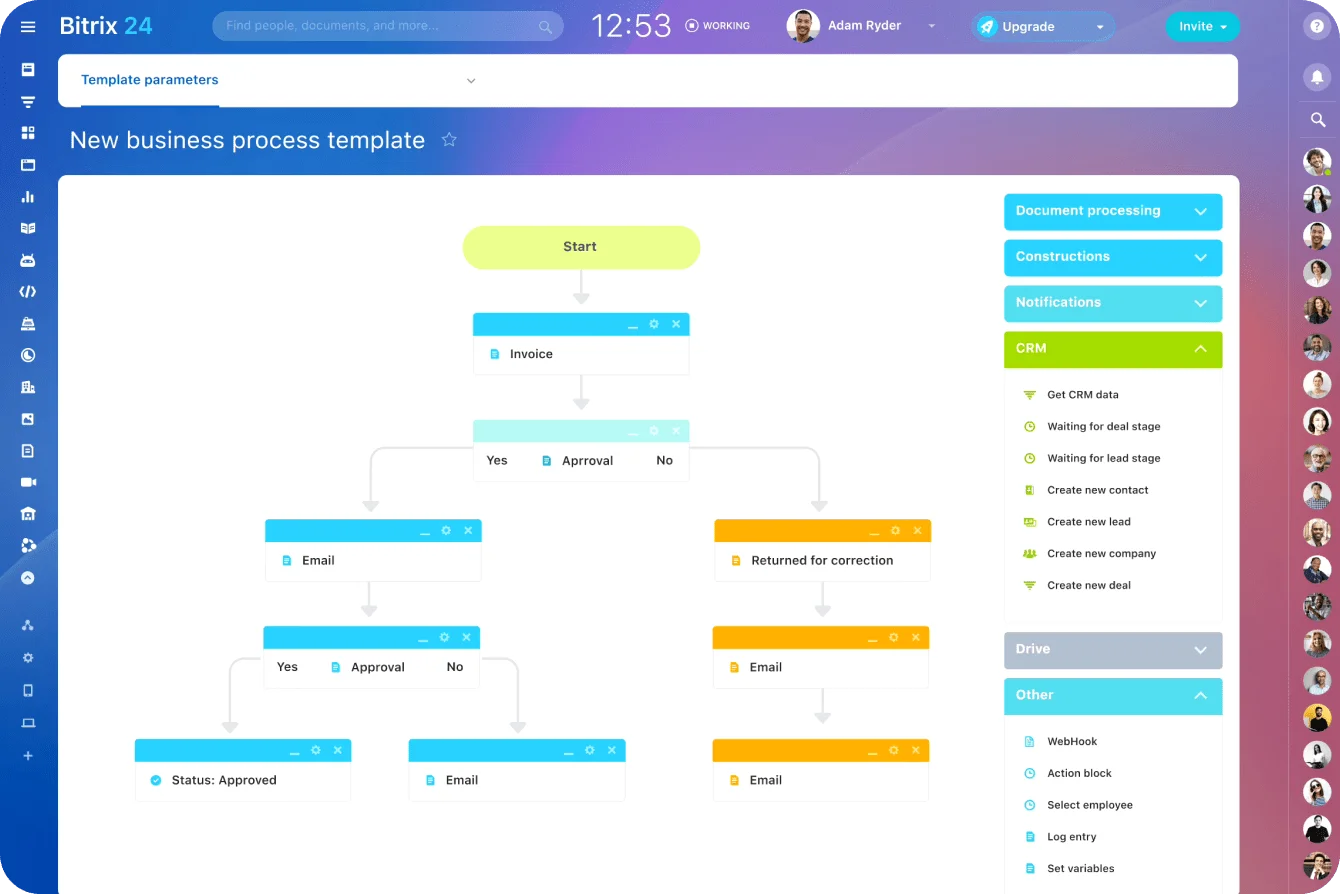
Salesforce becomes more useful when automation must support exceptions and controls. If lead routing depends on territory logic, product lines, account ownership, approvals, or multi-step escalation, Salesforce usually handles that complexity more cleanly.
Collaboration model
The collaboration model is different.
Bitrix24 is built around an internal workspace experience, so communication and task coordination are native to the platform. Teams can keep conversations, assignments, meetings, and customer-related work in one environment.
That matters in practical workflows. A sales rep can update a deal, assign a follow-up task, discuss the customer with a manager, and coordinate next steps without leaving the broader workspace.
Salesforce is less centered on being the team’s primary collaboration hub. Its strength is collaboration around a more structured CRM process, often with connected applications supporting adjacent work.
What this means for each team
- Sales reps may find Bitrix24 more closely tied to daily communication and task follow-up. Salesforce usually expects more disciplined record management.
- Managers may prefer Bitrix24 for coordination visibility. Salesforce usually gives them stronger pipeline oversight, forecasting, and performance reporting.
- Operations teams often gain more process enforcement in Salesforce. With Bitrix24, they need to balance flexibility with standardization so the workspace doesn’t become too loose.
Watch where users avoid the CRM
Look at where users currently avoid the CRM.
If reps avoid it because customer work happens in chat, tasks, and meetings, Bitrix24 may reduce friction. If reps avoid it because fields, stages, and ownership rules are unclear, switching tools won’t fix the problem until the process is redesigned.
Migration, implementation, and adoption considerations
Migrating to Bitrix24 or Salesforce is rarely a simple export-and-import exercise.
The real work lies in cleaning data, mapping fields, removing duplicates, deciding which historical activity to retain, and redesigning pipeline stages. If the current system contains inconsistent records or loose workflows, the migration should correct those problems rather than reproduce them in a new platform.
What migration actually involves
Teams usually need to decide:
- Which contacts, companies, leads, and deals should move.
- Which fields are still useful.
- Which old fields should be merged, renamed, or deleted.
- How duplicate records will be handled.
- Whether historical activities should be migrated.
- Which open opportunities need manual review.
- Who owns data validation before go-live.
This is where supposedly simple migrations run late. A field called “customer type” may contain company size for one team, contract status for another, and notes such as “call next quarter” for everyone else.
What looked like a clean export becomes a week of interpretation, cleanup, and arguments about which data can still be trusted.
Historical activity decisions
Historical activity transfer is often underestimated.
Businesses need to decide what matters after launch: open opportunities, recent communication history, account ownership, service context, or full long-term customer records.
Bringing everything over can increase cost without improving usability. Bringing too little can hurt adoption because teams lose context.
Implementation expectations
Bitrix24 may be faster to adopt when organizations want CRM, communication, and tasks available quickly. Teams can often start operating without a large admin function if workflows are straightforward.
Salesforce usually requires more planning upfront. Data structure, permissions, process definitions, reporting requirements, and automation ownership should be decided early. That planning is often the cost of a more controlled CRM foundation.
Adoption after launch
Users need clarity on required fields, opportunity movement, ownership, and mandatory workflows. Documentation, training, and governance after launch often determine whether the CRM becomes trusted or merely tolerated.
By week three, managers may already be asking for updates in Slack because it feels faster, while reps enter several days of deal activity just before the pipeline meeting. The new CRM then looks unreliable, even though the real failure is that the old working habits were never replaced.
A common failure pattern is launching the new CRM, running one training session, and assuming behavior will change. It usually won’t.
Managers need to inspect pipeline hygiene weekly at first. Operations teams need to fix confusing fields quickly. Leadership needs to stop accepting spreadsheet-based workarounds.
Selection mistakes businesses make when comparing Bitrix24 and Salesforce
The most common mistake is buying on entry-level pricing alone.
Lower subscription fees can be misleading if the platform later requires extra tools, manual admin work, reporting workarounds, or process redesign. Higher pricing can also be wasteful if the business lacks the complexity or internal capacity to use advanced capabilities.
Mistake 1: Overbuying Salesforce
Salesforce can be excessive for simple relationship management.
If the company mainly needs contact tracking, straightforward pipelines, shared visibility, and built-in collaboration, Salesforce can become an expensive operational project instead of a productivity gain.
The risk isn’t the platform itself. The risk is buying a system that requires process discipline the business isn’t ready to maintain.
Mistake 2: Underbuying with Bitrix24
The opposite mistake is choosing Bitrix24 when the organization already needs rigorous automation, formal analytics, and stronger governance.
That can lead to workaround-heavy processes, uneven reporting, and a delayed second migration. If the business knows it needs advanced approvals, complex territory logic, and executive-level forecasting, those requirements should drive the decision from the start.
Mistake 3: Confusing ease of use with long-term fit
Ease of use can distort expectations.
Bitrix24 may feel more accessible as a general workspace, but CRM processes can still become complex as requirements expand. Salesforce may feel heavier at first because it imposes more structure for larger-scale process control.
The better question is: which system matches the operating model the business will actually maintain?
FAQ: Bitrix24 vs. Salesforce for CRM, automation, collaboration, and pricing
Which platform is better for small businesses?
Bitrix24 is often more practical for small businesses that want CRM plus collaboration and task management without a large implementation effort. Salesforce fits smaller companies when structured revenue operations are already a priority.
Which one scales better for multi-team operations?
Salesforce generally scales better when multiple departments depend on CRM permissions, approvals, forecasting, and standardized process enforcement. Bitrix24 can support multi-team work well when coordination and shared visibility matter more than strict CRM governance.
Which platform has stronger CRM reporting?
Salesforce is usually stronger for formal reporting, forecasting, and analytics. Bitrix24 covers common operational visibility needs, especially for teams managing CRM alongside tasks and communication.
How do the automation capabilities compare?
Bitrix24 handles routine workflow automation well, including reminders, assignments, follow-ups, and task creation. Salesforce is stronger for complex logic, approvals, exceptions, and process branching.
Which platform is better for collaboration?
Bitrix24 is stronger for built-in chat, tasks, workgroups, calendars, and shared workspace functionality. Salesforce is more CRM-centric and often relies on connected tools for collaboration.
Is lower pricing the same as lower total cost?
No. Total cost depends on administration, process fit, add-ons, training, workarounds, and long-term scalability.
When is it time to upgrade from Bitrix24?
It may be time to consider Salesforce when reporting, governance, automation logic, or cross-team process control become more important than bundled collaboration convenience.
When is Salesforce excessive?
Salesforce may be excessive when the business only needs straightforward contact management, simple pipelines, and general team coordination.
How should businesses choose between them?
Choose based on process complexity, governance needs, reporting expectations, collaboration requirements, and implementation capacity.
Unify CRM, Tasks, and Team Collaboration
Bitrix24 brings CRM, tasks, chat, calendars, and workflows together so growing teams reduce tool switching and keep customer work visible.
Get Started NowChoose the CRM your team will actually maintain
The expensive mistake is choosing a CRM around theoretical capability rather than the work your team will maintain every day.
Salesforce earns its additional implementation and administration overhead when missing controls, unreliable forecasts, and complex approval logic are the real constraints.
Bitrix24 is the stronger choice when customer work is fragmented across CRM records, chat, tasks, calendars, and separate coordination tools.
Before committing, map one live customer journey from lead capture to delivery. Record every handoff, duplicate update, approval, and point where context gets lost.
If scattered work and tool-switching are causing the most drag, sign up for Bitrix24 for free and build that workflow in one shared workspace today.