Bitrix24 vs. Basecamp: Simplifying Project Tracking and Team Communication

Teams usually compare Bitrix24 and Basecamp when project work starts spreading across too many places. Tasks sit in one tool, updates happen in chat, files live in shared drives, and decisions disappear into email threads.
The result is familiar: unclear ownership, slow follow-up, and managers chasing status instead of moving work forward.
Basecamp and Bitrix24 both aim to bring that work back together, but they take very different approaches. Basecamp keeps project communication and coordination simple. Bitrix24 connects project work with workflows, documents, CRM, and broader business processes.
The question is whether your team needs a cleaner way to coordinate projects or a more structured system for running the work around them. The rest of this comparison looks at how that difference plays out in day-to-day use, implementation, reporting, and scale.
What growing teams should evaluate before switching project collaboration platforms
Before comparing dashboards and feature lists, define what you’re trying to fix. “Better project management” can mean very different things depending on the team.
For one company, it may mean fewer missed task updates. For another, it may mean connecting delivery work to CRM activity, approvals, HR admin, or customer service requests.
Those are different problems, and they point to different tools.
Start with the people using the platform every day
The right choice depends on who needs the system most:
- Project managers need visibility, ownership, deadlines, and a reliable way to spot blocked work.
- Department leads need oversight across multiple initiatives without relying on manual check-ins.
- Cross-functional contributors need clarity, fewer meetings, and a simple way to know what’s expected.
- Client-facing teams may need separate spaces, formal tracking, and a way to connect delivery work to commercial processes.
The balance also changes by department. A marketing team coordinating campaigns may care most about deadlines, feedback, files, and approvals. A sales operations team may need task tracking tied to customer records, internal handoffs, and reporting.
Basecamp fits the first pattern more naturally. Bitrix24 is stronger for the second, especially when project work needs to sit beside CRM, workflows, and broader business records.

Check your implementation capacity
Constraints matter as much as features. A simple tool that people use consistently can beat a larger system that nobody maintains.
Before switching, ask:
- Who will own setup?
- Who will create naming conventions?
- Who will clean up duplicate spaces, old tasks, and unused workflows?
- How much training can the team realistically absorb?
- Does leadership need reporting, or mainly better daily coordination?
Pro tip
Don’t choose a platform based only on what it can do on launch day. Choose it based on what your team can keep clean six months later.
Three questions that clarify the decision early
These questions usually expose the real need:
- Is the priority cleaner team coordination or broader operational control?
- Can the business support structured implementation, or does it need fast rollout with limited admin effort?
- Does leadership need formal oversight, or mainly better day-to-day execution visibility?
If the answer leans toward communication clarity and fast adoption, Basecamp is often the better fit. If the answer leans toward controlled workflows, permissions, reporting, and process consolidation, Bitrix24 deserves closer attention.
Common workflow and scaling problems that trigger a move away from the current setup
A common breaking point appears when tasks and conversations split apart. Work is assigned in one place, but clarifications, approvals, and decisions happen somewhere else.
That sounds minor until it becomes daily behavior.
A sales team tracking deal handoffs manually will often rely on chat messages, spreadsheet notes, and informal reminders. A project manager then has to ask three people for updates before knowing whether a task is blocked.
The tool exists, but the workflow still lives in people’s heads.
Anyone who has managed this kind of handoff knows how it usually surfaces: not when the task first stalls, but during the Thursday status check, when the designer mentions they are still waiting for approval and the copywriter admits they have been working from an older brief…
When lightweight coordination stops being enough
Simple collaboration setups often work well when one team is involved. They become harder to govern when several departments run projects in parallel.
At that point, teams start needing:
- Standard project templates
- Clear task ownership
- Permission controls
- Repeatable approval paths
- Consistent reporting
- A way to connect project updates to customer, sales, or service activity
Basecamp keeps work easy to follow, but it is intentionally limited. That simplicity can be a strength until the organization needs stronger rules.
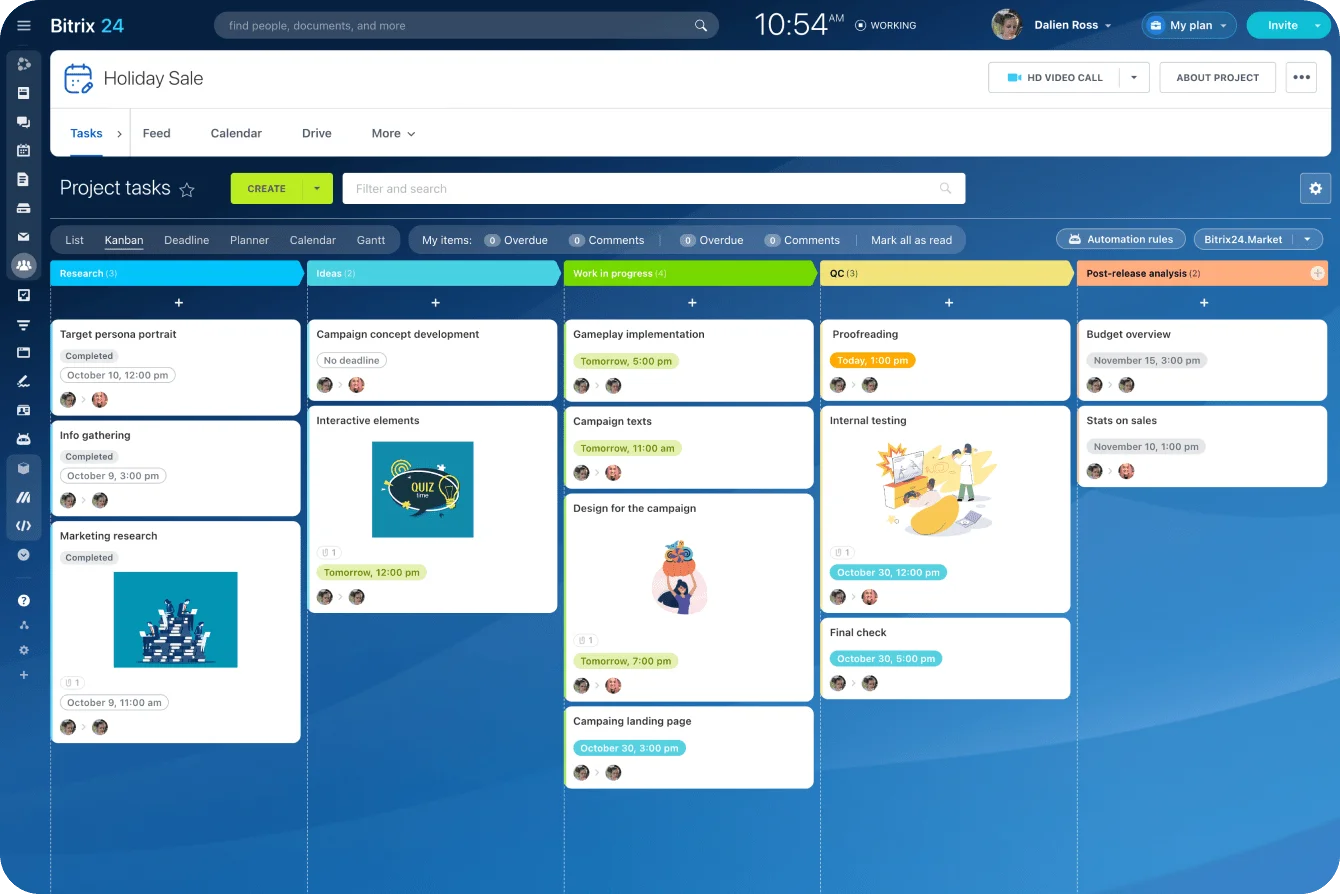
Bitrix24 gives teams more structure through task management, workgroups, calendars, access permissions, and project tools. That can reduce tool-switching, but only if the business is ready to define how those parts fit together.
When a bigger platform creates its own problems
The reverse problem is also real. Some teams move toward a broader system because they want everything in one place, then discover that the platform asks for more structure than users are ready to maintain.
That often shows up as:
- Too many fields
- Too many statuses
- Unclear workspace ownership
- Duplicate projects
- Inconsistent task naming
- Reports that look useful but depend on incomplete data
Reports can look clean while the underlying labels mean different things to different teams. One department uses “ready” to mean ready for review, another means client-approved, and a third clicks it whenever their own part is finished. You usually discover the mismatch when someone asks why three supposedly ready tasks still can’t move forward.
If users have to choose from too many modules or rules just to finish routine work, adoption drops.
Bitrix24 vs. Basecamp is often less about replacing an app and more about correcting a scaling mismatch. Teams either need more operational discipline than their current setup supports, or less complexity than a broader platform would introduce.
A practical framework for comparing Bitrix24 and Basecamp
The most useful comparison is not feature count. It is how each platform behaves under real operating conditions: how work is seen, how updates are captured, how consistently teams follow the workflow, and how much effort it takes to keep the system useful.
Basecamp works best when teams want projects organized in a way that feels natural quickly. Communication, to-dos, schedules, and files are grouped together in shared project spaces.
Bitrix24 offers more ways to structure work and control how it moves. It works best when someone is actively defining how teams should use it.
Governance here means the rules that keep projects consistent, including permissions, naming conventions, approval steps, and reporting standards.
|
Platform |
Typical team size |
Operational fit |
Main limitation |
Onboarding effort |
Reporting maturity |
Workflow flexibility |
|---|---|---|---|---|---|---|
|
Basecamp |
Small to mid-sized teams; departments inside larger firms |
Simple project coordination, centralized communication, and fast adoption |
Limited depth for formal governance and advanced process management |
Low |
Basic |
Moderate, but intentionally constrained |
|
Bitrix24 |
Growing mid-sized teams to more complex organizations |
Work management plus broader operational consolidation |
Higher setup burden and more configuration decisions |
Moderate to high |
Broader and more structured |
High |
What to test before deciding
Feature pages won’t tell you how the system will behave under pressure. A short internal pilot will.
Use the same real workflow in both platforms, such as a campaign launch, client onboarding process, or product release checklist. Then ask:
- Can managers oversee recurring work without parallel spreadsheets?
- Can teams align across departments without turning every update into a meeting?
- Can the platform be administered without constant cleanup?
- Will people use it consistently after the first month?
- Can reports be trusted without manual data repair?
Pro tip
Run a two-week test with one real project, not a fake demo project. Fake projects hide the messy parts: late approvals, missing owners, unclear files, and side-channel decisions.
A simpler tool that people use daily can outperform a more capable system that only project leads understand. But a business with growing compliance, reporting, or cross-functional coordination needs may outgrow simplicity faster than expected.
Where Bitrix24 and Basecamp fit best as collaboration platforms
Bitrix24 and Basecamp can both act as central collaboration platforms, but they centralize different things. Basecamp brings project communication together. Bitrix24 brings project work closer to CRM, workflows, documents, permissions, and other operating processes.
A customer onboarding workflow shows the difference. It may require delivery tasks, a CRM record owned by sales, shared contract files, approval steps, and internal handoffs. Bitrix24 can keep those elements closer together rather than splitting them across several apps.
Where Bitrix24 fits best
Bitrix24 is usually the stronger fit when teams need:
- Project work connected to CRM or customer activity
- Formal task ownership and status tracking
- Shared communication tied to tasks, files, and project spaces
- Document creation, storage, and collaborative editing
- Permission controls across teams or departments
- Reporting across workstreams
- Automation for recurring processes and approval steps
It is better suited to operations-minded organizations that are comfortable trading some simplicity for more control. Someone needs to own configuration decisions; otherwise the workspace can become messy.
Where Basecamp fits best
Basecamp fits best when teams want one place to coordinate work without introducing a heavy operating model. It is especially effective where communication clarity is the main issue and adoption speed matters more than deep customization.
Basecamp is usually a good fit when teams need:
- A simple project hub
- Organized discussion threads
- Shared to-do lists
- File and schedule visibility
- Fewer meetings
- A quick rollout with limited admin work
Company size alone is not a reliable guide. A 50-person organization with light process needs may work better in Basecamp than a 15-person company with structured approvals, cross-team dependencies, and administrative complexity.
The better choice depends on whether the organization needs operational depth or communication simplicity.

How project tracking, communication, and automation differ in day-to-day use
Basecamp keeps activity close to the conversation. Teams move from message threads and project discussions into to-dos and schedules with little overhead. That makes coordination feel lighter when the goal is alignment without heavy status management.
Bitrix24 handles project tracking in a more structured way. Teams that need formal task progression, multiple work views, controlled ownership, and stronger process logic have more room to design those workflows.
Project tracking
Basecamp works well when tasks are straightforward and the team mainly needs a shared source of truth. A content team, for example, can use Basecamp to group briefs, drafts, feedback, and deadlines in one project space.
Bitrix24 is better when tracking needs more structure. Teams can use project spaces, multiple task views, roles, deadlines, dependencies, and reporting to manage work that crosses departments. That’s useful when tasks move from sales to operations to customer service, or when managers need to see workload across several active projects.
Communication
The communication model is a major divider.
Basecamp centers collaboration around shared project spaces, written updates, and organized discussion threads. It encourages slower, clearer communication instead of constant chat.
Bitrix24 supports communication inside a broader work system. That helps when conversations need to connect directly to tasks, workflows, files, and business records. Teams can use communication tools, workgroups, calendars, and task comments without separating the discussion from the work.
Automation and reporting
Automation follows the same pattern. Bitrix24 is stronger for workflow rules, structured routing, and repeatable operational control. Basecamp is better for teams that want coordination to remain human-centered and easy to maintain, even if that means less automation.
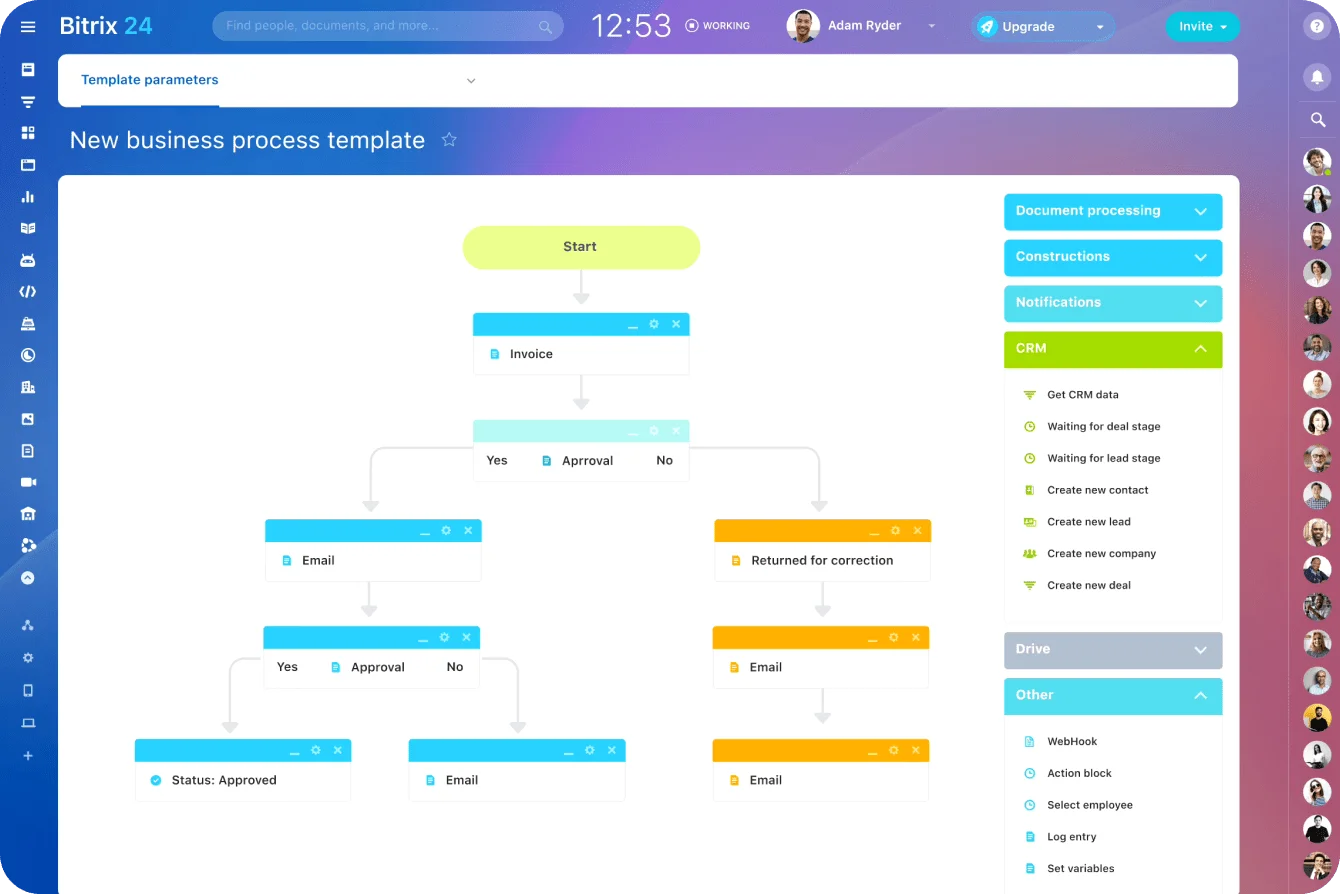
Reporting also differs. Basecamp supports visibility through organized project activity, but it is not built for heavy operational reporting. Bitrix24 is more appropriate when leadership needs formal tracking across workstreams, provided someone maintains the structure behind the reports.
Pro tip
Automation should remove repeatable admin, not compensate for a poorly defined process. If nobody agrees what “approved,” “blocked,” or “ready for client” means, automation will just move confusion faster.
Migration, onboarding, and implementation realities
Switching collaboration platforms is rarely just a data transfer. Files, projects, tasks, and comments can often be moved in some form, but habits are harder to migrate.
The gap often appears a few weeks after launch. The tasks have been imported, but approvals still happen in private messages, files are still emailed, and managers rebuild status reports by hand because nobody agreed what belongs in the new system.
Teams need to know:
- Where updates belong
- How tasks are created
- How ownership is defined
- What should happen inside the platform
- What should stop happening in email or chat
- Who manages cleanup after launch
Basecamp rollout is usually faster
Basecamp is usually easier to roll out quickly. Its simpler operating model lets teams start using it for communication and project coordination without a long design phase.
The tradeoff is that more complex organizations may still need external integrations for reporting, process control, CRM, approvals, or adjacent business workflows.
Training is often about team norms:
- Use project threads instead of side messages.
- Add decisions where others can find them.
- Keep to-dos updated.
- Put files in the right project space.
- Avoid creating duplicate project areas.
Basecamp also provides training videos covering its core project tools, which can help teams establish those habits during rollout.
Bitrix24 rollout needs more upfront decisions
Bitrix24 typically requires more setup work. Teams need to decide how projects are organized, what permissions different roles need, how workflows should be structured, and which parts of the business should live in the platform.
That effort can pay off if the organization is prepared to manage the change. A team using Bitrix24 for project management might define separate workgroups for departments, standard templates for recurring projects, and approval workflows for tasks that need sign-off.
Implementation should cover:
- Workspace structure
- Roles and permissions
- Project naming rules
- Task templates
- Reporting standards
- Communication norms
- Admin ownership
- Training by role
Internal champions matter in both cases, but especially with Bitrix24. Someone needs to define standards, answer usage questions, and prevent the workspace from becoming inconsistent. Bitrix24’s training courses and documentation can support that process, but the business still needs an internal owner.
Implementation success depends on whether the team can support the operating model after launch, not just whether the software can be deployed.
Common mistakes teams make when choosing between Bitrix24 and Basecamp
The wrong choice usually comes from treating feature breadth or simplicity as a substitute for operating discipline. Each platform fails in a predictable way when the team asks it to support a working model it can’t maintain.
Mistake 1: Choosing breadth without ownership
A broader platform needs clear ownership. Without it, teams create their own naming conventions, task statuses, fields, and workspaces. A familiar response is to add more mandatory fields in the hope of cleaning up the reporting.
In practice, people start selecting whichever option lets them close the task fastest. The dashboard becomes tidier at exactly the point the data becomes less trustworthy.
Bitrix24 works best when an admin or operations owner defines how the system should be used. That does not need to be a full-time role for every business, but someone must own decisions.
Mistake 2: Choosing simplicity when governance is already needed
The opposite mistake is choosing Basecamp only because it feels easier, even when the business already needs stronger governance.
Simplicity can become a ceiling when teams require:
- Formal reporting
- Permission controls
- Repeatable approval workflows
- Cross-functional dependencies
- Structured process tracking
- Connections between project work and customer records
Basecamp can centralize project communication effectively, but it should not be expected to cover heavier workflow management without supplemental tools or workarounds.
Mistake 3: Assuming consolidation is costless
Moving multiple workflows into Bitrix24 can improve control and reduce switching between tools, but it also increases design responsibility.
The business must decide:
- How work is categorized
- Who controls access
- Which processes should be standardized
- Which workflows should stay simple
- Which teams need training first
Consolidation works when it removes friction from real workflows. It fails when every team is forced into the same structure regardless of how they work.
The strongest decisions come from matching the platform to actual operating behavior, not from assuming either simplicity or breadth is always better.
FAQ: Bitrix24 vs. Basecamp for project tracking and team communication
Which platform is better for small teams?
Basecamp is often the easier fit for small teams that mainly need cleaner communication and straightforward project coordination. Bitrix24 makes sense when small teams already need broader internal structure or process consolidation.
What about growing cross-functional organizations?
Bitrix24 usually has the stronger long-term fit when multiple departments need shared workflows, structured oversight, and formal control. Basecamp works better when cross-functional collaboration remains relatively light.
Which tool is easier to use?
Basecamp is generally easier to learn and adopt. Bitrix24 requires more setup, configuration decisions, and time spent exploring the features relevant to each team.
Which platform has stronger customization?
Bitrix24. Its flexibility supports defined internal processes, but it increases setup and maintenance. Basecamp is intentionally more constrained.
How do reporting capabilities compare?
Bitrix24 is stronger for formal reporting and oversight across projects or teams. Basecamp provides project visibility but is less suitable for structured operational reporting.
Is Basecamp better for remote collaboration?
It can be, especially for teams that want asynchronous communication, organized discussion, and fewer status meetings. Bitrix24 fits better when remote work needs more controlled workflows, communication tied to tasks, and shared operational visibility.
Can either platform serve as a long-term central workspace?
Yes, but in different ways. Basecamp can serve as a collaboration hub. Bitrix24 can serve as a broader operational workspace for projects, communication, CRM, workflows, documents, and internal processes.
When should a team choose Bitrix24?
Choose Bitrix24 when the business needs stronger workflow structure, permissions, reporting, or consolidation across project work and adjacent operations. It is also a better fit when teams want project activity to connect with CRM, documents, communication, or automation.
When is Basecamp the better fit?
Choose Basecamp when the main objective is to reduce communication chaos, improve project clarity quickly, and keep the operating model lightweight.
When is neither ideal?
If the need is specialized portfolio management, complex resource planning, or advanced operational analytics, a more specialized work management platform may be better.
Run projects with structure, not scattered tools
Bitrix24 connects tasks, chat, files, CRM, workflows, and reports so teams can manage handoffs and scale with clarity.
Get Started NowFinal takeaway: Test the workflow that breaks under pressure
Choose based on where work breaks when pressure rises.
If updates disappear because project communication is scattered, Basecamp is likely the cleaner fix. If the breakdown sits between project work, CRM, approvals, documents, and reporting, Bitrix24 is the stronger candidate.
Map one recurring workflow from start to finish. Mark every side channel, manual reminder, duplicate entry, missing owner, and status chase. Then test that same workflow in both platforms for two weeks.
The winner isn’t the platform with the longest feature list. It’s the one that removes the most real friction without creating an administrative burden your team won’t maintain.
If that test points to connected workflows and broader operational control, sign up for Bitrix24 for free and rebuild one broken handoff in a shared workspace today.